Trying to price something on eBay without checking sold prices is a little like guessing the weight of a watermelon by staring at it from across the room. You might be close. You might also be wildly, wallet-shakingly wrong.
Whether you are selling vintage sneakers, old video games, collectible coins, designer handbags, trading cards, electronics, toys, tools, or that mysterious “possibly valuable” item from the back of the closet, eBay sold prices help you understand what buyers have actually paidnot what sellers are hoping someone will pay after three cups of coffee and too much optimism.
The good news: eBay makes it fairly easy to view sold listings, completed listings, and pricing trends. The even better news: once you know how to read the results, you can avoid underpricing good inventory, overpaying as a buyer, or listing your item at a fantasy price that scares buyers away faster than a shipping quote for a bowling ball.
This guide walks you through easy ways to check eBay sold prices in 12 practical steps, including desktop search, mobile app filters, Advanced Search, Product Research, price comparisons, condition checks, shipping adjustments, and smart pricing tips for real-world selling.
Why Checking eBay Sold Prices Matters
Before we get into the steps, let’s make one thing clear: active listings are not the same as sold listings. An active listing only tells you what someone is asking. A sold listing tells you what a buyer actually paid. That difference can be huge.
For example, a seller might list a used digital camera for $399. But if the same model recently sold five times between $210 and $260, the market has already spokenand it did not say “four hundred bucks, please.” Sold prices give you a more realistic picture of demand, buyer behavior, and current market value.
Checking sold prices can help you:
- Set a competitive Buy It Now price
- Decide whether to run an auction or fixed-price listing
- Estimate the resale value of thrift-store finds
- Avoid overpaying as a buyer
- Spot trends in collectibles, fashion, electronics, and parts
- Understand how condition, shipping, and timing affect final prices
In short, sold prices are the “receipts” of the marketplace. They keep pricing honest.
Easy Ways to Check eBay Sold Prices: 12 Steps
Step 1: Search for the Exact Item on eBay
Start with the main eBay search bar. Type the clearest possible description of your item. Include the brand, model number, size, color, year, material, or other important details.
Instead of searching “old watch,” search something like:
- “Seiko 5 automatic SNK809 men’s watch”
- “Nike Air Jordan 1 Retro High size 10 Chicago”
- “Nintendo GameCube console purple DOL-001”
The more specific your search, the better your pricing data will be. eBay is a huge marketplace, and broad searches can mix together items that are not truly comparable. A sealed game, a loose disc, and a broken “for parts” copy may all appear in the same general search if your keywords are too vague.
Step 2: Use the “Sold Items” Filter
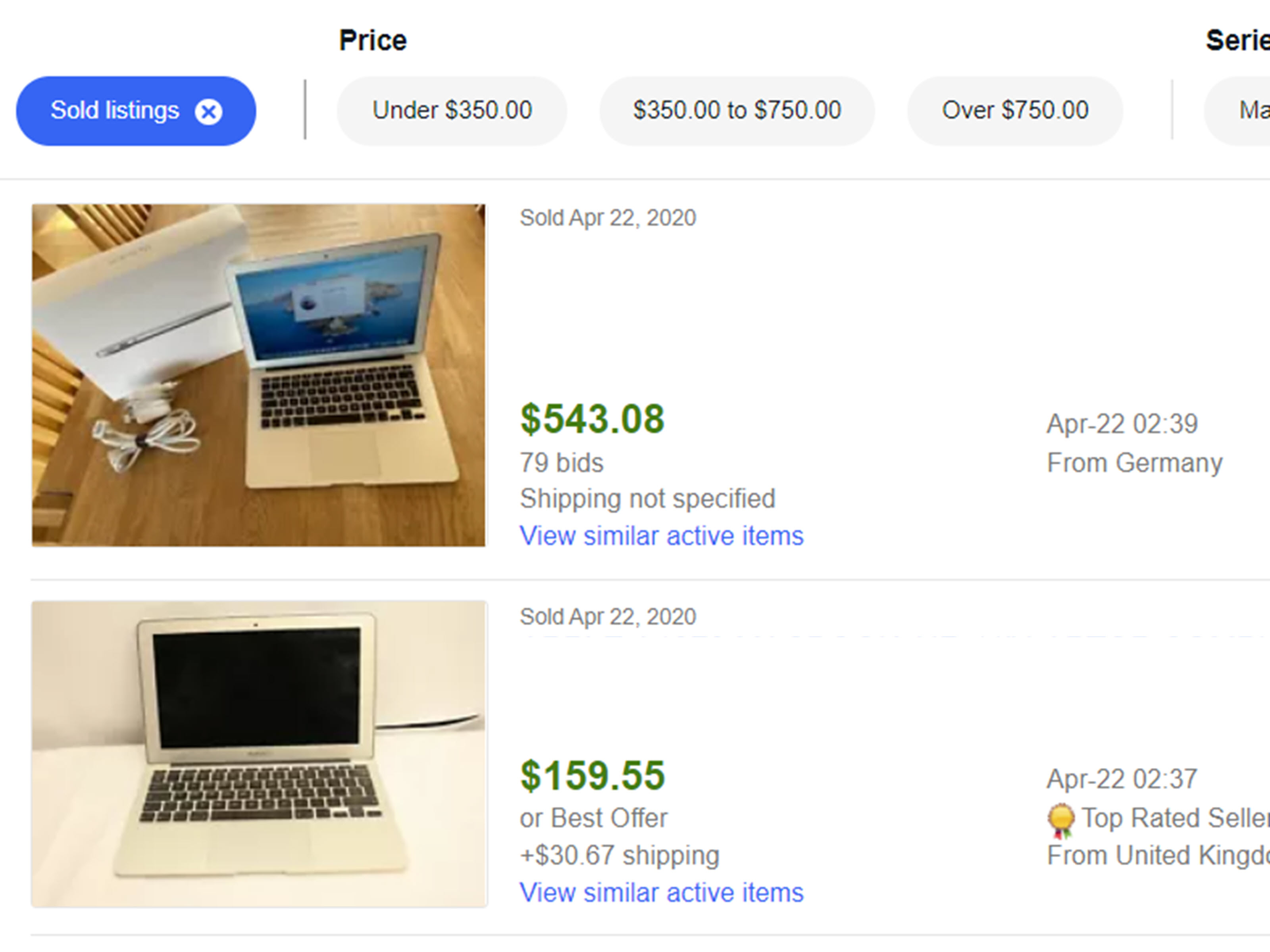
After running your search, look for the filter options. On desktop, this is often found on the left side of the results page. On mobile, tap “Filter,” then look for the option labeled “Sold Items.” When you turn this on, eBay shows listings that ended with a sale.
This is the quickest way to check eBay sold prices. Sold listings are usually shown with the final sale price and sale date. In many cases, the price appears in green, making it easy to scan results.
Be careful not to confuse sold listings with active listings. Active listings may look impressive, but they do not prove demand. A rare action figure listed for $1,000 may be exciting, but if sold listings show similar figures selling for $175, that $1,000 listing is more of a dream journal than a market guide.
Step 3: Compare Sold Items With Completed Items
eBay also offers a “Completed Items” filter. Completed listings include items that ended whether they sold or not. This is useful because unsold listings show you what prices may have been too high, what keywords failed, or which item conditions had weak demand.
Here is the simple difference:
- Sold Items: listings that ended with a buyer purchasing the item
- Completed Items: listings that ended, including both sold and unsold items
If you see ten sold listings around $75 and twenty unsold listings around $140, that tells a useful story. Buyers may like the item, but not at the higher price. Completed listings help you understand the ceiling, while sold listings reveal the realistic market range.
Step 4: Use eBay Advanced Search
For a more controlled search, use eBay’s Advanced Search page. Advanced Search lets you narrow results by keywords, category, price range, condition, buying format, seller location, and other filters. It also includes checkboxes for completed and sold listings.
This is especially helpful when your item has a common name. For example, searching “Echo” could bring up Amazon Echo devices, vintage tools, musical equipment, or unrelated items. Advanced Search lets you refine the results so you do not accidentally price a speaker like a chainsaw part. That would be awkward, though possibly entertaining.
Use Advanced Search when you need cleaner data, especially for collectibles, parts, model numbers, and items with multiple versions.
Step 5: Match the Item Condition Closely
Condition can change an eBay sold price dramatically. A sealed collectible, a gently used item, and a damaged item may all have the same title but very different values.
When checking sold prices, compare your item to listings with the same or similar condition:
- New with tags
- Open box
- Used
- Refurbished
- For parts or not working
- New old stock
- Graded or authenticated
For example, a graded trading card can sell for many times more than an ungraded copy. A tested vintage receiver may sell higher than one marked “untested.” A designer bag with authentication and original dust bag may outperform one with blurry photos and a description that says, “Looks nice, I guess.”
Condition is not a small detail. It is often the price.
Step 6: Check the Sold Date
Prices change. Some categories move slowly, while others jump around like a cat near a vacuum cleaner. Electronics, sneakers, collectibles, toys, and trending items can change value quickly based on season, scarcity, influencer attention, product releases, or market hype.
When reviewing sold listings, pay attention to the sale date. A price from last week may be more useful than a price from several months ago. However, older sold prices can still be helpful for items with stable demand, such as replacement parts, common tools, books, or long-running collectibles.
If recent sold listings are limited, look at a wider date range, but be cautious. The more time that has passed, the more market conditions may have changed.
Step 7: Factor in Shipping Costs
Many beginners look only at the item price and forget shipping. That is a classic pricing mistake.
Suppose one item sold for $50 with free shipping, and another sold for $42 plus $12 shipping. The buyer effectively paid about the same total amount. From a pricing standpoint, both sales may be comparable.
Always look at the total cost to the buyer when possible. Shipping matters especially for heavy, bulky, or fragile items such as:
- Small appliances
- Tools
- Speakers
- Glassware
- Auto parts
- Board games
- Large collectibles
A lower item price with higher shipping may perform similarly to a higher item price with free shipping. Buyers often compare totals, even if they do not consciously do the math. Their wallet definitely does.
Step 8: Look for Best Offer Clues
Some eBay listings sell through “Best Offer.” In regular sold search results, the displayed price may not always clearly show the accepted offer amount. For more detailed seller research, eBay’s Product Research tool can provide stronger pricing insights, including accepted-price data for many Best Offer sales.
This matters because a listing may show a crossed-out or original price, while the buyer actually paid less. If you are pricing based only on the visible listing price, you might accidentally aim too high.
When you see many sold listings with Best Offer accepted, treat the numbers carefully. Look for patterns across several sales instead of trusting one listing as gospel. One sale is a clue. Ten sales are a conversation.
Step 9: Use Product Research in Seller Hub
If you sell on eBay, Product Research in Seller Hub is one of the most useful tools for checking market trends. Formerly associated with Terapeak Product Research, this tool helps sellers analyze real eBay marketplace data, including recent sales, average sold prices, sell-through behavior, competition, and trends.
Product Research is especially useful when you want more than a quick sold listing check. It can help you answer questions such as:
- What is the average sold price for this item?
- How many similar items are selling?
- Is demand rising or falling?
- Which categories perform best?
- What keywords are sellers using successfully?
- Are buyers paying more for certain conditions or bundles?
For serious sellers, this tool can turn random guessing into actual pricing strategy. It is useful for sourcing inventory, setting prices, planning promotions, and deciding whether an item is worth listing at all.
Step 10: Check Sold Prices on the eBay Mobile App
The eBay app is handy when you are standing in a thrift store aisle, garage sale, estate sale, flea market, or your own attic wondering whether an item is treasure or future clutter.
To check sold prices on mobile, open the app, search for your item, tap the filter menu, and turn on “Sold Items.” Depending on the app version and layout, you may need to tap “Show More” or scroll through additional filter options.
Mobile sold-price research is perfect for quick decisions. For example, if you find a vintage calculator for $8 and sold listings show several recent sales between $45 and $60, you may have a good flip. If sold listings show one sale from six months ago and twenty unsold listings, maybe leave it behind unless you personally enjoy adopting lonely calculators.
Step 11: Analyze Several Sales, Not Just One
One sold listing does not define the market. A single high sale could be an outlier. A single low sale could be a poorly titled listing, bad photos, missing accessories, or a seller who wanted fast cash.
Look for a range. Try to review at least 5 to 10 similar sold listings when possible. Ask yourself:
- What price appears most often?
- Are higher prices tied to better condition?
- Do complete sets sell better than single items?
- Do listings with free shipping perform differently?
- Are auctions ending lower than Buy It Now listings?
- Do certain keywords appear in higher-priced listings?
For example, if a vintage jacket sold for $35, $42, $44, $46, $49, and $110, you should investigate the $110 sale. Was it a rare size? New with tags? Celebrity-related? Better photos? International buyer? Or just market weirdness wearing a stylish hat?
Smart pricing is pattern recognition, not cherry-picking.
Step 12: Set Your Price Based on Realistic Market Value
After reviewing sold prices, condition, shipping, sale dates, and competition, choose a price that fits your goal.
If you want a fast sale, price near the lower end of the realistic sold range. If your item is in excellent condition, includes accessories, has strong photos, or is harder to find, you may price near the higher end. If you are willing to negotiate, use “Best Offer” and set an automatic minimum offer amount if available.
Here is a simple pricing framework:
- Fast sale: price slightly below recent comparable sold listings
- Balanced sale: price near the average sold price
- Premium listing: price above average only if your item has a clear advantage
- Auction: use when demand is strong and multiple buyers may compete
Remember: the best price is not always the highest price. It is the price that attracts the right buyer while still giving you a fair return.
How to Read eBay Sold Listings Like a Pro
Checking sold prices is easy. Interpreting them well takes a little more skill. The trick is to compare like with like.
Let’s say you are pricing a used iPhone. Do not compare a locked phone with an unlocked phone. Do not compare a cracked-screen phone with a mint-condition phone. Do not compare 64GB with 256GB unless you enjoy confusing yourself professionally.
Good comparisons should match:
- Brand and model
- Version or generation
- Condition
- Included accessories
- Color, size, or storage capacity
- Authenticity or grading status
- Shipping method and location
- Sale date
The closer your comparison, the more useful the sold price becomes.
Common Mistakes When Checking eBay Sold Prices
Mistake 1: Pricing From Active Listings Only
Active listings are useful for checking competition, but they do not prove value. Anyone can list a coffee mug for $500. That does not mean someone is buying itunless the mug also makes coffee, files taxes, and compliments your outfit.
Mistake 2: Ignoring Shipping
A $30 sale with free shipping may produce less profit than a $24 sale with paid shipping. Always think in terms of total buyer cost and seller net profit.
Mistake 3: Comparing Different Conditions
A sealed vintage toy and a loose toy missing one arm are not the same market. Condition gaps can create huge price differences.
Mistake 4: Trusting One Big Sale
Outlier sales happen. Maybe two buyers got into a bidding war. Maybe the item had rare features. Maybe someone clicked too fast. Use multiple sold listings to form a realistic price range.
Mistake 5: Forgetting Fees and Costs
Your selling price is not your profit. Consider eBay fees, payment processing, promoted listing costs, shipping supplies, postage, returns, and the original cost of the item.
Best Categories for eBay Sold Price Research
Sold price research is useful in almost every category, but it is especially powerful for items where value changes based on condition, rarity, trend, or demand.
- Collectibles: trading cards, coins, comics, toys, stamps, autographs
- Fashion: sneakers, handbags, vintage clothing, designer accessories
- Electronics: phones, cameras, gaming consoles, audio gear, laptops
- Home goods: discontinued dishes, lamps, decor, replacement parts
- Automotive: parts, manuals, accessories, tools
- Media: records, DVDs, books, video games, software
- Tools: power tools, hand tools, specialty equipment
For rare items, you may need to broaden your search. Try alternate keywords, model numbers, misspellings, or related categories. Sometimes the best comp is not identical, but close enough to guide your decision.
Example: How Sold Prices Change a Listing Strategy
Imagine you found a vintage denim jacket at a thrift store for $12. Active eBay listings show similar jackets priced from $40 to $150. That range is not very helpful by itself.
Now you check sold listings and see:
- Used jacket, average wear: sold for $38 plus shipping
- Excellent condition, popular size: sold for $62 with free shipping
- Rare made-in-USA version: sold for $95 plus shipping
- Overpriced listing at $145: completed without selling
Your jacket is in good condition but not rare. A smart price might be around $54.99 with Best Offer enabled, or $49.99 if you want a faster sale. Without sold data, you might list it at $129 and wonder why it sits there collecting digital dust.
Extra Experience: Real-World Lessons From Checking eBay Sold Prices
After checking eBay sold prices across many categories, one lesson becomes obvious: the market rewards accuracy. Sellers who price from emotion often wait. Sellers who price from data usually move inventory faster.
One common experience is discovering that “rare” does not always mean valuable. Many sellers use the word rare because they cannot find another exact match. But rare plus unwanted is not valuableit is just lonely. Sold listings help reveal whether buyers actually care. If an item has no recent sales, only unsold listings, and weak search demand, it may not matter how unusual it is.
Another real-world lesson is that photos and titles influence sold prices more than many beginners expect. Two identical items can sell for different amounts because one listing has sharp photos, clear measurements, and a searchable title, while the other looks like it was photographed during an earthquake. Buyers pay more confidently when they can see what they are getting.
Condition notes are also incredibly important. A small flaw may not ruin a sale, but hiding it can lead to returns, negative feedback, or buyer frustration. Strong sellers mention defects clearly and photograph them. Oddly enough, honesty can help an item sell because buyers trust the listing.
Timing matters too. Holiday decor sells better before the holiday, not two days after everyone has shoved decorations back into storage. Winter coats often perform better before cold weather peaks. Collectibles may spike after movie releases, sports events, celebrity news, product discontinuations, or viral trends. Sold prices are snapshots of demand, so timing should always be part of the analysis.
For thrift resellers, checking sold prices on the mobile app can prevent bad buys. A shelf full of “interesting” items becomes less tempting when sold listings show slow demand. On the other hand, small parts, discontinued accessories, remote controls, replacement lids, and niche manuals can surprise you. The boring item nobody notices may have stronger sell-through than the flashy collectible everyone is fighting over.
It is also smart to check whether items sell as singles, lots, or bundles. Some products perform better grouped together. For example, replacement flatware, craft supplies, toy accessories, books in a series, and clothing lots may sell better when bundled. Sold listings show whether buyers prefer one item at a time or a convenient group.
Finally, experienced sellers learn not to chase the highest comp blindly. The highest sold price may have special circumstances: rare color, perfect condition, free expedited shipping, international buyer, original packaging, or a keyword-rich title. A better approach is to find the realistic middle range, then decide whether your item deserves to be priced above or below it.
In practice, eBay sold price research becomes faster over time. At first, you may spend several minutes comparing listings. Eventually, you start recognizing patterns quickly: strong sell-through, weak demand, inflated asking prices, seasonal dips, and categories where condition makes or breaks the sale. That experience is where pricing becomes less stressful and more strategic.
Conclusion
Learning how to check eBay sold prices is one of the easiest ways to become a smarter buyer or seller. Instead of guessing, you can use real marketplace data to understand what similar items actually sold for, how condition affects price, whether shipping changes buyer behavior, and where your item fits in the current market.
The 12 steps are simple: search accurately, use sold filters, compare completed listings, try Advanced Search, match condition, check sale dates, factor in shipping, watch Best Offer sales, use Product Research, research on mobile, analyze several comps, and set a realistic price. Do that consistently, and you will make better pricing decisions with fewer “Why isn’t this selling?” moments.
eBay sold listings are not magic, but they are close enough for anyone who has ever stood in a thrift store holding a strange gadget and whispering, “Could this be worth something?” With the right research, the answer gets much clearer.
Note: This article is for informational and educational purposes. eBay tools, filters, and app layouts may change over time, so users should check the latest eBay interface when applying these steps.