The Raspberry Pi Zero line was always the scrappy underdog of the single-board computer world. It was tiny, cheap, and charmingly willing to squeeze into projects where a full-size board would feel like wearing hiking boots to a pool party. But the original Pi Zero and Pi Zero W also came with a catch: they were clever little boards that could occasionally feel like they were thinking through molasses. Great for simple embedded work, yes. Great for anything remotely ambitious? That depended on your patience, your SD card, and whether you had recently made peace with long boot times.
Then came the Raspberry Pi Zero 2 W, the upgrade that finally gave the smallest mainstream Pi a real punch in the silicon. The headline feature was not subtle: a quad-core 64-bit processor replacing the older single-core chip. Same tiny footprint. Same maker-friendly spirit. Far more muscle. In practical terms, this meant the Zero family stopped being just the board you used when space was tight and started becoming the board you could choose because it was actually capable.
That is why the Raspberry Pi Zero 2 W matters. It does not try to outmuscle a Raspberry Pi 4 or newer flagship boards. It does something arguably smarter: it takes the famous Zero formula of size, cost, and flexibility, then gives it enough performance to feel modern in real projects. For makers, tinkerers, educators, and embedded developers, that is not a minor refresh. That is a glow-up with solder pads.
Why the Raspberry Pi Zero Upgrade Was Such a Big Deal
To understand why this launch turned heads, it helps to remember what the original Pi Zero represented. When the first Zero arrived, it was astonishingly affordable and almost comically compact. It made DIY electronics feel democratic. Need a tiny Linux computer for a sensor node, portable gadget, custom controller, or minimalist media hack? The Zero made that possible without draining your wallet.
But the original design had limits that became harder to ignore over time. The classic Zero boards were based on an older single-core architecture with 512MB of RAM. For lightweight tasks, they were perfectly fine. For anything involving a graphical desktop, heavier scripting, multitasking, web interfaces, or modern software stacks, they could feel like a determined intern trying to run an entire office alone.
The Zero 2 W changes that equation. Instead of asking users to accept slow performance as the price of tiny size, Raspberry Pi made the board dramatically more capable while preserving the same basic shape and layout. That compatibility is not a side note. It means many existing cases, accessories, and project enclosures still fit, which makes upgrading much easier than rebuilding from scratch.
What Actually Changed Inside the Raspberry Pi Zero 2 W
A quad-core processor replaces the old single-core brain
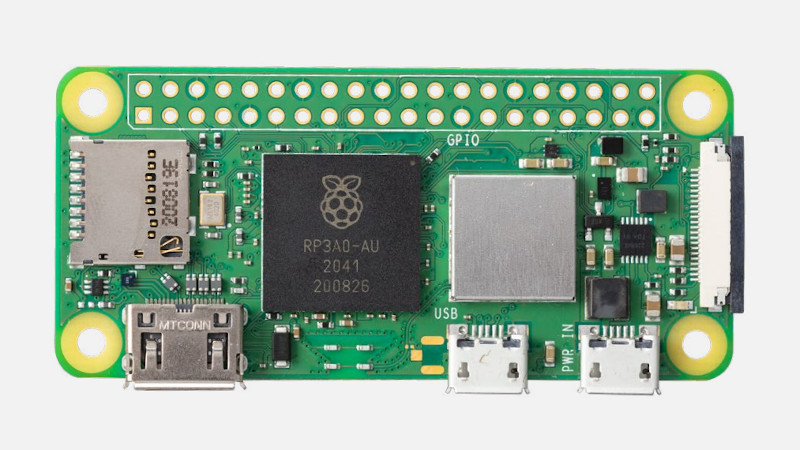
The star of the show is the upgraded processor: a 1GHz quad-core 64-bit Arm Cortex-A53 setup inside Raspberry Pi’s RP3A0 system-in-package. That is a very different class of chip from the original Zero family’s older single-core processor. The result is not just a nicer spec sheet for bragging rights. It delivers meaningful gains in everyday use, especially for workloads that can benefit from multiple cores.
Raspberry Pi described the Zero 2 W as being up to five times faster than the original Raspberry Pi Zero, and that general claim lines up with how reviewers and hands-on testers described the board. Multi-threaded tasks, boot times, app launches, and system responsiveness all improved enough that the board crossed an important line: it no longer felt like a novelty board pretending to be a computer. It felt like a real little computer that happened to be tiny.
The board keeps the same small form factor
One of the smartest parts of the upgrade is what Raspberry Pi did not change. The Zero 2 W sticks to the familiar 65mm by 30mm footprint. It still offers mini HDMI, micro USB for power, micro USB OTG for peripherals, a microSD slot, a CSI camera connector, and the unpopulated 40-pin GPIO header footprint that makers know by heart.
That means the new board slips neatly into the existing Zero ecosystem. If you already built an enclosure, compact robot, camera rig, handheld gadget, or wall-mounted smart display around a Zero-sized board, the Zero 2 W often feels like a drop-in upgrade rather than a full redesign. In maker culture, that kind of backward compatibility earns real affection.
Wireless stays built in, but feels more polished
The Raspberry Pi Zero 2 W includes 2.4GHz 802.11 b/g/n Wi-Fi, Bluetooth 4.2, and BLE. It also arrived with improved RF compliance and a cleaner wireless implementation than many people expected from such a tiny board. No, it is not a networking monster. There is no 5GHz Wi-Fi here, and it is not pretending to be a throughput champion. But for smart home devices, remote nodes, lightweight wireless tools, and compact headless systems, the built-in connectivity hits the sweet spot.
In other words, it is the kind of board that wants to disappear into a project and just quietly do its job. And that is often the highest compliment an embedded board can get.
How Much Faster Is It in the Real World?
This is where the Raspberry Pi Zero 2 W earns its applause. The old Zero could absolutely do useful work, but it often did that work with the vibe of someone trying to run through waist-deep water. The Zero 2 W is still not a powerhouse desktop machine, yet it feels dramatically more responsive in the situations that matter to hobbyists and developers.
Booting into Raspberry Pi OS is quicker. Opening applications is less painful. Running scripts while handling background services is more realistic. Lightweight server tasks become more comfortable. Retro gaming, camera-based builds, Bluetooth gadgets, print server duties, and smart home automation all become more attractive use cases because the board has enough headroom to avoid feeling constantly stressed.
That last point matters more than benchmark charts. Raw numbers are useful, but what most people really notice is friction. With the Zero 2 W, there is less waiting, less stutter, and less “maybe I should just use a bigger board instead.” That is a massive win.
Best Uses for the Raspberry Pi Zero 2 W
The Zero 2 W shines brightest when you want a compact Linux computer that can live inside something. Think of it as the brains behind a project rather than the center of a desk setup. Some of the most compelling use cases include:
- Smart home controllers: perfect for sensor hubs, status displays, appliance monitors, and tiny automation nodes.
- Camera projects: the CSI-2 connector makes it useful for compact security cams, wildlife cams, and custom vision builds.
- Retro handhelds and lightweight gaming: the extra CPU power makes emulation and menu performance much more practical than on the original Zero.
- Headless servers: think Pi-hole, lightweight file services, simple web dashboards, or custom network tools.
- Wearables and embedded gadgets: the size is still one of its biggest superpowers.
- Educational projects: students get a board that is affordable, hackable, and no longer feels painfully slow for basic experimentation.
In short, the Zero 2 W is excellent when your project needs to be small, low-cost, and competent. That trio is harder to find than product pages make it look.
Where the Raspberry Pi Zero 2 W Still Has Limits
Now for the honest part, because every good gadget deserves one reality check before the hype train gets its own ZIP code.
The biggest limitation is memory. The board still has 512MB of RAM, and that ceiling matters. The quad-core upgrade makes the CPU far more capable, but memory-heavy tasks can still hit a wall. If you want a browser with many tabs, a full desktop environment with modern web apps, large containers, or heavier development workflows, you will quickly discover that the Zero 2 W is not a pocket-size miracle worker. It is a very smart specialist.
Connectivity is also intentionally minimalist. You get one USB OTG data port, so adapters and hubs are often part of the story. There is no Ethernet onboard. Wireless is 2.4GHz only. None of these are deal-breakers, but they are reminders that this board was designed for compact embedded use first, convenience second.
Thermals can matter too. Packing more compute into a tiny board means heat management becomes worth thinking about if your project runs sustained workloads in a cramped case. Most maker projects will be fine, but the laws of physics remain stubbornly non-negotiable.
Why This Upgrade Was More Than a Spec Bump
The beauty of the Raspberry Pi Zero 2 W is not that it suddenly became the fastest board in the Pi family. It is that it became more balanced. The original Zero line excelled in price and size. The Zero 2 W adds enough performance to make those strengths much more useful.
That shift has a ripple effect. Developers can build richer software around the same physical footprint. Educators can give students a more forgiving experience. Makers can revisit older projects and imagine new ones that previously felt too sluggish to be worth the trouble. Even businesses using Pi-based embedded designs get a more attractive platform for lightweight connected devices.
It also says something important about Raspberry Pi’s philosophy. Instead of abandoning the smallest board to budget-bin status, the company treated the Zero line like a real platform worth improving. That matters because the world does not only need more powerful computers. It also needs better tiny ones.
Experiences With the Raspberry Pi Zero 2 W in Real Projects
What does using the Raspberry Pi Zero 2 W actually feel like once the press release glow wears off and the adapters start breeding on your desk? For many people, the experience is pleasantly familiar with one crucial difference: far less irritation. The board still behaves like a Pi Zero, which means setup involves the same tiny ports, the same reliance on a good microSD card, and the same need to think carefully about power and accessories. But after boot, it feels like the board has had coffee, breakfast, and a motivational speech.
In a headless setup, the Zero 2 W makes a strong first impression. It is still an ideal candidate for projects you configure once and then tuck away behind a monitor, inside a case, or near a router. SSH feels snappier. Installing packages is less painful. Running a background service while updating the system no longer feels like asking one overworked employee to mop the floor, answer the phone, and write the quarterly report at the same time.
Camera-based projects benefit in a particularly satisfying way. On the older Zero boards, image capture and lightweight video tasks were possible, but performance margins could feel thin. With the Zero 2 W, there is more breathing room for scripts, motion detection experiments, timelapse tools, and custom monitoring builds. It still is not a workstation pretending to be a camera server, but it has enough horsepower to feel dependable in small deployments.
Retro gaming is another area where the experience improves noticeably. The original Zero could dabble in the classics, but menus, emulation overhead, and system responsiveness could make the whole thing feel more charming than smooth. The Zero 2 W is much better suited to compact retro builds, and that matters because this is exactly the kind of board people love to turn into pocket consoles, arcade controls, or tiny handheld experiments. It feels less like a proof of concept and more like a finished gadget.
For smart home and IoT work, the experience is arguably even better. This board is small enough to hide almost anywhere, wireless enough to deploy without drama, and powerful enough to run logic, lightweight dashboards, device polling, and automation routines without constantly gasping for air. That combination makes it genuinely fun. The best maker hardware often disappears into the project and lets you focus on what you are building rather than what the board cannot do.
Of course, the Zero 2 W still teaches humility the moment you treat it like a mainstream desktop. Open a heavy modern website, ask too much of the memory, or try to pile on bloated software stacks, and the board reminds you that 512MB of RAM is still 512MB of RAM. The quad-core processor fixes many pain points, but it does not repeal arithmetic. This is the kind of board that rewards disciplined project design, not careless excess.
That is ultimately the real experience of the Raspberry Pi Zero 2 W: delight mixed with realism. It is not magical. It is better than magical. It is practical. It gives makers enough extra performance to build more ambitious things without losing the tiny size and affordable character that made the Zero family beloved in the first place. And in the DIY world, practical upgrades are often the ones that age best.
Final Verdict
The Raspberry Pi Zero 2 W is one of those upgrades that looks modest on paper until you think about what it unlocks. A quad-core processor in the same tiny form factor transforms the Zero from a lovable minimalist board into a genuinely versatile platform for compact computing. It is still best suited to embedded projects, headless systems, portable gadgets, and lightweight Linux jobs, but it now handles those roles with far more confidence.
If you loved the Pi Zero idea but hated waiting on it, this board is the answer. If you need a miniature single-board computer that can fit almost anywhere while still offering meaningful performance, the Zero 2 W is a smart buy. And if you were hoping for a tiny board that could do everything, well, that dream still lives in the land of unlimited RAM and zero thermal constraints. Lovely place. Very expensive real estate.
The big takeaway is simple: the Raspberry Pi Zero 2 W does not just upgrade the processor. It upgrades the usefulness of the entire Zero concept. That is why this launch mattered then, and why the board still earns attention now.