The Hackaday Prize Entry: MOLBED Braille Display is the kind of hardware project that makes engineers lean closer to the screen and accessibility advocates nod with cautious excitement. At first glance, it looks like a tidy maker challenge: raise and lower tiny pins so a blind or low-vision reader can feel Braille characters. Easy, right? Just move six or eight dots with precision, keep them stable, make the device affordable, make it manufacturable, make it comfortable to read, and please do not require a suitcase battery. No pressure.
MOLBED, short for Modular Low-cost Braille Electronic Display, tackles one of assistive technology’s stubborn problems: refreshable Braille displays are powerful, but they have historically been expensive. Commercial devices can connect to computers, phones, or tablets and turn text into tactile characters, but many models cost hundreds or thousands of dollars. That price tag matters. Braille is not decorative; it is literacy, editing, spelling, punctuation, math, code, privacy, and independence under the fingertips.
Created by Madaeon, the MOLBED project began as an attempt to build a modular, low-cost, open-source Braille display that could be prototyped, improved, and eventually scaled. The 2017 version, often referred to as MOLBED 2.0, refined earlier work by exploring Flexinol actuator wire instead of the magnetic coil system used in the first version. It is a beautiful example of what the Hackaday Prize does best: invite practical dreamers to build something that matters, then document the messy, fascinating path from idea to working hardware.
Why a Low-Cost Refreshable Braille Display Matters
A refreshable Braille display is an electromechanical device that raises and lowers tiny pins to form Braille characters. When paired with a computer or mobile device, it allows a user to read digital text by touch. Unlike embossed paper Braille, a refreshable display can update instantly, making it useful for email, web browsing, documents, coding, note-taking, and classroom work.
The problem is that moving Braille dots is mechanically demanding. Each cell needs precise pin travel, consistent height, reliable reset behavior, low noise, low power use, and a surface that feels natural at reading speed. Multiply that by 20, 40, or 80 cells, and suddenly the “tiny pins” become a full orchestra of miniature mechanisms. If one dot misbehaves, the word can become confusing. If many dots misbehave, the reader gets a tactile bowl of alphabet soup.
That is why affordability is not just a shopping preference. It is an access issue. A high-quality Braille display can open doors to education, employment, and independent digital reading, but only if people can actually obtain one. Projects like MOLBED are important because they question whether every Braille cell must be expensive by default. They ask a sharper question: can open hardware, 3D printing, clever actuation, and modular design lower the barrier?
What MOLBED Set Out to Build
MOLBED’s core idea is refreshingly direct: create a modular Braille character that can be combined into a longer display. Instead of starting with a full 40-cell device, the project focused on one character module. That approach makes engineering sense. If a single cell can be made reliable, affordable, and repeatable, a line of cells becomes a scaling problem rather than a mystery wrapped in solder smoke.
The project’s early requirements were practical. It aimed to use commercially available parts wherever possible, minimize the parts count, make custom pieces easy to prototype, and design parts that could eventually scale toward manufacturing. Another key requirement was that the pins should not need continuous power to hold their position. In assistive technology, battery life is not a luxury feature. Nobody wants their reading device to quit halfway through a recipe, exam, work email, or dramatic novel chapter.
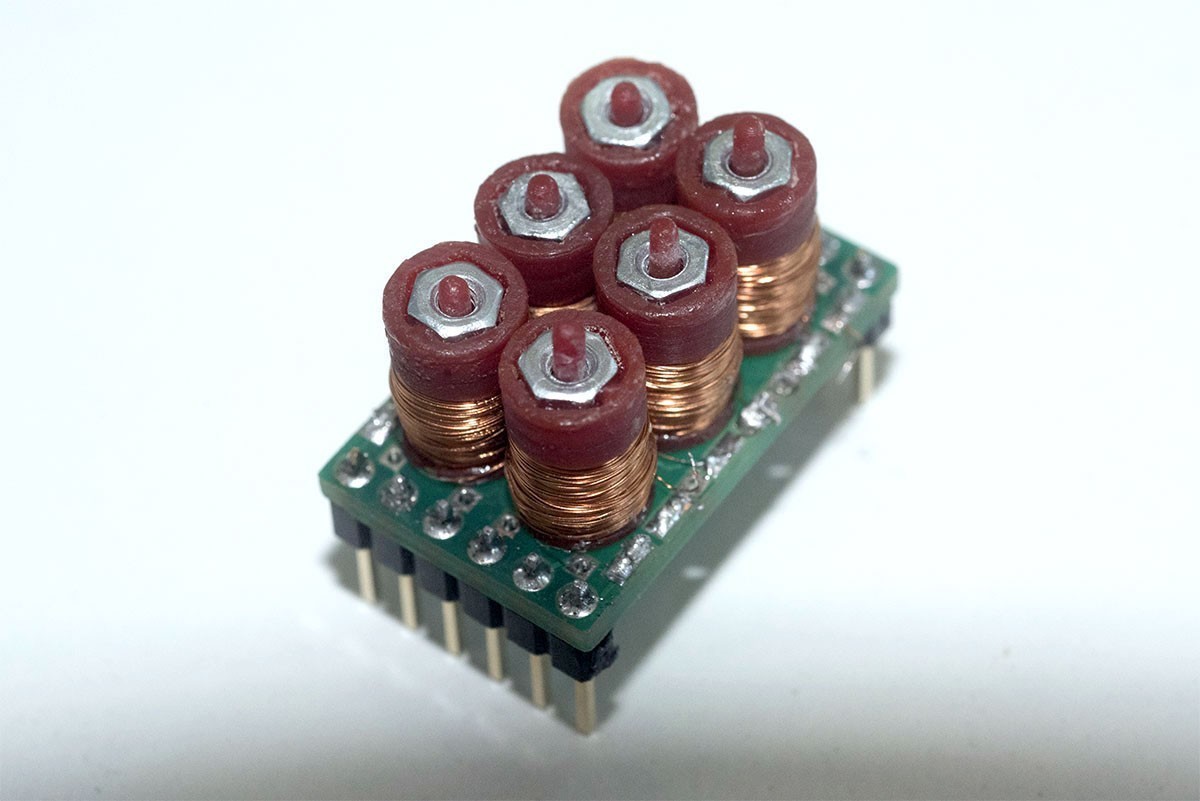
The first MOLBED prototype used a magnetic retaining system. Each dot relied on small 3D-printed parts, magnets, M2 nuts, fine enameled wire, and a controlling PCB. The design was intentionally low in part count and breadboard-friendly, making it approachable for experimentation. It could display words in Braille one character at a time, which is modest compared with a commercial multi-cell display but meaningful for a research prototype.
From MOLBED 1.0 to MOLBED 2.0
MOLBED 1.0 proved the concept, but it also revealed the mechanical gremlins hiding in the walls. The magnetic coil design could move pins, yet the interaction between magnets introduced problems. A strong magnetic movement could affect nearby pins, while reducing the power too much made actuation unreliable. In other words, the pins were not merely raising and lowering; they were occasionally doing the tiny mechanical equivalent of gossiping with their neighbors.
MOLBED 2.0 addressed this by exploring Flexinol actuator wire, a shape-memory alloy wire that contracts when heated by electrical current. In the revised concept, each pin would be moved by Flexinol wires and a lever mechanism. The project logs describe using two short wires per pin to create roughly one millimeter of movement, amplified mechanically. Most parts were planned for high-definition resin 3D printing, with metal 3D-printed pins considered as a possibility.
This shift is significant. Shape-memory alloy wire can simplify certain actuator designs because the wire itself performs movement. However, it also introduces design challenges: heat management, response time, cycle life, current control, and repeatable movement. Flexinol is clever, but it is not fairy dust. It must be tuned carefully, especially when the user’s finger will judge the result instantly.
The Engineering Challenge: Tiny Dots, Big Consequences
Pin Height and Tactile Consistency
A Braille dot must be tall enough to read but not so tall that it feels harsh or slows the user down. It also needs to return cleanly to a flat state. In a visual display, a weak pixel may be annoying. In Braille, an incorrect raised dot changes meaning. For MOLBED, this meant the mechanism had to provide predictable travel while keeping the surface comfortable.
Standard Braille Dimensions
One of the most important lessons from user feedback was that standard Braille cell size mattered more than the maker’s instinct to build multiple lines quickly. Readers wanted dimensions that felt familiar and supported faster reading. That feedback is gold. It reminds designers that accessibility devices are not judged only by clever mechanics; they are judged by real hands, real habits, and real reading speed.
Power and State Retention
MOLBED’s early magnetic design attempted to hold pin states without continuous power. This is a valuable feature because a Braille display may need to keep text stable while the user reads. Constant power draw can create heat, shorten battery life, and complicate portable use. Any low-cost Braille display must treat energy efficiency as a core design goal, not an afterthought squeezed in after the enclosure looks cute.
Modularity
The “M” in MOLBED matters. A modular Braille display can be developed cell by cell, tested in small batches, and potentially expanded into longer rows. Modularity also helps repairability. If one character fails, replacing one module is far friendlier than retiring the whole device to the sad drawer of half-working electronics.
User Feedback Made the Project Smarter
MOLBED’s development benefited from testing with people connected to visual impairment communities. The feedback was practical and direct: standard dimensions were essential, one line of characters could be enough if refresh speed was decent, and eight-pin cells would be important for computer and digital-device compatibility. This is the kind of feedback that turns a cool prototype into a potentially useful tool.
The suggestion of integrating a Braille paper printer into a docking station also shows how users think beyond the gadget itself. A refreshable display is powerful for temporary reading, but printed Braille still matters for labels, education, documents, and situations where tactile material must be kept. A docking station that bridges digital and physical Braille could make the ecosystem more useful.
The larger lesson is simple: assistive technology should not be designed in a vacuum. A maker can build a mechanism that works beautifully on a bench, but the bench does not read books, attend school, ride buses, or work in an office. Users do. MOLBED’s strongest design move may not have been a coil, magnet, or Flexinol wire; it was listening.
Open Source as an Accessibility Strategy
MOLBED was made open-source, and its creator chose not to patent the system so more people could benefit from the idea. That decision fits the spirit of the Hackaday community, where documentation, files, logs, and imperfect prototypes can inspire future builders. Open-source assistive technology is not automatically cheaper or better, but it can make innovation more transparent and collaborative.
For low-volume accessibility hardware, open documentation can be especially valuable. Commercial markets often overlook small user groups because manufacturing margins are thin and support requirements are high. Open projects let students, researchers, engineers, makerspaces, and nonprofit groups learn from earlier attempts instead of starting from zero. Even when a design is not production-ready, it can save the next builder months of guesswork.
How MOLBED Compares With Modern Braille Technology
Today’s refreshable Braille landscape includes portable displays, notetakers, smart displays, and advanced multi-line tactile devices. Some products focus on affordability and basic reading, while others integrate graphics, word processing, math tools, and cloud libraries. At the high end, multi-line tactile displays can render Braille and tactile graphics, offering a much richer learning experience for maps, charts, math, and science.
MOLBED should not be viewed as a finished competitor to these systems. It is better understood as a research and maker platform: a low-cost, modular exploration of how Braille dots might be actuated with accessible fabrication methods. Its importance lies in the questions it raises and the design lessons it documents.
Could a future MOLBED-like system become a practical low-cost display? Possibly, but the road is steep. A finished product would need durability testing, safety review, manufacturing tolerance control, software integration, enclosure design, repair planning, and extensive user testing. Tiny pins are only the visible part of the iceberg. Underneath are firmware, drivers, power electronics, heat behavior, tactile standards, and daily reliability.
Specific Examples of MOLBED’s Design Thinking
Arduino-Friendly Testing
The project used Arduino-style testing boards and demo hardware to evaluate character units. That matters because fast iteration is crucial when designing electromechanical systems. A designer needs to test pin motion, driver behavior, current levels, and tactile output repeatedly. A friendly development setup lowers the friction between “I have an idea” and “the idea just made a tiny clicking sound, so now I know something.”
3D Printing for Rapid Prototyping
MOLBED leaned heavily on 3D printing, including resin printing for small detailed parts. For a Braille cell, small geometry is everything. The body, magnet holder, pin guide, lever, and surface tolerances all affect feel. 3D printing makes it possible to revise those details quickly, though production would still require careful material choices and manufacturing consistency.
Testing Alternative Materials
The project logs mention experimenting with different materials, including castable resin and brass-like results for a more professional look. This kind of exploration is common in serious prototyping. A part that works in one material may flex, bind, wear, or feel different in another. In Braille hardware, the final tactile surface must be durable and pleasant, not merely photogenic.
The Real Value of the Hackaday Prize Entry
The Hackaday Prize has always favored projects with social value, and MOLBED fits that mission neatly. It is not a novelty gadget. It addresses a real barrier in access technology: the cost and complexity of refreshable Braille. Even if MOLBED itself remains a prototype project, it contributes to a larger design conversation about how open hardware can serve people who are often priced out of specialized devices.
MOLBED is also a reminder that assistive technology can be ambitious without being flashy. It does not need lasers, drones, or a voice assistant named something suspiciously cheerful. It needs dots. Reliable dots. Affordable dots. Dots that rise and fall at the right time, in the right places, so a person can read independently.
Challenges That Still Need Solving
A low-cost Braille display faces several hard problems before it can become a daily-use device. First, the actuator must survive many cycles. A reader may refresh text thousands of times in normal use. Second, the pins must resist dust, skin oil, misalignment, and mechanical wear. Third, the software must integrate with screen readers and common operating systems. Fourth, the device must be portable, safe, and repairable.
There is also the business challenge. Assistive hardware needs support, documentation, replacement parts, and user training. A brilliant prototype can win admiration online, but a reliable accessibility product must earn trust over years. That requires funding, partnerships, and manufacturing discipline.
Still, MOLBED’s design direction remains inspiring because it attacks the cost problem at the cell level. If each Braille character can be simplified, repaired, and produced affordably, the economics of a full display begin to change. That is the kind of leverage point engineers love: solve the tiny thing well, and the big thing becomes less impossible.
Experience Notes: What Building Around MOLBED Teaches
Spending time with a project like the MOLBED Braille Display changes how you think about “simple” hardware. On paper, a Braille cell is almost laughably small: a handful of dots arranged in a tidy rectangle. In practice, each dot is a design argument. How high should it rise? How fast should it respond? How much force should it resist under a fingertip? How do you keep it from sticking? How do you manufacture it without needing a watchmaker, a wizard, and a second mortgage?
The first experience lesson is that accessibility design rewards humility. A maker may begin with a clever mechanism, but users quickly reveal what matters. For example, the feedback that standard Braille cell dimensions were more important than multi-line ambition is a classic design correction. Engineers often want to add more capability. Users often want the essential capability to feel right. That difference is not a small detail; it is the difference between a demo and a tool.
The second lesson is that low cost is a system-level goal. It is not enough to choose cheap parts. A low-cost Braille display must also be easy to assemble, calibrate, repair, and reproduce. If the parts cost ten dollars but assembly takes three hours of expert labor per cell, the savings evaporate faster than coffee at a hackathon. MOLBED’s focus on modularity, low parts count, and commercially available components shows a good instinct: design cost out of the architecture, not merely out of the shopping cart.
The third lesson is that tactile technology has no hiding place. A visual interface can sometimes disguise small imperfections with animation or styling. A Braille display cannot. The user’s finger is both the input device and the quality-control department. A pin that is too low, too slow, too sharp, or too wobbly will be noticed immediately. This makes prototyping more demanding, but also more honest.
The fourth lesson is that open-source assistive technology has cultural value beyond the files themselves. MOLBED’s documentation gives future builders a map of experiments: magnetic retention, coil issues, Flexinol exploration, 3D-printed bodies, Arduino shields, user feedback, and design tradeoffs. Even if someone chooses a completely different actuator, the project still teaches them what questions to ask.
Finally, MOLBED shows why the maker movement matters when it aims at real human needs. Not every project becomes a product, and not every prototype survives contact with manufacturing reality. But a documented attempt can still move the field forward. It can inspire a student, inform a researcher, or help another builder avoid a dead end. In the world of refreshable Braille, where every reliable dot can support literacy and independence, that contribution is worth celebrating.
Conclusion
The Hackaday Prize Entry: MOLBED Braille Display is more than a clever electromechanical experiment. It is a thoughtful attempt to make refreshable Braille more affordable, modular, and open to improvement. By moving from a magnetic coil design toward Flexinol-based actuation, documenting user feedback, and focusing on manufacturable simplicity, MOLBED shows how accessibility innovation often begins: one small mechanism, one stubborn problem, and one builder refusing to accept that useful technology must stay expensive.
MOLBED may not be a polished consumer device, but it represents exactly the kind of project the hardware community should keep encouraging. It listens to users, documents tradeoffs, explores cost-saving design, and treats Braille not as an old technology but as a living form of literacy. That is a prize-worthy idea, even before the pins rise.
Note: This article is an original, publish-ready synthesis based on verified project information and broader accessibility technology context. Source links are intentionally omitted from the HTML body for clean web publication.