The original Macintosh Plus was not the fastest computer of the 1980s, not the loudest, and certainly not the cheapest. But it had something rare: personality. It looked like a tiny beige appliance that had learned to think, blink, beep, and occasionally judge you with a floppy-disk icon. Nearly four decades later, the Mac Plus still has a loyal fan base, and now one of the most exciting retrocomputing developments is giving it a very modern twist: a new Mac Plus motherboard that can be built without scavenging special chips from a donor machine.
That last part is the magic trick. In the vintage computing world, many reproduction boards are not truly “new” computers. They are excellent repair tools, but they often need rare original Apple chips, ROMs, or other parts pulled from broken machines. A modern Mac Plus logic board that avoids that dependency is a bigger deal than it first appears. It means preservation can move from “save what survives” to “build what should not disappear.” For collectors, hackers, educators, and anyone who thinks a 9-inch monochrome Mac is still cooler than a smart fridge, this is wonderfully nerdy news.
Why the Macintosh Plus Still Matters
The Macintosh Plus arrived in January 1986 as Apple’s third major compact Macintosh model. It kept the familiar all-in-one shape, the black-and-white display, and the friendly graphical interface, but it fixed several important limitations of the original Macintosh and the Macintosh 512K. The Plus shipped with 1 MB of RAM, supported up to 4 MB, used an 8 MHz Motorola 68000 processor, and included an 800 KB double-sided floppy drive. Most importantly for long-term usefulness, it added SCSI, giving users a practical way to connect external hard drives and other peripherals.
By modern standards, those numbers sound almost comic. A single browser tab can casually eat more memory than a warehouse of Mac Plus machines. But in the mid-1980s, the Plus was a serious productivity computer. It could run classic Mac software, handle desktop publishing workflows, connect to external storage, and offer a polished graphical experience when many PC users were still typing commands into the digital darkness.
The Mac Plus also became a bridge between the first Macintosh generation and the more expandable Macs that followed. It was still compact and charmingly limited, but it had enough RAM expansion and external storage support to remain useful for years. That is one reason so many people still restore them today. The Plus is not just a museum object; it is a machine that can still boot, draw windows, open files, and remind everyone that “user experience” existed before app stores started asking for subscriptions.
The Problem With Restoring Old Macs
Classic Macs are aging in ways that are both predictable and creatively annoying. Batteries leak. Capacitors fail. Solder joints crack. Plastic yellows. Connectors corrode. Some machines survive in closets for decades, while others return from storage looking as though they lost a bar fight with chemistry.
Logic boards are often the heart of the repair challenge. A damaged trace can be patched. A bad capacitor can be replaced. But when corrosion spreads under chips, through vias, and across multi-layer boards, repair becomes slow detective work. Even worse, many vintage computers rely on custom chips that are no longer manufactured. If a reproduction board requires those chips, the repair may still depend on sacrificing another machine. That helps one Mac live, but it does not help the population.
This is why a Mac Plus motherboard that needs no special donor chips is so exciting. It changes the restoration equation. Instead of asking, “Which dead board do we rob today?” builders can ask, “Which modern parts can recreate the function cleanly?” That is a healthier path for preservation. No one wants vintage computing to become a tiny electronic version of a zombie movie.
What Makes This New Mac Plus Motherboard Different?
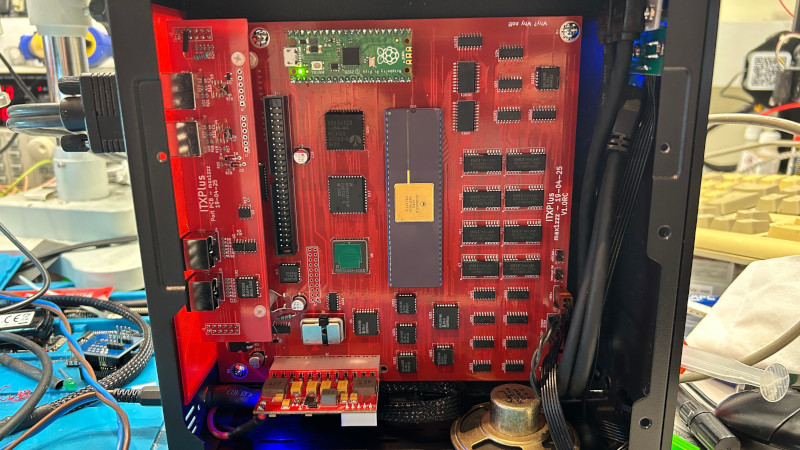
The modern project often discussed under the ITXPlus name takes the soul of the Macintosh Plus and rearranges it for the present. Rather than copying the original board shape exactly, it uses a Mini-ITX form factor. That matters because Mini-ITX cases, power supplies, and mounting hardware are widely available. A Mac Plus-compatible logic board can therefore live in a modern enclosure, on a bench, in a small custom case, or inside a carefully designed retro-inspired build.
The design keeps the essential Mac Plus architecture but replaces hard-to-source or obsolete special components with modern equivalents and community-developed substitutes. The board is designed with 4 MB of soldered RAM, onboard VGA output through a scan-conversion approach, PS/2 keyboard and mouse support through adapters, an internal 50-pin SCSI connector, and ATX power input. In other words, it speaks old Mac where it needs to and modern builder where it helps.
The biggest philosophical win is that it can be assembled to a working state without original Apple custom parts. The Motorola 68000 CPU remains central, but that chip is not the same kind of impossible, proprietary treasure as some Apple-specific silicon. The project leans on replacement designs for functions such as sound, real-time clock behavior, video conversion, and floppy-controller bypassing. It is not magic; it is a pile of smart engineering decisions stacked until a Happy Mac appears.
“No Special Chips” Does Not Mean “No Chips”
Let’s clear up a phrase that can cause confusion. “No special chips required” does not mean the motherboard is made of wishes, copper, and a single heroic resistor. It still uses chips. It still uses logic. It still requires programmed devices, memory, connectors, and careful assembly. The key point is that it avoids depending on rare, machine-specific Apple chips that must be harvested from original Mac Plus hardware.
That distinction is important. Retro projects often use modern microcontrollers, programmable logic devices, or small adapter boards to recreate old behavior. Some purists may raise an eyebrow at that. Then again, some purists raise an eyebrow at using anything newer than a beige keyboard, so we should all breathe into a paper bag and continue.
In practice, using modern parts makes the project more buildable and more maintainable. If a hobbyist can order components, assemble a board, and troubleshoot it with current tools, the machine has a better chance of surviving beyond one collector’s parts drawer. Open hardware is especially powerful here: when schematics, board files, and supporting designs are available, the knowledge spreads instead of disappearing into one person’s basement next to a box labeled “probably important cables.”
The Role of SCSI, VGA, and Modern Storage
One reason the Macintosh Plus aged better than earlier compact Macs is SCSI. The original Plus used external SCSI for hard drives and other peripherals, which made it far more practical for serious work than floppy-only systems. Today, SCSI is still central to the retro Mac experience, but it is often paired with modern solid-state replacements such as BlueSCSI-style devices. These let users store disk images on SD cards while the old Mac sees what looks like a hard drive.
That combination is wonderfully convenient. Instead of listening to a vintage hard drive grind like a coffee machine full of gravel, a builder can boot from silent flash storage. It also makes file management easier: disk images can be prepared or backed up on a modern computer, then used on the vintage-compatible system.
Video is another clever adaptation. The original Mac Plus drove its internal monochrome CRT. A new Mini-ITX-style board has different goals. Onboard VGA output makes it easier to test, display, and integrate the machine without depending on a fragile original analog board and CRT. This does not replace the charm of the original compact Mac display, but it does make the design more flexible and safer for builders who prefer not to wrestle with high-voltage hardware. Vintage CRTs are beautiful; they are also very serious about reminding you that electrons have opinions.
Floppy Drives: The Charming Trouble-Makers
The floppy drive is where nostalgia and engineering start arguing at the dinner table. The Macintosh Plus originally used an 800 KB auto-inject floppy drive. For many users, that drive is part of the authentic experience. The click, whirr, and mechanical drama are inseparable from the classic Mac mood.
However, floppy support is not simple. Apple’s original disk-control hardware is one of the areas where custom or semi-custom parts can become a problem. Modern Plus-compatible board projects may bypass the original floppy controller behavior by default, especially when SCSI-based storage is easier, faster, and more reliable. Some designs provide expansion headers or future paths for connecting original or replacement disk interfaces, but floppy support often becomes optional rather than central.
That may sound like a compromise, but it is a reasonable one. A Mac Plus that boots reliably from SCSI storage is still a very usable Mac Plus-class machine. Meanwhile, builders who want floppy support can explore add-on solutions, adapter boards, or emulators. In the retro world, “optional floppy drama” is usually better than “mandatory floppy drama.”
Why Mini-ITX Is a Smart Choice
Using Mini-ITX is more than a convenience; it changes who can realistically build and use the board. The original Macintosh Plus enclosure is iconic, but it is also a specific compact case tied to a CRT, analog board, and tight internal layout. A Mini-ITX board can be mounted in standard cases, test frames, custom acrylic builds, 3D-printed enclosures, or even portable experiments.
This opens the door to creative Mac Plus-inspired machines that are not trying to impersonate museum originals. A builder could make a slim desktop Plus, a tiny bench Mac for software testing, a transparent showcase build, or a classroom demonstration machine. The project becomes less about replacing a single broken part and more about keeping the platform alive in new forms.
That is where retrocomputing becomes especially fun. The goal is not always perfect historical reenactment. Sometimes the goal is to understand how old systems worked by rebuilding them with modern tools. Sometimes the goal is to run classic software. Sometimes the goal is simply to look at a tiny board and say, “I made a Macintosh,” which is a perfectly valid emotional support hobby.
Open Source Hardware and Community Engineering
The new Mac Plus motherboard is part of a broader movement in retrocomputing: community-led preservation through open design. Enthusiasts have recreated logic boards, reverse-engineered programmable array logic, designed replacement sound circuits, built storage emulators, made keyboard adapters, and documented obscure hardware behavior that major companies stopped caring about long ago.
This work matters because corporate support eventually ends. Documentation vanishes. Parts dry up. Repair knowledge becomes scattered across old forum posts, archived PDFs, and one person who definitely knows the answer but has not logged in since 2018. Open projects gather that knowledge and turn it into something buildable.
The Mac Plus is a particularly good candidate for this approach because it sits at a sweet spot. It is old enough to be relatively understandable compared with later machines full of dense custom chips, but advanced enough to run a meaningful library of Macintosh software. Its architecture rewards study. Its limitations are visible. You can trace what the machine is doing without needing a semiconductor lab and three interns named Kevin.
Challenges Builders Should Expect
Even with a smart modern design, building a new Mac Plus motherboard is not like snapping together a toy. Surface-mount soldering can be demanding. Small components are easy to misplace, rotate, bridge, or launch into another dimension with tweezers. Programmable logic devices need correct files. Microcontrollers need firmware. Connectors need careful orientation. Power rails need verification before the first dramatic switch-on.
Debugging is part of the adventure. A reversed data bus, a missing pull-down resistor, a wrong footprint, or a tiny solder bridge can turn a promising board into a silent rectangle. That is not failure; that is electronics being electronics. The good news is that modern builders have better tools than hobbyists did decades ago: digital oscilloscopes, affordable logic analyzers, hot-air stations, searchable schematics, and online communities that can identify a mistake from a blurry photo faster than most people can identify their own luggage.
There are also software and legal considerations. Classic Macintosh ROM images and system software have their own rights issues, so builders should be thoughtful about what they use and distribute. Hardware may be open, but not every piece of the historical software stack is automatically free to share. Responsible retrocomputing means preserving history without pretending copyright is just a decorative suggestion.
Why This Project Is Bigger Than One Board
A new Mac Plus motherboard with no donor-specific chips is not just a cool build. It is a sign that vintage computing is entering a more mature preservation phase. The first phase was collecting. The second phase was repairing. The third phase is reconstructing: understanding old systems deeply enough to reproduce them, improve their maintainability, and keep them accessible.
That has educational value. A Mac Plus-compatible board teaches computer architecture, memory mapping, video timing, bus behavior, storage protocols, firmware, and practical PCB design. Students can learn why old systems were designed the way they were. Hobbyists can compare original constraints with modern alternatives. Engineers can appreciate the elegance of a machine that did a lot with very little.
It also has cultural value. Computers are not just specifications. They are tools people used to write books, design newsletters, manage offices, make art, learn programming, and play games. When the hardware disappears, part of that cultural memory becomes harder to experience. Emulators are excellent, but real or near-real hardware teaches different lessons. A modern reproduction board lets people feel the timing, constraints, and quirks of the original platform in a more physical way.
Practical Uses for a New Mac Plus Board
For collectors, the board can preserve original machines by reducing the need to harvest parts. For repairers, it provides a known-good platform for testing peripherals and software. For educators, it is a compact example of 1980s computer design in a form that can be displayed, measured, and explained. For makers, it is a playground for custom cases, modern displays, storage experiments, and keyboard adaptations.
It could also become a useful development platform for classic Mac software. Developers interested in System 6 or System 7 can test programs on hardware that behaves like a Mac Plus while using modern conveniences for storage and display. That is a rare combination: historically meaningful, but not so fragile that every boot feels like a séance.
And yes, it is also just fun. There is something deeply satisfying about seeing a decades-old architecture come alive on a newly manufactured PCB. The Happy Mac icon has always felt cheerful, but on a board made from modern parts, it becomes a tiny celebration of stubborn engineering optimism.
Hands-On Experience: What Building a Modern Mac Plus Feels Like
Working with a project like a new Mac Plus motherboard is a strange mix of archaeology, electronics, and comedy. You start with the confidence of a modern person surrounded by modern tools. You have a temperature-controlled soldering iron, a multimeter, online schematics, and maybe even a microscope. Then a tiny capacitor flips off the tweezers and disappears forever, and suddenly you understand why ancient civilizations invented rituals.
The first lesson is patience. Vintage-compatible builds reward slow progress. Before applying power, you check orientation marks, inspect solder joints, confirm rails, and look for bridges. The temptation is always to plug it in and see what happens. That temptation should be treated like a raccoon holding a lit match: interesting, but not a leadership figure.
The second lesson is that old computer architecture is surprisingly understandable when you meet it at board level. Modern computers hide almost everything inside giant chips and firmware layers. A Mac Plus-style system is more exposed. You can follow the CPU bus, understand why RAM timing matters, see how I/O chips participate, and appreciate how much work was done by carefully arranged logic. The machine feels less like a sealed appliance and more like a conversation between parts.
The third lesson is that compatibility is not a single yes-or-no switch. A board may boot, but keyboard behavior, mouse timing, SCSI quirks, sound output, soft power, and video conversion all need their own attention. That is part of the fun. Each subsystem has a personality. SCSI, in particular, behaves like a strict librarian who will help you only if every label is correct, every terminator is present, and no one breathes too loudly near the cable.
A modern Mac Plus build also changes how you experience classic software. Booting System 6 or System 7 from solid-state storage feels both authentic and slightly mischievous. The interface is still slow enough to be charming, but the storage is quiet and convenient. You can open MacPaint, HyperCard, MacWrite, or old utilities and feel the rhythm of the machine without worrying that an original hard drive is about to perform its final mechanical yodel.
There is also a social experience. Projects like this are rarely solitary in the old-fashioned sense. Even if you are soldering alone at a desk, the build stands on forum posts, GitHub repositories, adapter designs, repair notes, and experiments from other hobbyists. Someone figured out a sound replacement. Someone else made a keyboard adapter. Another person documented a SCSI issue. The final working board is not just hardware; it is community knowledge made physical.
Perhaps the most enjoyable part is the moment the machine finally responds. After hours of checking, cleaning, flashing, rechecking, and wondering whether your flux is secretly maple syrup, a screen appears. The system boots. The mouse moves. The Mac behaves like a Mac. For a second, the decades collapse. You are looking at a 1986 idea running on a newly built board, and it feels less like nostalgia than continuity.
That is the real beauty of a new Mac Plus motherboard with no special chips required. It does not merely imitate the past. It proves the past can be studied, rebuilt, shared, and enjoyed without destroying the remaining originals. It gives old software a new home, gives builders a satisfying challenge, and gives the retrocomputing community one more reason to keep tiny beige computers in the conversation.
Conclusion
A new Mac Plus motherboard that can be built without special donor chips is a major step forward for retro Mac preservation. It respects the original Macintosh Plus while adapting it for modern builders through Mini-ITX sizing, soldered RAM, VGA output, SCSI-friendly storage options, ATX power, and open hardware thinking. It is not a replacement for original machines, and it does not erase the value of careful restoration. Instead, it gives the community another path: buildable, repairable, documented, and less dependent on rare Apple silicon.
The Macintosh Plus earned its place in computing history because it made the graphical computer feel approachable, expandable, and useful. This new motherboard keeps that spirit alive in a wonderfully practical way. No special chips required, no donor board sacrificed, and no time machine needed. Just patience, solder, documentation, and the kind of enthusiasm that makes people cheer when a 40-year-old operating system boots from a modern board.
Note: This article is original, written in standard American English, and synthesized from real public technical information about the Macintosh Plus, modern Mac Plus reproduction boards, open hardware projects, and retrocomputing repair practices. Source links are intentionally omitted from the article body as requested.