Every electronics project has a dramatic middle act. First, there is the spark of genius: a blinking LED, a sensor board, a Raspberry Pi contraption, or a custom PCB that makes you feel like Tony Stark with a soldering iron. Then comes the awkward phase: wires everywhere, exposed headers, a board sliding around your desk like it is trying to escape, and a growing suspicion that “temporary prototype” is just another way of saying “future dust collector.”
That is where a custom enclosure generator earns its tiny plastic crown. Instead of designing a box from scratch every time, a parametric enclosure tool lets you type in dimensions, adjust wall thickness, choose screw mounts, add ventilation, and generate a printable case. In other words, it turns the least glamorous part of the project into something fast, repeatable, and oddly satisfying. Yes, making the box can be fun. We live in strange and wonderful times.
The title Printed It: Custom Enclosure Generator points directly at one of the maker world’s favorite shortcuts: using 3D printing and parametric CAD to create professional-looking project boxes without ordering custom tooling, bending sheet metal, or sacrificing an innocent takeout container. For makers, engineers, students, and hobbyists, this workflow can transform a project from “science fair spaghetti” into “finished product, please do not touch unless impressed.”
What Is a Custom Enclosure Generator?
A custom enclosure generator is a digital tool that creates a 3D-printable case based on user-defined parameters. Instead of drawing every wall, post, lid, and cutout manually, you enter values such as length, width, height, corner radius, lid style, screw type, wall thickness, PCB dimensions, and connector locations. The tool then produces a model that can be exported as an STL or 3MF file and sent to a slicer for 3D printing.
Many popular enclosure generators are built with OpenSCAD, a script-based CAD program loved by people who think dimensions belong in neat variables instead of mysterious mouse gestures. OpenSCAD is especially useful for parametric design because the same file can generate hundreds of different boxes simply by changing numbers. Need a case 80 mm wide today and 95 mm wide tomorrow? Change a value, render again, and try not to feel too powerful.
The most famous examples include tools like Ultimate Box Maker and YAPP_Box, both of which demonstrate why parametric modeling is so attractive for electronics cases. These generators are not just “box makers.” They can handle lids, mounting posts, rounded edges, screw holes, panel cutouts, ventilation features, and board supports. That is a big leap from downloading a random enclosure and hoping your USB-C port magically lines up.
Why 3D Printed Enclosures Matter
A custom 3D printed enclosure does three big jobs: it protects, organizes, and presents. Protection matters because exposed electronics are vulnerable to dust, fingers, accidental drops, curious pets, and the ancient enemy of all circuits: spilled coffee. Organization matters because connectors, cables, displays, buttons, and mounting holes need a home. Presentation matters because the difference between a prototype and a product is often a clean case and four screws.
Off-the-shelf project boxes are useful, but they rarely fit perfectly. You may find one that is nearly the right size, only to discover that the board is too tall, the cable exits on the wrong side, the lid blocks the antenna, or the buttons sit in a place only a raccoon could comfortably reach. A 3D printed electronics enclosure solves that by fitting around the project instead of forcing the project to fit inside a generic rectangle.
This is particularly valuable for small-batch products, IoT sensors, robotics modules, home automation projects, test fixtures, portable instruments, and educational builds. When you can print a custom project case overnight, you can test ergonomics, airflow, cable routing, and assembly before committing to a more expensive manufacturing method. That makes enclosure generators a practical bridge between prototype and production.
How a Parametric Enclosure Generator Works
The magic is not really magic. It is geometry with better manners. A parametric project box generator defines a model through adjustable values. These values control the dimensions and features of the enclosure. For example, one variable might set the internal width, another might set the wall thickness, and another might control the lid overlap. When the values change, the model updates automatically.
Common Parameters You Can Adjust
Most enclosure generators let you change the outer or inner dimensions, wall thickness, corner radius, lid height, screw hole diameter, post position, post height, and clearance between the lid and base. More advanced generators may also allow custom connector cutouts, PCB stand-offs, snap-fit clips, cable slots, vents, labels, panel openings, countersunk screws, and internal ribs.
For an electronics case, the most important starting point is usually the PCB. Measure the board length and width, then measure the tallest components on both sides. Do not forget connectors, heat sinks, battery holders, antenna modules, terminal blocks, and cable bend radius. The connector is always where the drama begins. A board may technically fit inside the enclosure, but if the USB cable cannot plug in without performing yoga, the design is not finished.
Why OpenSCAD Is So Popular for Enclosure Generators
OpenSCAD works beautifully for box generators because it treats a design like a reusable recipe. You define the ingredients, call the modules, and generate the model. It is less about sculpting and more about precise construction. That makes it friendly to people who want repeatability, version control, and predictable changes.
This also means a custom enclosure can become part of a larger engineering workflow. If a PCB changes size, you update the board dimensions. If a connector moves 4 mm to the left, you update the cutout coordinate. If the lid tolerance is too tight, you increase the clearance. There is no need to redraw the whole case while whispering stern words at your CAD software.
Design Features That Make a Printed Enclosure Feel Professional
A good enclosure is not just a box with a lid. A good enclosure feels intentional. It opens cleanly, holds the board securely, exposes only the parts users need, and survives normal handling without cracking like a cookie. The following details separate a quick container from a polished custom project enclosure.
1. Wall Thickness That Matches the Job
For FDM printing, thin walls may look efficient, but they can become weak, warped, or poorly formed. Many makers use walls around 1.5 mm to 3 mm for functional enclosures, depending on nozzle size, material, and expected handling. For a small desktop sensor, thinner walls may work. For a handheld controller, shop tool, or enclosure that gets opened often, thicker walls are a safer choice.
The goal is not to make every wall massive. That wastes filament and time. The better strategy is balanced strength: reasonable wall thickness, rounded corners, ribs where needed, and enough clearance for assembly. Plastic is happiest when designers stop asking it to behave like steel.
2. Proper Clearance and Tolerances
3D printers are accurate, but they are not magical teleporters of dimensionally perfect objects. A lid that is designed with zero clearance will often become a lid that does not close, followed by a person holding sandpaper and questioning their life choices. For sliding or overlapping parts, leave clearance. For screw holes, test your printer’s actual hole behavior. For snap fits, print a small sample before committing to a six-hour enclosure.
A practical habit is to print a tolerance coupon or a small section of the enclosure first. This lets you test lid fit, screw engagement, post strength, and connector alignment before printing the full case. It is cheaper to fail in 18 minutes than to fail after dinner.
3. PCB Stand-Offs and Mounting Posts
Stand-offs are the little towers that keep your board from rattling around like a coin in a dryer. They provide spacing under the PCB, allow room for solder joints, and create secure mounting points. A good generator should let you place posts according to the board’s mounting holes or define them manually.
For screw-mounted posts, avoid making the post walls too thin. Add fillets or ribs at the base if the generator supports them. Tall, skinny posts can snap under screw pressure, especially along layer lines. If you have ever watched a mounting boss break after the final screw turn, you know the sound. It is not loud, but emotionally it is thunder.
4. Connector Cutouts That Actually Line Up
USB, HDMI, barrel jacks, terminal blocks, RJ45 ports, buttons, switches, and displays all need openings. The safest method is to measure from a known board origin and include extra clearance around the connector body and plug. Remember that cable housings are often wider than the connector itself. A microcontroller may fit perfectly, but the charging cable may arrive wearing a plastic winter coat.
For rectangular cutouts, leave a little extra room and use chamfered or rounded edges when possible. For circular holes, consider printing orientation because holes printed vertically and horizontally behave differently. If the enclosure generator supports panels or separate faceplates, use them. A replaceable panel is a gift to your future self.
5. Ventilation and Heat Management
Not every box needs vents. A low-power sensor running on a coin cell may be fine in a sealed case. A Raspberry Pi, motor driver, LED controller, or power converter may need airflow. Enclosure generators that include vent slots, fan openings, or heat sink clearance can prevent your project from becoming a tiny toaster with ambitions.
Thermal design starts with knowing what gets warm. Leave space above hot chips. Avoid pressing lids directly against heat sinks. If airflow matters, include intake and exhaust paths rather than random decorative holes. Vents should help air move, not just make the enclosure look like it is wearing sporty sunglasses.
Choosing the Right Material for a Custom Project Case
Material choice can make or break a 3D printed enclosure. PLA is easy to print, clean-looking, and great for indoor prototypes. PETG offers better toughness and temperature resistance while remaining fairly friendly to print. ABS and ASA handle heat better but often require more controlled printing conditions. Nylon can be excellent for tough functional parts, though it may be more demanding. TPU is flexible and useful for gaskets, feet, bumpers, or protective sleeves.
For a simple desk gadget, PLA is usually fine. For a device used in a garage, vehicle, outdoor enclosure, or warm electronics environment, PETG, ABS, or ASA may be smarter. For snap features, impact resistance, or repeated opening, material flexibility matters. A brittle snap tab is not a snap tab; it is a scheduled disappointment.
Color also matters more than people admit. Black hides layer lines and looks professional, but it can absorb heat. White or light colors may be better for outdoor or sunny locations. Transparent or translucent filament can look great for LED indicators, but it may reveal internal messiness. Use with confidence or with very tidy wiring.
Workflow: From Idea to Printed Enclosure
A reliable workflow makes enclosure design faster and less painful. Start by measuring the electronics. Use calipers if possible. Write down board length, width, hole positions, component height, connector positions, and cable clearance. Then choose a generator that matches your project. Ultimate Box Maker is useful for classic project boxes. YAPP_Box is powerful for PCB-based enclosures. Other OpenSCAD, CadQuery, JSCAD, and web-based tools may fit specific needs.
Next, enter the key dimensions and generate a basic box. Do not add every fancy feature on the first pass. Print a simplified shell or a thin test slice around the connector area. Check the fit. Adjust tolerances. Then add stand-offs, lid features, ventilation, labels, and screw details. This staged approach prevents the classic maker mistake of printing a beautiful enclosure that is wrong in fourteen different ways.
After the final model is ready, slice it with appropriate settings. Use enough perimeters for strong walls. Orient the enclosure so visible faces look clean and critical features are strong. Avoid placing screw posts in orientations that make them weak along layer lines. Consider heat-set inserts if the case will be opened repeatedly. They add a touch of “real product” energy and reduce the risk of stripped plastic threads.
Custom Enclosure Generator vs. Manual CAD Design
Manual CAD gives maximum control. A skilled designer can create beautiful snap assemblies, curved industrial forms, gasket channels, molded-in textures, and complex internal structures. But manual design takes time, especially when every project needs a slightly different box. A generator is faster, more consistent, and easier to modify.
The best choice depends on the project. For a one-off sensor, data logger, controller, classroom build, or lab tool, a generator may be ideal. For a consumer product with strict branding, ergonomics, sealing, drop testing, and manufacturing requirements, manual CAD or professional industrial design may be worth the extra work. Many teams use both: a generator for early prototypes, then custom CAD once the electronics and user requirements settle down.
Think of an enclosure generator as the pocketknife of product development. It may not replace every specialized tool, but it solves many problems quickly, cleanly, and without requiring a heroic afternoon of CAD wrestling.
Common Mistakes to Avoid
The first mistake is designing around nominal dimensions only. Always include real-world clearance. The second mistake is ignoring cable bend radius. The third is using weak posts without ribs or adequate wall thickness. The fourth is forgetting how the enclosure will be assembled. If you need tweezers, a flashlight, and the patience of a monk to install the board, the design needs another pass.
Another common mistake is placing vents where dust, water, or fingers can easily enter. Ventilation must be balanced with protection. If the device will sit in a workshop, car, kitchen, garden shed, or child-accessible zone, design accordingly. Electronics do not enjoy sawdust, steam, mud, or peanut butter. Honestly, few of us do.
Finally, avoid overcomplicating the first version. Start with a simple, functional enclosure. Then improve aesthetics, labels, texture, and fastening. Iteration is the whole advantage of 3D printing. Use it.
Who Benefits Most from a Custom Enclosure Generator?
Makers benefit because they can finish projects instead of leaving them naked on the bench. Engineers benefit because they can test fit, access, and assembly early. Teachers benefit because students can learn design constraints through physical results. Startups benefit because they can show investors and customers something that looks tangible. Repair technicians, ham radio operators, robotics teams, IoT builders, and home automation enthusiasts all benefit for the same reason: custom electronics rarely fit standard boxes perfectly.
A custom enclosure generator also supports better documentation. When dimensions live in a parametric file, future revisions are easier. You can label versions, keep settings with the project, and regenerate the case when the board changes. That makes the enclosure less of a one-time craft object and more of a repeatable part of the design system.
Experience Notes: What It Feels Like to Use a Custom Enclosure Generator
The first time you use a custom enclosure generator, the experience feels almost suspiciously easy. You open the file, change a few numbers, render the model, and suddenly there is a box on the screen that looks like it was made for your project. Because it was. This is a dangerous moment. You may begin looking around your desk for other things that need enclosures. Your multimeter probes? Your spare buttons? A single lonely resistor? Everything starts looking box-worthy.
The real learning begins when you print the first version. The outside may look great, but then you discover the board fits only if inserted at the angle of a submarine dive. Maybe the USB cutout is 1 mm too low. Maybe the lid is too tight. Maybe the screw posts are perfect except for the one that sits directly under a capacitor you forgot to measure. These small failures are not disasters. They are tuition payments to the University of Plastic Reality.
After a few rounds, you develop habits. You measure twice, then measure the connector again because connectors enjoy betrayal. You add more clearance than your optimistic brain wants. You print a corner test or a faceplate section before printing the full enclosure. You begin thinking about how fingers will reach the reset button, how a cable will exit the side, and whether the lid should slide, snap, or screw down. The enclosure stops being an afterthought and becomes part of the product experience.
One of the best moments is when the board drops onto the stand-offs and the ports line up cleanly with the cutouts. It is a tiny mechanical symphony. The screws bite, the lid closes, the LED glows through the right opening, and the whole project suddenly feels finished. Not “I made a circuit” finished, but “I made a device” finished. That difference is huge.
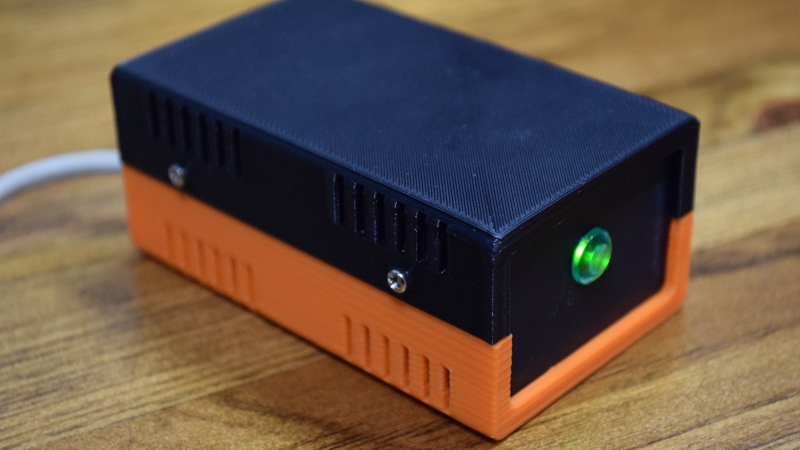
There is also a practical joy in customization. You can add embossed labels, rounded corners, a logo, ventilation slots, wall-mount tabs, rubber feet, or a removable battery door. You can make one enclosure for the bench version and another for the wall-mounted version. You can print in bright orange so nobody loses the field sensor in tall grass, or matte black so your desk gadget looks like it has a tiny venture-capital budget.
The best advice from experience is simple: keep the first enclosure boring. Make it fit. Make it strong. Make it easy to assemble. Once that works, make it beautiful. A custom enclosure generator gives you speed, but good design still comes from observation. Print, test, adjust, and repeat. The printer is not just making the case; it is teaching you what the case needs to become.
Conclusion: A Better Box for Better Builds
Printed It: Custom Enclosure Generator is more than a catchy maker-style title. It represents a practical shift in how people finish electronics projects. Instead of settling for loose boards, generic plastic boxes, or hours of repetitive CAD work, makers can use parametric tools to generate enclosures that fit the project, the components, and the workflow.
A good custom enclosure generator saves time, improves reliability, and makes prototypes look intentional. It helps protect electronics, organize connectors, support PCBs, manage heat, and create a cleaner user experience. Whether you are building a weekend Arduino gadget, a Raspberry Pi controller, an IoT sensor, or a small batch of test devices, the enclosure is not just packaging. It is the handshake between your project and the real world.
And yes, it is still a box. But when the box fits perfectly, closes neatly, and makes your project look like it belongs in the future, it is a very good box indeed.