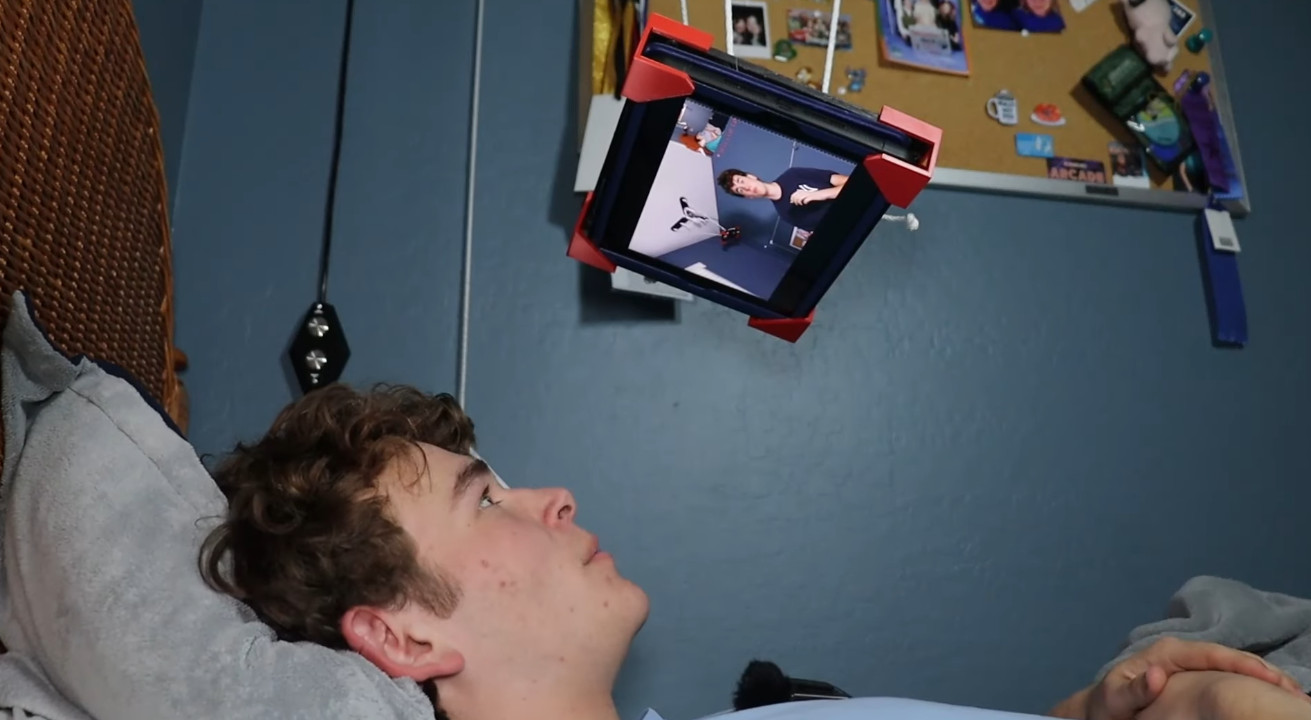
There is a special kind of bedtime optimism that makes a person think, “I’ll just hold this tablet for ten minutes.” Forty-five minutes later, the wrists are negotiating surrender, the neck has folded itself like a lawn chair, and the tablet has almost performed a surprise trust fall onto your nose. This is where a tablet suspension system becomes less of a gadget and more of a tiny domestic hero.
A tablet suspension system is usually an adjustable arm, floor stand, clamp mount, or overhead holder designed to keep a tablet floating in a comfortable viewing position. Instead of balancing an iPad, Kindle, Samsung Galaxy Tab, or other device on your chest, pillow, knees, or increasingly annoyed hands, the mount holds the screen for you. The result is a hands-free tablet setup that can reduce bedtime fatigue, improve posture, and make evening reading or streaming feel less like an upper-body workout disguised as relaxation.
The idea is simple: bring the screen to your eyes instead of forcing your neck, shoulders, and wrists to chase the screen. That single change can make a big difference, especially for people who read in bed, watch shows before sleep, follow recipes from a tablet, video chat with family, or use accessibility apps while lying down.
What Is a Tablet Suspension System?
A tablet suspension system is a support structure that holds a tablet above, beside, or in front of the user without requiring constant hand contact. Think of it as a crane arm for your bedtime entertainment, minus the construction helmet. Most systems use one of four designs: a clamp-on gooseneck arm, an articulated metal arm, a freestanding floor stand, or a pillow-style tablet support.
Clamp-on models attach to a headboard, nightstand, desk edge, or bed frame. Flexible gooseneck arms are popular because they are inexpensive and easy to reposition, although cheaper ones may wobble when tapped. Articulated arms use hinges and tension joints for more stability. Floor stands avoid clamping altogether and are useful for upholstered beds or delicate furniture. Pillow stands are softer and simpler, but they typically do not “suspend” the tablet overhead; they simply prop it at an angle.
The best system depends on your device size, bed layout, viewing habits, and tolerance for wobble. If you mostly read with page taps, a sturdy gooseneck may be enough. If you draw, type, or tap frequently, a rigid arm or floor stand will usually feel better. If your tablet is large, heavy, or protected by a thick case, stability becomes the main event.
Why Bedtime Tablet Use Causes Fatigue
Tablets are light compared with laptops, but “light” becomes suspiciously heavy after thirty minutes of holding one above your face. A modern tablet may weigh around a pound or more, and that weight is often supported by small muscles in the hands, wrists, forearms, shoulders, and neck. Add a blanket, awkward pillow angle, and one gripping hand slowly going numb, and bedtime comfort quickly turns into a low-budget circus act.
Neck Strain and “Tablet Neck”
One of the biggest problems is neck flexion. When a tablet rests flat on the lap or chest, the user often looks downward for long periods. This forward-bent posture can strain the neck and upper back. Ergonomic guidance for screen use generally favors a neutral head position, relaxed shoulders, and a screen placed directly in front of the viewer rather than far below the line of sight.
A tablet suspension system helps by raising the screen closer to eye level. You do not need a perfect office workstation in bed, because nobody is turning their duvet into a cubicle. But you do want to avoid the classic “shrimp posture,” where the head drops, the shoulders round forward, and the spine files a formal complaint.
Wrist and Hand Fatigue
Holding a tablet in bed often requires a pinch grip, bent wrists, or one-handed balancing. Over time, this can create fatigue in the forearms and hands. People with arthritis, tendon irritation, carpal tunnel symptoms, wrist cysts, or general hand weakness may notice discomfort much sooner.
A hands-free tablet holder removes the need to grip the device continuously. That matters for comfort, but it also matters for accessibility. For some users, a tablet suspension system can make reading, browsing, telehealth visits, video calls, and entertainment easier to enjoy without pain becoming the price of admission.
Eye Discomfort and Screen Distance
Digital eye strain is commonly linked with prolonged screen viewing, reduced blinking, glare, poor lighting, and improper viewing distance. A tablet held too close to the face may encourage squinting and dry eyes. A mount allows the user to set a more consistent distance and angle, which can reduce glare and make reading more comfortable.
For bedtime use, brightness matters too. A tablet mount will not magically make screen habits sleep-friendly, but it can help you avoid holding a bright screen inches from your face. Lower brightness, larger text, dark mode, and a reasonable viewing distance can make the experience gentler.
How a Tablet Suspension System Avoids Fatigue At Bedtime
The main keyword phrase sounds technical, but the benefit is beautifully practical: Tablet Suspension System Avoids Fatigue At Bedtime because it shifts the physical burden from your body to a support structure. Your muscles stop acting like a tripod. Your wrists get a break. Your neck can stay closer to neutral. Your shoulders relax. Your tablet stops threatening your dental work.
It Supports the Device Weight
The most obvious advantage is weight relief. Whether you are reading a mystery novel, watching a cooking show, or pretending one more episode will not become three, the mount carries the tablet. This can be especially useful for larger screens, protective cases, and people who use tablets for long reading sessions.
It Improves Viewing Angle
A good tablet arm mount allows you to position the screen in portrait or landscape mode and adjust the viewing angle while lying on your back, side, or propped against pillows. Instead of bending your neck down, you can bring the screen upward and slightly forward. That helps reduce the awkward posture that often causes bedtime stiffness.
It Encourages Hands-Free Comfort
Hands-free tablet use is not only about laziness, although laziness deserves more respect when properly engineered. It is about reducing repetitive strain. With the tablet suspended, you can rest your arms under the blanket, use a Bluetooth remote for page turns, or tap lightly without supporting the whole device.
It Reduces the “Dropped Tablet” Problem
Anyone who has dropped a tablet on their face knows the sound: not the impact, but the silence afterward while you reconsider every life choice. A secure tablet holder helps prevent accidental drops by locking the device in place. This is particularly important for nighttime reading, when sleepy hands are not exactly known for professional-grade grip strength.
Best Uses for a Bedside Tablet Suspension System
A tablet suspension system is not just for streaming movies. It can support a wide range of bedtime and recovery routines.
Reading E-books and Digital Magazines
For e-book lovers, a tablet holder for bed can make long reading sessions more comfortable. Pair it with larger font settings and a remote page-turner, and suddenly your bedroom feels like a tiny library with better blankets.
Watching Shows Without Shoulder Strain
Streaming in bed often turns into pillow architecture. One pillow supports your back, another supports your elbow, another mysteriously disappears, and none of them truly supports the tablet. A suspension arm gives the screen a dedicated position, reducing the need to constantly adjust your body.
Video Calls and Telehealth
For people recovering from illness, managing mobility limitations, or caring for loved ones, a stable tablet mount can make video calls and telehealth appointments easier. The device stays steady, the camera angle improves, and the user does not have to hold the tablet through an entire conversation.
Accessibility and Limited Mobility
For users with reduced grip strength, tremors, chronic pain, or fatigue-related conditions, a tablet suspension system can be more than convenient. It can create independence. When combined with voice control, switch control, styluses, or external buttons, a mounted tablet can become an accessible entertainment, communication, and productivity station.
What to Look for When Buying a Tablet Suspension System
The market is full of tablet holders that promise comfort, stability, flexibility, and possibly world peace. Some deliver. Some bounce around like a fishing rod in a storm. Here is what to evaluate before buying.
1. Device Compatibility
Check the size range and weight limit. A holder built for phones may not safely support a 12.9-inch tablet. If your device has a bulky case, measure the total thickness before purchasing. A mount that barely grips the tablet is not a mount; it is a suspense thriller.
2. Clamp Strength and Furniture Fit
If the system uses a clamp, check the maximum clamp opening and the surface it is designed for. Thin metal bed frames, thick upholstered headboards, round rails, and delicate wood all behave differently. Look for padded clamps to reduce furniture damage and ensure the clamp can tighten securely without slipping.
3. Arm Stability
Flexible gooseneck arms are affordable and versatile, but they may shake when touched. Articulated arms with locking joints are often sturdier. Floor stands can be excellent for renters or people who do not want to clamp anything to furniture. The heavier the tablet, the more stability matters.
4. Rotation and Viewing Flexibility
A good holder should rotate between portrait and landscape mode. It should also allow tilt adjustment so you can reduce glare from lamps or windows. The best position is not always directly overhead; many users prefer the screen slightly off-center so the arm does not hover in an awkward place.
5. Charging Access
Bedtime tablet use often means long sessions, so charging access matters. Make sure the holder does not block the charging port, speakers, volume buttons, or camera. Bonus points if the arm has cable clips or enough clearance to prevent cords from dangling like electronic spaghetti.
6. Safety and Build Quality
Choose a mount that feels secure and is rated for your device weight. Avoid placing a heavy tablet directly above your face unless the holder is extremely stable. Tighten joints regularly, inspect clamps, and do not overload the mount with accessories. Comfort is the goal, not recreating a medieval ceiling trap.
How to Set Up a Tablet Holder for Bed Comfortably
Setup matters. A great stand in a bad position can still create neck strain. Use these steps to build a more comfortable bedtime tablet station.
Step 1: Choose Your Bed Position First
Decide whether you usually lie flat, recline, or rest on your side. Your mount should serve your natural position, not force you into a posture that feels like a dentist chair with blankets.
Step 2: Place the Screen Near Eye Level
Position the tablet so your head stays relaxed and your eyes look forward or slightly downward. Avoid extreme overhead placement that forces your eyes upward for long periods. If your neck feels tense after a few minutes, adjust the angle.
Step 3: Keep a Comfortable Viewing Distance
Do not place the screen too close. Increase font size instead of pulling the tablet toward your face. Larger text can help you maintain a healthier viewing distance while still reading comfortably.
Step 4: Reduce Brightness and Glare
Dim the screen, use night settings when appropriate, and avoid glare from lamps. A matte screen protector may help if reflections are a recurring issue. Screen comfort is not only about posture; it is also about light.
Step 5: Use Accessories Wisely
A small Bluetooth remote can make page turning easier. Wireless earbuds can prevent tangled cords. A long charging cable can keep the tablet powered without pulling on the mount. The goal is a smooth system, not a bedside command center that requires a pilot license.
Tablet Suspension System vs. Pillow Stand vs. Handheld Use
Each bedtime tablet setup has strengths. Handheld use is simple and portable, but it causes the most fatigue. Pillow stands are cozy and inexpensive, but they may not position the screen high enough for neutral posture. A tablet suspension system offers the most adjustability and hands-free comfort, especially for people who spend more than a few minutes reading or watching in bed.
If you use a tablet only occasionally, a pillow stand may be enough. If you use it nightly, have wrist discomfort, experience neck stiffness, or regularly wake up to a tablet sliding into the blankets like a runaway sled, a suspension system is worth considering.
Sleep Considerations: Comfort Is Not the Same as Good Sleep Hygiene
A tablet holder can reduce physical fatigue, but it does not automatically make bedtime screen use ideal for sleep. Health and sleep experts commonly recommend limiting electronic device use before bed, dimming screens, and building a consistent wind-down routine. Screens can delay sleep for several reasons: light exposure, stimulating content, notifications, emotional scrolling, and the timeless danger of “just one more video.”
That means the healthiest approach is balance. Use the tablet suspension system to make necessary or chosen screen time more comfortable, but consider setting a “screens off” time. If you read at night, choose calm content. If you stream, avoid cliffhanger-heavy shows unless you enjoy negotiating with yourself at 1:17 a.m. If you use your tablet for work emails in bed, please know that your pillow is silently judging you.
Common Mistakes to Avoid
Mounting the Tablet Too High
Too high can be just as uncomfortable as too low. If you have to raise your chin or strain your eyes upward, lower the screen slightly.
Using a Weak Clamp on a Heavy Tablet
A mount should hold the device securely without sliding. If the clamp shifts when you tap the screen, it may not be safe for overhead use.
Ignoring Cable Pull
A charging cable can tug on the device and change the balance of the arm. Route cables loosely and avoid tension at the port.
Forgetting to Take Breaks
Even with perfect positioning, long screen sessions can tire the eyes and body. Change posture, blink often, and take short breaks. Comfort improves when your setup and habits work together.
Who Benefits Most from a Tablet Suspension System?
A bedside tablet arm mount is useful for many people, but it is especially helpful for nightly readers, frequent streamers, students reviewing notes in bed, remote workers who occasionally take calls from a reclined position, older adults, people recovering from surgery, and users with wrist, neck, or shoulder discomfort.
Parents may also appreciate it for supervised children’s screen time in limited sessions, though bedtime device use for kids should be handled carefully because sleep routines matter. Caregivers can use mounted tablets for entertainment, communication, medication reminders, or telehealth support. In short, the device holder is not just a luxury. For some households, it is a practical comfort tool.
Real-Life Experience: What It Feels Like to Use One
The first night with a tablet suspension system usually includes a small setup comedy. You clamp it to the headboard, bend the arm, move it too close, move it too far, rotate the tablet, accidentally turn the volume up, and briefly wonder whether you are assembling bedroom furniture or docking a spaceship. But after the arm is adjusted correctly, the appeal becomes obvious.
Reading feels calmer because your hands are free. You can tuck your arms under the blanket instead of holding the tablet like a courtroom exhibit. The screen stays in the same place, so your neck does not keep chasing it. If you use a remote page-turner, the experience becomes almost suspiciously comfortable. You tap a button, the page turns, and you begin to understand why people become loyal to small ergonomic upgrades.
Streaming is also more comfortable. Instead of stacking pillows into unstable architecture, the tablet floats where you need it. Side sleepers may need more careful positioning, but once the angle is right, it is easier to keep the shoulders relaxed. The biggest surprise is how much less fidgeting happens. When you are not constantly adjusting the tablet, you are more likely to relax.
There are drawbacks. A cheap arm may bounce when you tap the screen. Some clamps do not work well on padded headboards. Very large tablets need stronger support. Overhead placement can feel odd at first, and nobody wants a heavy device hovering above their face unless the holder is trustworthy. The best experience comes from choosing a system that matches the tablet’s weight and your furniture.
Another practical lesson: place the mount where it can swing away when not in use. A tablet arm that blocks you from getting out of bed is not ergonomic; it is a household obstacle course. Also, keep the charging cable managed. A cable dangling across the bed can turn your peaceful reading nook into a trap designed by a bored electrician.
After a week, the biggest benefit is not dramatic. It is subtle. Your wrists do not feel as tired. Your neck does not feel as cranky. You stop dropping the tablet into the blanket valley between your knees. You read longer with less effort, or you watch a show without constantly changing position. It is one of those accessories that seems unnecessary until it solves a problem you had accepted as normal.
Extended Bedtime Experience Notes: Living With a Tablet Suspension System
Using a tablet suspension system at bedtime changes the rhythm of your night more than you might expect. Before installing one, bedtime tablet use often feels casual but messy. The device begins in your hands, slides to your chest, migrates to a pillow, gets propped against a blanket, tips over, and eventually ends up under the comforter where it continues playing audio like a tiny haunted theater. With a suspension system, the tablet has a home. That alone makes the routine feel cleaner.
One of the most pleasant experiences is the reduction in micro-adjustments. Without a holder, you may not notice how often you shift your wrists, raise your elbows, re-stack pillows, or move the tablet away from your face. Those tiny movements add up. They interrupt reading flow and make the body feel busier than it needs to be. A stable arm reduces that background effort. The tablet stays put, and your body can finally take the hint that bedtime is supposed to involve rest.
For reading, the improvement can be dramatic. Large-font e-book settings work beautifully with a mounted tablet. Instead of bringing the screen closer, you enlarge the text and keep the device at a comfortable distance. This is helpful for tired eyes, bifocal wearers, and anyone who reads after a long day of screen work. The combination of larger text, dim brightness, and hands-free support makes digital reading feel less demanding.
For watching video, the best setup is usually slightly off-center rather than directly above the nose. A tablet positioned a little to the left or right can feel more natural and less intrusive. It also makes it easier to roll over, sit up, or reach for water without bumping the arm. People who share a bed should consider placement carefully; the perfect solo setup may become annoying if the arm swings into someone else’s pillow territory. Domestic diplomacy matters.
Another experience-based tip is to avoid over-tightening your routine around the device. A tablet suspension system can make screen time so comfortable that it becomes easy to stay awake longer than planned. Comfort solves fatigue, but it does not solve self-control. Set a sleep timer for videos, use reading goals, or enable app limits if needed. The mount should support relaxation, not become a launchpad for midnight scrolling expeditions.
Cleaning and maintenance also matter. Dust can collect around clamps and joints, especially near bedding. Wipe the arm occasionally, check that screws remain tight, and inspect the tablet grip. If the holder uses rubber pads, make sure they have not loosened. A thirty-second check can prevent slips and wobble.
The best part of living with a tablet suspension system is how ordinary it becomes. At first, it looks like a gadget. Later, it feels like part of the room. You swing it into place, read comfortably, swing it away, and wonder why you spent years treating your hands like a tablet stand. It is not glamorous, but it is practical in the way the best household upgrades are practical: it removes a daily annoyance so quietly that you forget the annoyance used to exist.
Conclusion
A tablet suspension system avoids fatigue at bedtime by solving a simple but common problem: tablets are comfortable to use until your body has to hold them for too long. By supporting the device, improving screen position, reducing wrist strain, and encouraging a more neutral viewing angle, a good tablet holder for bed can make nighttime reading, streaming, video calls, and accessibility tasks easier and more enjoyable.
The key is choosing the right design for your device and bedroom. Look for strong support, secure clamps, stable joints, flexible rotation, charging access, and a setup that keeps your neck relaxed. Combine the hardware with sensible sleep habits, dim lighting, larger text, and regular breaks. Your tablet can still be part of your bedtime routine; it just does not need to be a tiny gym weight with Wi-Fi.
In the end, the best bedtime technology is the kind that disappears into comfort. A well-chosen tablet suspension system lets you read one more chapter, watch one calm episode, or make one goodnight video call without your wrists, neck, and shoulders joining the conversation.