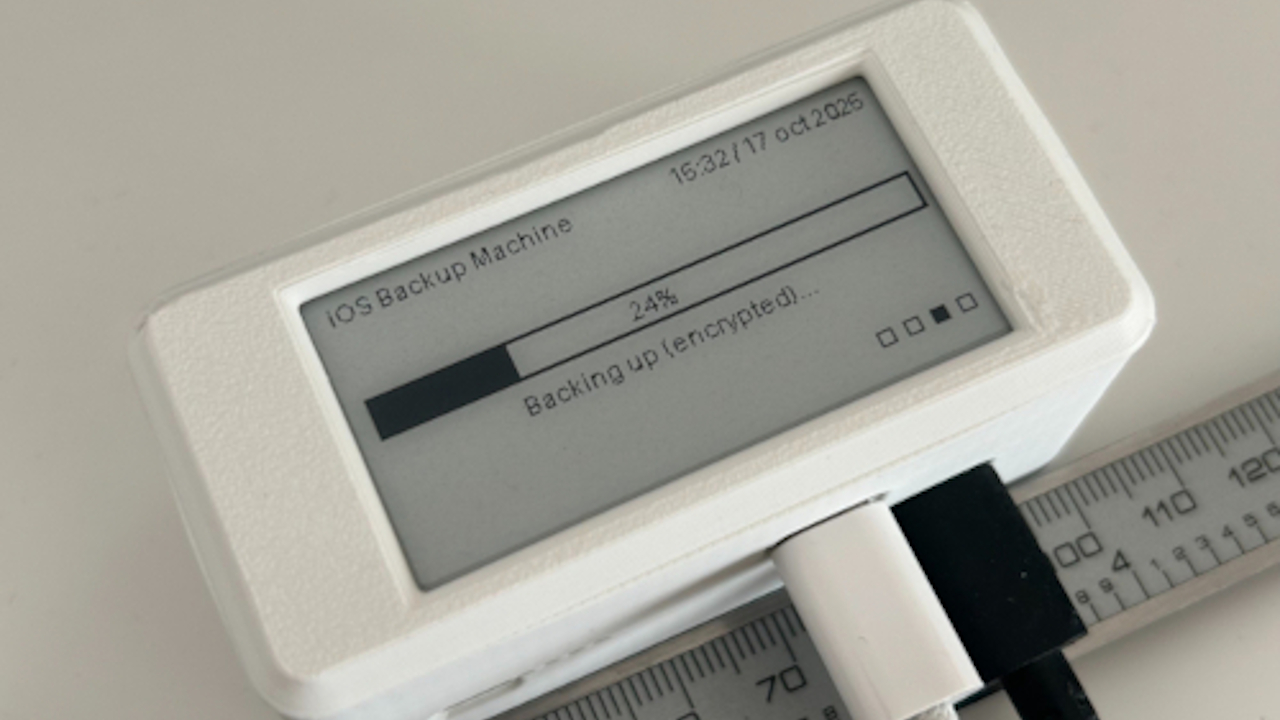
Your iPhone is not just a phone. It is a camera, wallet, scanner, baby-photo vault, travel diary, receipt drawer, note-taking machine, and occasionally a device used to make actual phone calls. That means losing it is not merely inconvenient; it can hy iPhone backups matter, and why a pocket-sized backup machine may be one of the smartest accessories you can buy.
For years, most iPhone users have lived in one of two camps: “I trust iCloud completely” or “I keep getting the iCloud storage full warning and now I’m emotionally avoiding Settings.” Both are understandable. Apple’s iCloud backup is simple, automatic, and excellent for restoring a new iPhone. But cloud storage is not the only answer, especially if your Photos app looks like a documentary about every sandwich, sunset, pet, toddler, concert, and parking receipt you have ever encountered.
A compact portable SSD or personal backup hub gives you another layer of protection. Think of it as a tiny digital safe that fits in a jacket pocket. It does not replace iCloud, and it does not magically solve every storage problem, but it can make your backup routine faster, more private, and less dependent on monthly cloud storage upgrades.
Why iPhone Backups Deserve More Attention
Most people do not think about backups until the moment they desperately need one. That is also the worst possible time to discover your last backup happened during a presidential administration your phone barely remembers.
Apple currently gives every iCloud account a small amount of free storage, but modern iPhones can produce enormous files. A few minutes of high-resolution video, a growing photo library, app data, messages, and device settings can fill free cloud space quickly. Once storage fills up, automatic backups may stop completing, and your phone will keep politely reminding you until the notification becomes part of your personality.
The basic Apple backup choices are still strong: use iCloud, or back up to a Mac or Windows PC. A computer backup can be especially useful because it can store a full device backup locally. If encrypted, it can also preserve more sensitive categories of data. But many people do not plug their iPhone into a computer regularly anymore. Some do not even own a personal computer. Others own one but treat it like a dusty filing cabinet with a keyboard.
That is where a pocket backup device enters the conversation. It can help you move photos, videos, documents, and creative files off your iPhone, keep local copies of important media, and give you a practical backup habit that does not rely entirely on cloud syncing.
What Is a Pocket Backup Machine?
A “pocket machine” for iPhone backups usually means one of three things:
- A portable SSD that connects through USB-C or an adapter.
- A mobile-friendly flash drive with Lightning, USB-C, or dual connectors.
- A personal backup hub such as a compact drive with software designed to back up phone photos, computer files, SD cards, and cloud photos in one place.
The most interesting category is the personal backup hub. A device like Synology BeeDrive, for example, is not just a plain external drive. It is built around the idea of simple local backup. It can back up computer files, mobile photos, iCloud Photos, SD cards, and external drives into one searchable local storage space. For people who want NAS-style thinking without installing a full network-attached storage system, this is the friendly middle ground. It is backup for people who do not want their weekend to include the phrase “RAID configuration.”
For newer iPhones with USB-C, compact SSDs have become more useful than ever. Apple’s USB-C iPhones can connect to external storage, and Pro models can record Apple ProRes video directly to compatible external drives when the drive and cable meet requirements. That matters for creators because professional video files can devour internal storage like a raccoon in a bakery.
Why a Portable Backup Drive Makes Sense
1. It Gives You Local Control
Cloud backups are convenient, but they require internet access, available cloud storage, and an active account. A local drive gives you a copy you physically control. That matters when you are traveling, working with large files, or simply prefer not to store every personal memory exclusively in the cloud.
Local control does not mean you should abandon iCloud. The smartest approach is layered: iCloud for automatic restoration, a computer or local drive for physical copies, and another off-site or cloud copy for true disaster protection. Backup experts often recommend a version of the 3-2-1 rule: keep three copies of important data, on two types of storage, with one copy off-site. For everyday iPhone users, that might look like iPhone plus iCloud plus a portable SSD.
2. It Helps Tame Giant Photo Libraries
The iPhone camera has become so good that people now shoot everything. Family vacations, recipes, school projects, product photos, TikTok drafts, dog zoomies, and “just in case” pictures of appliance serial numbers all pile up. A portable backup drive lets you export photos and videos and organize them by year, event, client, or project.
This is especially useful because iCloud Photos is a sync service, not a traditional archive in the old-school sense. If you delete a photo from iCloud Photos, that deletion can sync across devices. A separate exported copy on a drive gives you breathing room before you start deleting anything from your phone.
3. It Can Save Money Over Time
Cloud storage subscriptions are not bad. In fact, for many people, they are worth every penny. But if you keep upgrading only because you never offload old photos and videos, a portable drive can reduce pressure on your cloud plan. You still may want iCloud+, but you can reserve it for active device backups and frequently accessed files instead of treating it like a storage attic where everything goes forever.
A good 1TB or 2TB portable SSD can hold years of photos and videos for many users. The exact amount depends on your shooting habits, especially if you record 4K video or ProRes clips. Still, for many households, one small drive can become the “family media vault” that prevents every iPhone from begging for storage upgrades at the same time.
4. It Is Great for Creators
If you shoot content on an iPhone 15 Pro, iPhone 16 Pro, or newer Pro model, external storage becomes more than a backup tool. It becomes part of the workflow. Fast USB-C SSDs can support direct ProRes recording, which is a major advantage for filmmakers, vloggers, real estate agents, event shooters, and small business owners who create video on the go.
Drives such as the Lexar Professional Go, Samsung T-series portable SSDs, SanDisk portable SSDs, Kingston portable drives, and similar USB-C SSDs are popular because they combine speed, capacity, and portability. Some are tiny enough to attach near the phone while recording. Others are better suited for dumping files after a shoot. Either way, the point is the same: your iPhone can now behave more like a small production camera, and your backup plan should keep up.
The Important Catch: Not Every Drive Is a Full iPhone Backup
Here is the part many product listings whisper very quietly: copying photos to an external drive is not the same thing as making a full iPhone system backup.
A full iPhone backup includes device settings, app data, messages, layouts, and other restore-friendly information. Apple supports full device backups through iCloud or through a computer. A portable SSD connected directly to your iPhone is excellent for exporting photos, videos, files, and creative projects, but it is not automatically a full clone of your phone.
That does not make the drive less valuable. It just means you should use it correctly. Your best setup may be:
- iCloud Backup for automatic device recovery.
- A computer backup for a local full-device restore option.
- A pocket SSD or backup hub for photos, videos, documents, project files, and long-term archives.
In other words, the pocket machine is not the entire safety net. It is the part of the safety net that keeps your memories from dangling by one cloud-shaped thread.
What to Look For in an iPhone Backup Drive
USB-C or Lightning Compatibility
If you have an iPhone 15 or newer, USB-C makes external storage much simpler. If you use an older Lightning iPhone, you may need a Lightning-compatible drive or Apple adapter. Before buying anything, check your iPhone model and the connector type. This sounds obvious, but so does “do not wash AirPods,” and yet society has evidence.
Enough Capacity
For casual users, 512GB may be enough for a focused photo archive. For families, creators, and anyone who records a lot of 4K video, 1TB is a better starting point. If your iPhone already has 512GB or 1TB of storage and you actually use it, consider a 2TB drive. Buying too small often leads to the least enjoyable hobby: managing storage twice.
Fast Transfer Speeds
Speed matters most when moving large video files. For regular photos and documents, almost any modern SSD will feel decent. For ProRes recording or heavy video workflows, look for fast USB 3.2 Gen 2 performance, high sustained write speeds, and compatibility with your iPhone model. Also remember that the cable matters. A charging cable may not support high-speed data transfer.
Useful Software
Plain SSDs are flexible, but backup-focused devices often include helpful apps. BeeDrive-style software can make recurring backups easier by detecting new files and copying them automatically or semi-automatically. That matters because the best backup system is the one you actually use. A perfect manual system that you forget for eight months is just a very expensive good intention.
Durability and Security
Portable drives live dangerous lives. They get tossed into bags, dropped on floors, buried under cables, and occasionally left next to coffee cups with suspicious confidence. Look for solid build quality, drop resistance, water or dust resistance when needed, and encryption options for sensitive files. If the drive stores client media, family documents, or private videos, password protection is not a luxury; it is basic hygiene.
How to Use a Pocket Backup Machine the Smart Way
Start by deciding what you want the device to protect. If your biggest fear is losing photos and videos, build a media backup routine. Once a week or once a month, connect your iPhone to the drive or backup hub, export new media, and organize it into folders. Use simple names such as “2026-06 Family Trip” or “2026 Client Videos.” Your future self will thank you, probably while wearing sweatpants and looking for one specific birthday video.
If you use a Mac or Windows PC, also consider making a full encrypted iPhone backup to the computer. Then back up that computer to the portable drive or another external drive. This gives you a stronger restore path if your iPhone is lost, stolen, or damaged.
For creators, use the SSD as part of your production workflow. Record directly to compatible external storage when needed, then copy the footage to a computer and keep at least one additional copy before formatting the drive. Never treat a single SSD as the only home for paid work. Drives are reliable until they are not, which is also how umbrellas behave during storms.
Who Should Consider This Pocket Machine?
A portable iPhone backup machine is especially useful for:
- Parents with years of photos and videos.
- Travelers who want offline copies while away from stable internet.
- Creators shooting large video files on iPhone.
- Small business owners using iPhone for product photos, invoices, or social media content.
- Anyone tired of seeing “iPhone Storage Full” at the worst possible moment.
It may be less necessary if you already pay for enough iCloud storage, own a Mac that backs up regularly, and have a clean photo library. Congratulations, you are either very disciplined or secretly a spreadsheet. For everyone else, local backup storage is a practical upgrade.
Common Mistakes to Avoid
Mistake 1: Thinking Sync Is the Same as Backup
Syncing keeps files available across devices. Backup protects you when files disappear, get corrupted, or are deleted by accident. These overlap, but they are not identical. A true backup should preserve a separate copy that does not instantly mirror every mistake.
Mistake 2: Buying the Cheapest Drive Possible
There is nothing wrong with saving money, but your memories deserve better than a mystery-brand flash drive that looks like it came free with a conference lanyard. Choose reputable storage brands and read current reviews before buying.
Mistake 3: Never Testing the Backup
A backup you have never checked is a wish wearing a trench coat. Open the drive, verify files, preview photos, and confirm videos play. If you use backup software, make sure you know how to restore files before an emergency happens.
Mistake 4: Keeping the Drive in the Same Bag as the Phone
If your iPhone and backup drive are stolen together, your backup plan just became a matching luggage set for disaster. Keep one copy somewhere else: at home, in a safe drawer, with a trusted family member, or in the cloud.
Real-World Experience: What It Feels Like to Use One
The first time you use a pocket backup drive, the experience can feel oddly satisfying. You connect a small device, open the Files or Photos app, select a mountain of media, and watch years of digital clutter move into a neat folder. It is like cleaning a closet, except no one finds a Halloween costume from 2014.
The biggest benefit is psychological. Once your photos and videos exist somewhere outside the phone and cloud, you stop treating your iPhone like a fragile museum exhibit. You can delete duplicate screenshots. You can remove old video drafts. You can finally clear the 87 photos you took of the same dinner because the lighting “almost worked.” Local backups give you permission to breathe.
For travel, the usefulness becomes obvious quickly. Imagine spending a week shooting photos in New York, the Grand Canyon, or a family reunion where every aunt believes she is the official photographer. Hotel Wi-Fi may be slow, iCloud uploads may stall, and mobile data may be limited. A portable SSD lets you offload media at night and keep shooting the next day. It is not glamorous, but neither is running out of storage during the one moment your kid, dog, or friend finally does the cute thing again.
For small business owners, the pocket backup machine can become part of the workday. A boutique owner can shoot product photos on an iPhone, transfer them to a drive, and hand them to a designer. A realtor can record walkthrough videos and copy them before editing. A food blogger can archive recipe shoots by date and campaign. The device becomes less of a gadget and more of a routine, like charging your phone or pretending you will answer all emails before lunch.
There are annoyances. Transfers can take time, especially with huge video files. Some drives need more power than an iPhone wants to provide. Some apps are better than others. Older Lightning iPhones may require adapters that make the setup look like a tiny cable octopus. But once the routine is built, the friction drops. You learn which cable works, which folders make sense, and how often you need to back up.
The best habit is to pair the drive with a calendar reminder. Once a week for heavy users or once a month for casual users is realistic. Plug it in, copy new media, check that the files open, then disconnect and store the drive safely. Do not leave it permanently attached to a computer. A backup drive that is always connected can be more exposed to accidental deletion, malware, electrical problems, or plain old human chaos.
Over time, the value becomes obvious. You will not notice it every day. You will notice it when your phone breaks, when storage fills up, when a cloud upload fails, when you need an old video fast, or when someone asks, “Do you still have that photo?” and you can answer with the calm confidence of a person who has folders. That is the quiet magic of a pocket backup machine. It turns panic into a search task.
Final Thoughts
A pocket machine for iPhone backups is not a flashy accessory. It will not make your selfies better, your battery immortal, or your group chats less chaotic. But it can protect the files that make your iPhone valuable in the first place.
The best strategy is not cloud versus local storage. It is cloud plus local storage. Use iCloud for convenience, a computer backup for full-device recovery, and a portable SSD or personal backup hub for photos, videos, creative files, and long-term archives. That combination gives you speed, control, privacy, and redundancy.
If your iPhone is full, your iCloud plan is groaning, or your photo library has become a digital jungle, consider a compact backup drive. It is small, practical, and far less dramatic than discovering your memories were protected by hope, vibes, and one expired storage warning.
Note: This article is based on current real-world iPhone backup methods, Apple external storage support, portable SSD workflows, personal backup hub features, and modern data backup best practices. No source links are embedded in the publishable HTML.