Some programming languages fade away quietly, like old floppy disks in a desk drawer. QuickBASIC, however, did something more dramatic: it put on a modern jacket, learned how to compile for Windows, Linux, and macOS, and reintroduced itself as QB64. For anyone who remembers typing PRINT "HELLO" into a blue DOS screen, QB64 feels like finding your childhood bicycle in the garageexcept now it has disc brakes, GPS, and somehow runs on a Mac.
QuickBASIC was one of Microsoft’s most beloved programming tools of the 1980s and early 1990s. It gave hobbyists, students, and practical problem-solvers a way to write real DOS programs without needing a computer science degree, a beard, or a whiteboard full of pointers. Today, QB64 keeps that spirit alive by preserving the familiar QBasic and QuickBASIC 4.5 syntax while adding modern features such as 32-bit graphics, image loading, sound, networking, OpenGL support, and native compilation on current operating systems.
In other words, QB64 is not just retro nostalgia. It is a working bridge between the friendly BASIC programming style of the DOS era and the expectations of modern software development. It lets old code breathe again, teaches beginners without overwhelming them, and gives veteran programmers a surprisingly comfortable playground for games, utilities, experiments, and digital archaeology.
What Was QuickBASIC, and Why Did People Love It?
To understand why QB64 matters, it helps to remember why QuickBASIC mattered. BASIC itself was created in the 1960s to make programming approachable for ordinary students, not just mathematicians and engineers. That mission carried into the personal computer age, when versions of BASIC became the default language for millions of people learning to control their machines instead of merely using them.
Microsoft QuickBASIC arrived during a golden period of DOS programming. Earlier BASIC dialects often depended on line numbers and interpreted execution. QuickBASIC felt more polished. It offered an integrated development environment, structured programming features, named procedures, built-in help, debugging tools, and the ability to compile programs into executable files. Compared with typing mysterious commands into separate editors and linkers, QuickBASIC felt refreshingly civilized. It was the programming equivalent of discovering that your garage workshop had lights, shelves, and a coffee maker.
QuickBASIC 4.5 became especially famous because it struck a sweet balance. It was powerful enough for serious hobby projects, school assignments, business utilities, and shareware games, yet still friendly enough that a beginner could type a few lines and see a result immediately. Many programmers learned loops, variables, arrays, file handling, graphics, and debugging inside that environment. It did not feel like an ivory tower. It felt like a toolbox.
Then the Modern World Moved On
QuickBASIC’s biggest strength eventually became its limitation: it belonged to the DOS world. As Windows became dominant and operating systems moved away from 16-bit compatibility, running old QuickBASIC programs became more awkward. You could use emulators, virtual machines, or old hardware, but that turned a simple programming session into a small museum exhibit. Fun? Yes. Convenient? Not always.
Meanwhile, modern programming languages grew larger and more complex. C++, Java, C#, Python, JavaScript, and countless frameworks took over classrooms, offices, and open-source projects. These tools are powerful, but they can feel heavy to someone who simply wants to write a small game, automate a task, or teach a child how variables work. The old BASIC promisetype something simple and watch the computer respondstarted to feel rarer.
That is the gap QB64 fills. It does not pretend the last thirty years never happened. Instead, it asks a better question: what if QuickBASIC’s readable style could run on today’s machines?
What Is QB64?
QB64 is a modern BASIC programming language and development environment designed to remain compatible with QBasic and QuickBASIC 4.5 while compiling programs into native binaries for Windows, Linux, and macOS. It preserves much of the old syntax, so classic programs often run with little or no modification. At the same time, it extends BASIC with modern capabilities that would have seemed like wizardry on an old 386 PC.
Technically, QB64 works by translating BASIC code into C++ and then compiling it. That detail matters because it allows QB64 programs to become real native applications rather than scripts trapped inside an old interpreter. For the programmer, however, the process still feels BASIC-like: write code, run it, debug it, and build an executable. The machinery under the hood is modern, but the dashboard remains familiar.
QB64 Phoenix Edition, often called QB64 PE, is the actively developed continuation of the project. It keeps the QuickBASIC-compatible foundation while improving the compiler, IDE, libraries, documentation, and platform support. The Phoenix name is fitting. Like a mythological bird with better syntax highlighting, QB64 rose from the ashes of discontinued or scattered legacy tooling and kept flying.
Why QB64 Still Feels Like QuickBASIC
One of the smartest things QB64 does is avoid “modernizing” BASIC until it becomes unrecognizable. A simple program still looks simple:
That readability is not a small feature. It is the entire point. Beginners can understand what is happening without first learning package managers, object models, build systems, dependency graphs, or why one missing semicolon has personally chosen violence. QB64 keeps the classic BASIC rhythm: direct, readable, and forgiving enough to encourage experimentation.
For old QuickBASIC programmers, the familiarity goes deeper. Many statements, functions, data types, loops, arrays, file operations, and screen commands behave much as expected. Programs using classic console logic, text menus, calculations, and many graphics techniques can often be revived quickly. That makes QB64 valuable for preserving old code, updating educational examples, or revisiting projects that were abandoned when DOS stopped being the center of the universe.
Modern Features That QuickBASIC Could Only Dream About
QB64 is not merely a compatibility layer. It adds features that make BASIC practical on modern computers. Want a larger graphics window? QB64 can create one. Want to load PNG or JPEG images? It can do that. Want to play WAV, OGG, or MP3 audio? Also possible. Want 32-bit color instead of the classic limited palettes? Welcome to the future, where your pixels can finally stop dressing like it is 1992.
Graphics and Game Development
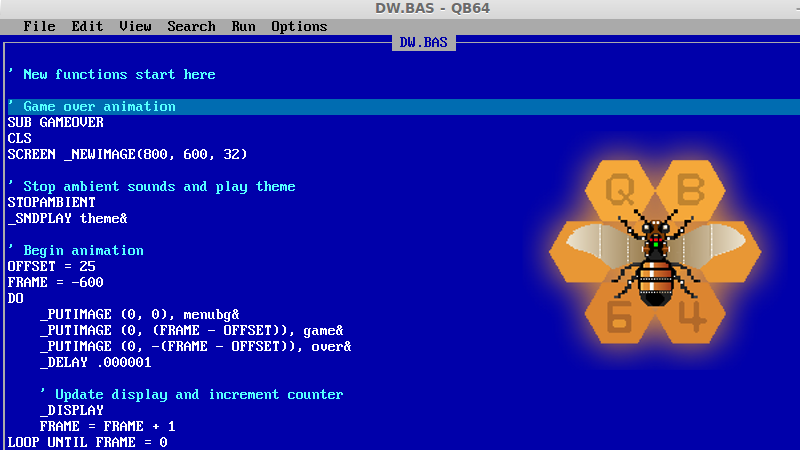
Classic QuickBASIC could create simple graphics, and many people built impressive games with it. But doing anything advanced often required clever workarounds, memory tricks, custom routines, and a willingness to argue with hardware like it owed you money. QB64 removes many of those barriers. Commands such as _NEWIMAGE, _LOADIMAGE, and _PUTIMAGE make image handling far more approachable.
That makes QB64 especially attractive for retro-style game development. You can write a tile-based adventure, arcade shooter, puzzle game, simulation, or visual toy using a language that feels close to old BASIC but offers modern media support. The result is a rare combination: nostalgic workflow, practical output.
Sound and Multimedia
Old BASIC sound often meant beeps, tones, and heroic patience. QB64 changes the mood by supporting modern audio playback. A programmer can load and play audio files with simple commands, making it much easier to add background music, sound effects, voice clips, or interface sounds.
This matters because multimedia is often what separates a dry programming exercise from something people want to use. A bouncing ball demo is fine. A bouncing ball demo with sound effects is suddenly a game prototype. Add images and input handling, and now you are dangerously close to spending the weekend building something instead of doing chores. Honestly, there are worse problems.
Cross-Platform Native Binaries
QuickBASIC was tied to DOS. QB64 breaks that boundary by producing native applications for modern desktop systems. This is one of its most practical advantages. A program written in QB64 can be compiled for Windows, Linux, or macOS, depending on the development setup and platform support.
For hobbyists, that means old ideas can become shareable programs again. For educators, it means students are not forced into a single operating system. For preservationists, it means legacy BASIC code can survive in a form that does not require everyone to install a DOS emulator before lunch.
QB64 Phoenix Edition: The Active Branch Keeping the Flame Lit
QB64 Phoenix Edition is important because software projects need more than nostalgia; they need maintenance. Bugs need fixing. Operating systems change. Compilers evolve. Documentation must be updated. Communities need forums, examples, releases, and people willing to answer questions that begin with, “This worked in 1991, why not now?”
QB64 PE continues development with a built-in IDE inspired by the original DOS environment but enhanced with conveniences such as syntax highlighting, real-time error checking, formatting tools, help systems, debugging features, themes, and utilities. That balance is central to the project’s appeal. It does not throw users into a bare terminal and say, “Good luck, brave traveler.” It offers a familiar workspace with modern assistance.
The Phoenix Edition also reflects the community nature of QB64. This is not a corporate revival designed to sell nostalgia in a collector’s tin. It is an open-source project sustained by people who care about BASIC, code compatibility, retrocomputing, education, and creative programming. That community element gives QB64 a personality. It feels less like a product and more like a workshop where someone is always restoring an old engine, building a new go-kart, or explaining why GOTO is both powerful and mildly cursed.
Why Programmers Still Use QB64 Today
1. It Revives Legacy Code
Many people still have old .BAS files sitting on backup drives, archived CDs, or forgotten folders. Some are school projects. Some are business utilities. Some are games written during summer vacation. Some are strange experiments that should probably remain unexplained. QB64 gives those files a second chance.
Not every QuickBASIC program will run perfectly without changes, especially if it relies on hardware-specific behavior, memory tricks, assembly routines, or DOS interrupts. Still, the level of compatibility is impressive enough that many programs can be revived faster than expected. For digital preservation, that is a big deal.
2. It Is Friendly for Beginners
Modern programming education often begins with excellent languages, but the surrounding ecosystem can be intimidating. Before a beginner prints a line of text, they may be asked to install a runtime, configure an editor, choose extensions, understand paths, and learn why their antivirus is suspicious of their homework.
QB64 offers a simpler path. The syntax is readable, the IDE is approachable, and the feedback loop is quick. A new programmer can learn variables, loops, conditions, arrays, subroutines, input, output, and files without drowning in abstractions. That makes QB64 useful for clubs, classrooms, parents teaching kids, and adults returning to programming after a long break.
3. It Makes Retro Programming Practical
Retro programming is popular because limitations can be fun. But authentic limitations can also be annoying. Writing for original DOS hardware has charm, but it also involves memory ceilings, driver issues, display constraints, and the occasional feeling that the computer is a haunted filing cabinet.
QB64 gives retro-minded programmers the style without all the pain. You can build software that feels old-school while still using a modern screen, modern files, modern audio, and modern operating systems. It is retro flavor without requiring a ritual sacrifice to the CONFIG.SYS gods.
4. It Encourages Small, Complete Projects
One underrated benefit of QB64 is that it encourages finishing things. Because the language is straightforward, programmers can focus on the program itself. A calculator, address book, maze game, quiz app, text adventure, sprite demo, or file converter can be built without constructing an entire software cathedral around it.
That makes QB64 refreshing in a world where even tiny apps sometimes arrive with a dependency tree the size of a banyan forest. Small programs are not lesser programs. They are often the best way to learn, experiment, and solve real problems.
QuickBASIC vs. QB64: What Changed?
The main difference is the world around the language. QuickBASIC belonged to 16-bit DOS. QB64 belongs to modern desktop systems. QuickBASIC used the tools and assumptions of its time: limited memory, limited graphics, DOS file paths, and hardware closeness. QB64 keeps the approachable BASIC syntax but adds modern compilation, media support, broader memory access, improved graphics, sound, and cross-platform output.
Another difference is community direction. QuickBASIC was a commercial Microsoft product with a defined life cycle. QB64 is community-driven and open-source. That means its future depends on contributors, users, documentation writers, testers, and people who keep asking interesting questions. It also means the project can evolve in ways that serve its user base rather than a corporate roadmap.
Still, the emotional continuity is real. QuickBASIC made programming feel possible. QB64 keeps that feeling alive.
Who Should Try QB64?
QB64 is a strong fit for several groups. Former QuickBASIC and QBasic users will enjoy the familiar syntax and the chance to revive old code. Beginners may appreciate the directness of BASIC and the immediate feedback of the IDE. Teachers can use it to introduce programming concepts without requiring a massive setup. Hobbyists can build games, tools, simulations, and visual experiments. Retrocomputing fans can preserve and modernize old programs without living entirely inside emulation.
It may not be the best choice for every professional software project. If you are building a large web platform, enterprise cloud system, mobile-first application, or machine learning pipeline, QB64 is probably not your main tool. But that is not a weakness. A hammer is not bad because it is not a microscope. QB64 is excellent at being QB64: approachable, compatible, fast enough for many projects, and wonderfully unpretentious.
Specific Example: A Tiny Modern QB64 Idea
Imagine a simple retro game menu. In QuickBASIC, adding a background image, custom font, and music could become a technical expedition. In QB64, the concept is much more direct. You can create a 32-bit graphics screen, load an image, load a font, play music, and print menu text with commands designed for the job. That lowers the friction between idea and result.
This is where QB64 shines. It does not merely preserve old programs; it lets old programming instincts produce modern-looking results. A student can build a memory game with images. A hobbyist can create a music player. A retro fan can remake a DOS game with better graphics. A teacher can demonstrate programming logic without explaining a modern framework first.
Is QB64 “Real Programming”?
Yes. Very yes. Wear-a-tiny-crown-and-say-it-louder yes.
There is a tired myth that beginner-friendly languages are somehow not serious. BASIC has endured that criticism for decades. But programming is not made real by syntactic suffering. It is made real by solving problems, controlling logic, modeling data, handling input, producing output, debugging mistakes, and improving systems. QB64 does all of that.
A person who learns loops in QB64 can transfer that knowledge to Python, C, JavaScript, or Java. A person who learns arrays, procedures, conditionals, file handling, and event loops is learning programming concepts that matter everywhere. The language may be friendly, but the thinking is real.
The Deeper Legacy: BASIC Made Computers Personal
The reason QuickBASIC still inspires affection is not just syntax. It represents a time when personal computers invited users to become creators. Many machines booted into BASIC or shipped with BASIC tools. The message was clear: this computer is not only for running software; it is for making software.
Modern computers are more powerful but often feel less programmable to ordinary users. Apps arrive sealed. Operating systems hide complexity. Development environments can feel industrial. QB64 pushes back against that trend by restoring a sense of direct conversation with the machine. Type a command. Run it. See what happens. Change it. Run it again. Laugh when it breaks. Fix it. Accidentally stay up until 2 a.m. because the sprite finally moves correctly.
That loop is the heart of programming joy.
Experiences With QB64: Why It Feels Like Opening a Time Capsule With a Turbo Button
Working with QB64 can feel surprisingly emotional, especially for anyone who first learned programming through QBasic or QuickBASIC. The first launch is familiar in a way that modern IDEs rarely are. There is no overwhelming wall of panels, no marketplace of extensions shouting for attention, and no project template asking whether your five-line experiment needs a dependency injection strategy. Instead, QB64 feels like it is saying, “Go ahead. Type something. We’ll figure it out.”
One of the best experiences is reviving an old program. You open a dusty .BAS file, half expecting disaster, and suddenly the code looks alive again. Maybe it is a text adventure with dramatic room descriptions. Maybe it is a math quiz that once terrorized younger siblings. Maybe it is a half-finished game where the hero is a blinking square because artistic ambition exceeded available pixel talent. When that program runs, even imperfectly, it creates a small jolt of satisfaction. It is not just code executing; it is memory compiling.
QB64 also changes how you think about old limitations. In classic QuickBASIC, loading modern image formats or playing high-quality music required complicated techniques or external tools. In QB64, those features are built into the language experience. That means you can keep the simple structure of BASIC while adding the polish people expect from modern programs. The result is almost mischievous. It feels like sneaking a sports car engine into a station wagon.
For beginners, the experience is different but just as valuable. QB64 rewards curiosity quickly. Change a number, and the circle moves. Add a loop, and the screen fills. Make a mistake, and the error is usually understandable. This quick feedback builds confidence. Many new programmers quit not because they lack ability, but because their first tools make them feel lost. QB64 lowers the emotional cost of trying.
There is also a pleasant discipline in QB64’s simplicity. Because the language is direct, you spend less time arranging architecture and more time deciding what the program should actually do. That is healthy. It teaches planning, testing, and problem-solving without burying the lesson under ceremony. A small QB64 project can still teach structure: separate logic into subroutines, name variables clearly, manage files carefully, and avoid turning every program into a bowl of spaghetti with extra GOTO sauce.
Most of all, QB64 is fun. That matters more than programmers sometimes admit. Fun is what keeps people exploring long enough to become skilled. QuickBASIC inspired countless people because it made computers feel approachable. QB64 continues that tradition with modern reach. It lets old programmers revisit a beloved style and lets new programmers discover why BASIC mattered in the first place. In a software world obsessed with scale, QB64 reminds us that joy, clarity, and a blinking cursor still count.
Conclusion: QuickBASIC Never Really Left
QuickBASIC lives on with QB64 because the core idea is still powerful: programming should be accessible. Not simplistic, not trapped in the past, not limited to nostalgia, but accessible. QB64 proves that an old language style can remain useful when it is paired with modern compilation, modern media support, and an active community.
For longtime BASIC fans, QB64 is a reunion. For beginners, it is an inviting doorway. For retro developers, it is a practical toolkit. For educators, it is a reminder that the first step into programming does not need to be intimidating. And for anyone who has ever smiled at a blue screen and a blinking cursor, QB64 is proof that good ideas can survive hardware generations, operating system changes, and the occasional floppy disk funeral.
QuickBASIC did not vanish. It evolved, stretched, compiled, and came back wearing the name QB64. Not bad for a language family that some people once tried to declare obsolete. BASIC, as it turns out, still has a few lines left to run.