Note: This article is written for historical and educational web publication. It explains magnetic bubble memory, the Heathkit H8 revival project, and why an almost-forgotten storage technology still makes vintage computing fans grin like they just found a sealed box of 8-inch floppies.
Magnetic bubble memory sounds like something a science-fiction prop department invented after too much coffee: tiny magnetic “bubbles” marching around microscopic tracks, storing data without spinning disks, flash chips, or battery backup. Yet this was a very real technology, once promoted as a potential future of computer storage. Decades later, it has returned in one of the most charming ways possible: as a custom storage board for a vintage Heathkit H8 computer.
The project, widely discussed in retrocomputing circles, shows why old technology is never truly dead. Sometimes it is just waiting on the right workbench, the right enthusiast, and the right amount of delightful impracticality. In an era when modern CompactFlash or SD storage can easily outperform vintage media, building a magnetic bubble memory board for a Heathkit is not about convenience. It is about learning, preservation, and the particular joy of making obsolete hardware do something useful again.
What Is Magnetic Bubble Memory?
Magnetic bubble memory is a type of nonvolatile computer memory, meaning it can retain information after power is turned off. Instead of storing bits as electric charges, as dynamic RAM does, or as magnetic patterns on a moving disk, bubble memory stores data as tiny cylindrical magnetic domains in a thin film material, commonly associated with garnet-based substrates.
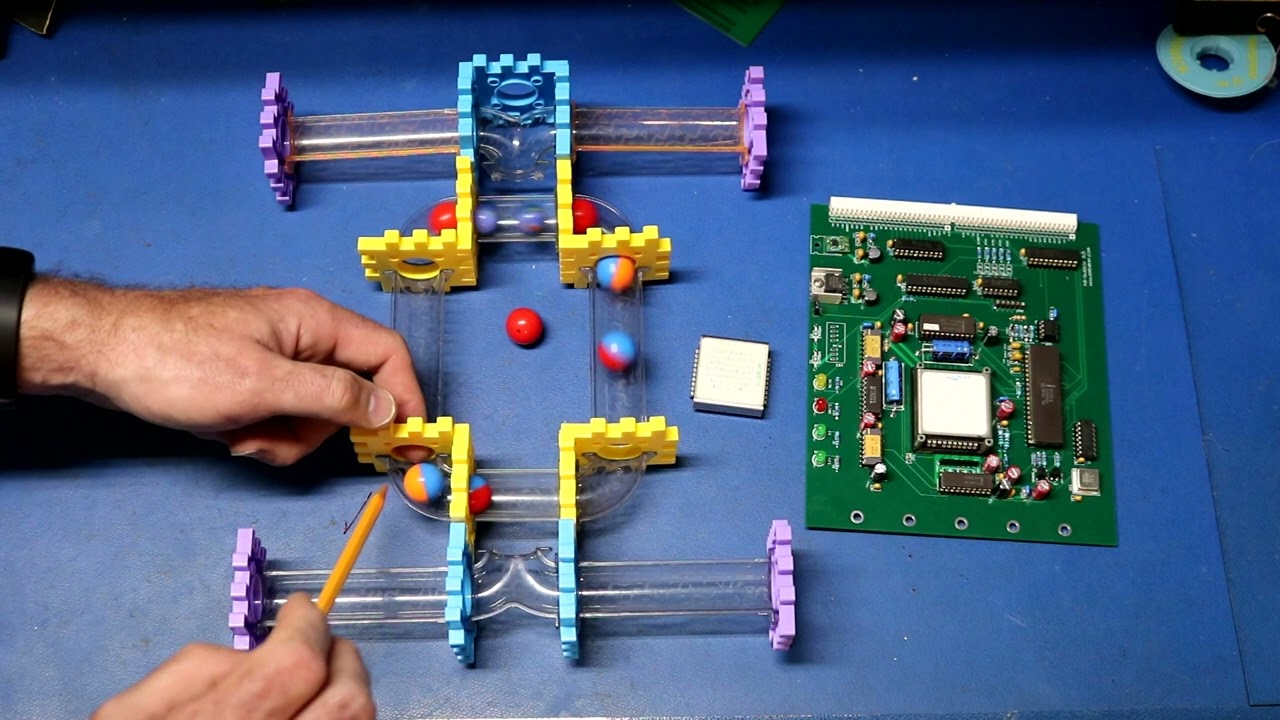
The “bubbles” are not bubbles in the soap-and-water sense. They are microscopic magnetic regions that behave like movable bits. A bubble can represent a binary 1, while the absence of a bubble can represent a binary 0. These bits travel around carefully designed paths under the influence of magnetic fields. Think of it as a tiny magnetic train system where each train car carries one bit of information. The conductor is physics, and the schedule is strict.
Unlike a hard drive, bubble memory has no spinning platter, no read/write head flying over a surface, and no mechanical seek arm doing a tiny robotic dance. That made it attractive for harsh environments where vibration, dust, or mechanical wear could cause trouble. In the 1970s and early 1980s, engineers saw magnetic bubble memory as a possible bridge between core memory, semiconductor RAM, tape, and disk storage.
Why Bubble Memory Once Looked Like the Future
Before flash memory became common, nonvolatile solid-state storage was a big deal. Computers needed ways to save programs and data without relying entirely on paper tape, cassette tape, floppy disks, or mechanical hard drives. Magnetic bubble memory promised several advantages: it was solid-state, rewritable, compact for its time, and capable of holding data without continuous power.
Bell Labs played a central role in the development of the technology. Andrew H. Bobeck, a Bell Labs researcher, became closely associated with magnetic bubble memory after earlier work in magnetic logic and memory devices. The concept gained attention because it seemed to offer a durable storage medium with no moving parts. In the 1970s, that was a thrilling pitch. “No moving parts” has always sounded magical to engineers, especially the ones who have spent a weekend diagnosing a floppy drive that only works when tapped gently on the left side.
Intel later introduced the 7110, a commercially available 1-megabit bubble memory device. At the time, that was impressive. It offered nonvolatile storage in a compact package and represented a serious attempt to commercialize the technology. Texas Instruments and other companies also explored magnetic bubble memory products, and the technology appeared in industrial systems, terminals, point-of-sale equipment, and specialized computers.
So Why Did Bubble Memory Fade Away?
Magnetic bubble memory was clever, but it had problems. Access was typically serial rather than truly random in the way modern RAM users expect. To read or write data, the correct bubble had to be moved through the loop structure, which made the technology feel a bit like waiting for luggage at an airport carousel. Your data is there. You just have to wait for it to come around.
Cost was another issue. Bubble memory required specialized materials, controllers, magnetic fields, and careful board design. As semiconductor memory improved, battery-backed CMOS RAM, EEPROM, hard disks, and eventually flash memory became more practical for many applications. These alternatives were easier to integrate, faster in many use cases, and increasingly affordable.
That is the central irony: magnetic bubble memory was futuristic, but the future moved faster. It did not fail because it was silly. It failed because other storage technologies became cheaper, denser, and simpler to use. In computing history, “technically fascinating” does not always beat “mass-produced and affordable.” Ask any brilliant but discontinued gadget sitting in a collector’s closet.
The Heathkit H8: A Perfect Retrocomputing Stage
The Heathkit H8 is a late-1970s kit computer built around the spirit of hands-on computing. Heathkit machines were not just products; they were experiences. Owners assembled, learned, tested, modified, and understood their systems in a way that modern sealed laptops rarely invite. The H8 used an Intel 8080A-class architecture and could run Heath’s HDOS, with CP/M support also part of the broader H8 ecosystem.
That makes the H8 a wonderful home for a magnetic bubble memory revival. It is old enough that bubble memory feels period-appropriate, but flexible enough that a talented hardware builder can design a new board and integrate it into the machine. A modern SD card adapter would be easier, of course. But easy is not the point. Mounting bubble memory on a Heathkit is like installing a hand-cranked espresso machine in a laboratory: impractical, educational, and deeply satisfying.
How the Heathkit Bubble Memory Board Works
The revived Heathkit H8 bubble memory project was built as a storage board, not as a replacement for system RAM. That distinction matters. RAM is where the computer actively works; nonvolatile storage is where programs and data survive after shutdown. The bubble memory board gives the vintage machine a way to store information without depending on cassette tape, paper tape, or a floppy disk.
The board design draws on earlier bubble memory experiments and reference circuits associated with Intel bubble memory documentation. It uses a bubble memory controller to manage the complicated timing and command structure required by the memory device. The controller handles the specialized work so the host computer can interact with the storage in a more manageable way.
On the Heathkit side, the project required interfacing the bubble memory controller to the H8 bus. That means translating the vintage computer’s read, write, reset, address, and data signals into a form the bubble memory system could understand. Address decoding, bus direction control, buffering, and timing all become part of the puzzle. This is not “plug it in and hope.” This is “read the datasheet, check the bus, stare at the logic analyzer, and negotiate with 1970s design decisions.”
Hardware Challenges
The hardware design had to account for the H8 bus, control signals, data direction, address decoding, and the practical behavior of a real vintage computer. Inverting buffers were used because of the way the H8 bus signals are arranged. A programmable logic device handled address decoding and supporting logic. Activity LEDs added the best kind of debugging feature: tiny lights that make a project look alive even before everything works perfectly.
Bubble memory also requires more than ordinary memory-chip wiring. The underlying technology depends on controlled magnetic behavior, specialized controller support, and careful signal timing. A designer cannot treat it like a simple SRAM chip. The charm of the project comes partly from that complexity. It is a memory board that asks to be understood, not merely installed.
Software Challenges
Software was just as important as hardware. To make the bubble memory useful, it had to behave like a disk under HDOS. That required a storage driver capable of connecting operating system read and write requests to the bubble memory controller’s block-level routines. The project also involved boot support, including a compact read-only driver that could fit within the tight constraints of a boot sector.
This is where vintage computing becomes especially interesting. Modern developers complain when a framework update breaks their build. Retrocomputing developers may need to fit a functional driver into a few hundred bytes while working around hardware assumptions from the Carter administration. It is a different kind of software engineering, and it rewards patience, discipline, and an ability to celebrate tiny victories.
Why This Project Matters
The magnetic bubble memory Heathkit project matters because it preserves more than a storage device. It preserves a way of thinking. In the 1970s and early 1980s, computer storage was not yet settled into the familiar categories we know today. Engineers explored magnetic domains, charge-coupled devices, core memory, tape, disks, PROMs, EPROMs, and many hybrid ideas. The winners became common. The losers became museum exhibits. But the “losers” often contain some of the best lessons.
Bubble memory teaches that a technology can be brilliant and still lose commercially. It teaches that reliability, cost, density, speed, and ease of manufacturing matter as much as elegance. It also shows why old computers remain valuable educational tools. When you build a storage card for a Heathkit H8, you do not just click “next” through an installer. You meet the machine on its own terms.
Magnetic Bubble Memory vs. Modern Flash Storage
Modern flash memory is smaller, faster, cheaper, denser, and easier to use than magnetic bubble memory. A tiny microSD card can store more data than a room full of vintage storage systems. From a practical standpoint, using flash storage with a Heathkit H8 makes more sense. It is reliable, available, and simple to move between modern and vintage machines.
But magnetic bubble memory offers something flash cannot: a direct encounter with an alternative path in computer history. Flash storage feels invisible because it is everywhere. Bubble memory feels visible because it must be explained. You can describe its loops, bubbles, magnetic fields, controllers, and timing. It turns storage from a black box into a story.
That story is valuable for engineers, students, collectors, and anyone who wants to understand how computing reached the present. Today’s storage devices did not appear by magic. They are the result of decades of experiments, some wildly successful and others beautifully strange.
Specific Examples of Bubble Memory Use
Bubble memory found roles in places where ruggedness and nonvolatility mattered. It appeared in industrial equipment, terminals, and point-of-sale systems. Some systems used bubble memory to preserve lookup tables or program data in environments where mechanical storage could be less desirable. Its ability to hold data without power made it attractive before flash memory became the obvious answer.
In the context of the Heathkit H8, the use case is more educational and historical than commercial. The bubble memory board provides roughly period-appropriate nonvolatile storage, allowing the machine to boot and use a storage device that feels like it belongs to the same technological universe. It is not the fastest or largest option. It is the most interesting one at the party.
Lessons for Vintage Computing Enthusiasts
One lesson is that documentation is gold. Bubble memory projects depend on old databooks, application notes, reference schematics, timing information, and example code. Without documentation, vintage hardware becomes archaeology with a soldering iron. With documentation, it becomes a conversation across decades.
Another lesson is that compatibility is rarely accidental. Making a bubble memory board work on a Heathkit H8 requires understanding both the memory technology and the host system. The board must respect bus timing, operating system expectations, boot requirements, and electrical behavior. A successful project is not just a board; it is a bridge.
A third lesson is that impractical projects can be deeply practical as learning tools. Nobody needs magnetic bubble memory to store a text file in 2026. But building with it can teach storage architecture, bus interfacing, embedded software, historical design trade-offs, and debugging methods in a way that a plug-and-play adapter cannot.
Hands-On Experiences and Reflections: Bringing Bubble Memory Back to Life
Working with a topic like magnetic bubble memory on a Heathkit H8 feels less like reviewing a component and more like visiting a small, humming museum where everything still wants to run. The first experience is usually surprise. Bubble memory is not just “old storage.” It is a complete system with its own personality. It has controllers, timing requirements, magnetic behavior, and operating assumptions that feel unfamiliar to anyone raised on USB drives and cloud folders.
The second experience is respect. Vintage hardware has a way of humbling modern confidence. A modern developer may be used to abundant memory, fast compilers, and error messages that at least try to be helpful. On a Heathkit-class system, every byte matters. A driver that must fit into a small boot area forces careful choices. Extra error handling may be useful, but space is limited. Elegance becomes a practical necessity, not a decorative luxury.
The third experience is patience. Bubble memory is not instant gratification hardware. It does not behave like a modern storage chip with a clean, simple interface. The designer has to think about controller commands, data blocks, bus signals, and the path from power-on to bootable storage. If something fails, the problem could be electrical, logical, timing-related, or software-based. That means the debugging process becomes part detective work, part engineering, and part ritual offering to the vintage computing gods.
There is also a special joy in seeing old and new tools cooperate. A modern programmable logic device can help decode addresses for a decades-old computer. Contemporary PCB design tools can produce a board for a machine from the late 1970s. Online archives can provide manuals and application notes that once lived in binders on engineering shelves. The result is not pure restoration and not pure modernization. It is a respectful hybrid.
For hobbyists, the most memorable moment is often not the first perfect boot. It is the first sign of life. An LED flickers. A read command returns something plausible. The operating system recognizes a device that should, by all ordinary standards, have remained a historical footnote. Suddenly the project changes from theory to reality. The computer is no longer just displaying nostalgia; it is performing it.
The Heathkit bubble memory revival also reminds us that obsolete does not mean worthless. Many technologies disappear from the market because economics moves on, not because the ideas were foolish. Bubble memory lost to cheaper, denser, more convenient storage. But as a learning platform, it remains excellent. It demonstrates how engineers once imagined the future of nonvolatile memory, and it makes that future tangible again.
Finally, the project captures the emotional side of retrocomputing. People restore, expand, and document vintage machines because these systems still have something to teach. They make computation physical. They show the relationship between software and hardware in a way that modern devices often hide. Magnetic bubble memory on a Heathkit H8 is not merely a storage upgrade. It is a reminder that computing history is full of clever detours, and sometimes the scenic route is the whole point.
Conclusion
“Magnetic Bubble Memory Brought To Life On Heathkit” is more than a catchy retrocomputing headline. It is a story about a once-promising storage technology, a beloved kit computer, and the persistence of hardware enthusiasts who refuse to let interesting ideas vanish quietly. Magnetic bubble memory may not have become the universal storage technology some engineers imagined, but it remains one of computing’s most fascinating side roads.
By bringing bubble memory to the Heathkit H8, the project turns history into a working machine. It demonstrates how nonvolatile storage worked before flash became ordinary, how vintage bus interfaces can be extended, and how old documentation can still guide new builds. Most importantly, it proves that impractical projects can be wonderfully meaningful. Sometimes the best reason to build something is not because it is efficient, but because it makes the past blink, boot, and store data again.