Artificial intelligence has become the internet’s new kitchen drawer: useful, slightly chaotic, and full of things you probably should not put your fingers into without thinking. ChatGPT, Gemini, Copilot, Claude, and other AI assistants have made it normal to ask a chatbot for everything from recipe ideas to business strategy. But one question keeps getting louder: what happens to all the personal stuff we type into these tools?
That is where Proton’s AI assistant, Lumo, enters the room wearing a privacy badge and, amusingly, a cat-like personality. Proton, the company best known for Proton Mail, Proton VPN, Proton Drive, and other privacy-first products, built Lumo as a direct response to the growing worry that AI tools may turn personal conversations into training data, business intelligence, advertising signals, or long-term records.
So I tried Proton’s privacy-first AI chatbot with one question in mind: is Lumo actually better than ChatGPT, or is it simply more private? The answer is not a neat “yes” or “no.” It is more like: Lumo is better for privacy-sensitive work, ChatGPT is still stronger for broad creative horsepower, and both have a place if you know what kind of digital weather you are walking into.
What Is Proton Lumo?
Lumo is Proton’s AI assistant designed around confidentiality. Unlike many mainstream consumer AI chatbots, Lumo’s pitch is not “ask me anything and I will dazzle you.” Its pitch is closer to “ask me anything, and I will not turn your nervous 1 a.m. thoughts into a data souvenir.”
Proton says Lumo uses zero-access encryption for saved chat history, follows a no-logs policy, does not use user conversations to train AI models, and runs on infrastructure controlled by Proton rather than sending prompts to third-party AI providers. Lumo is available through the web and mobile apps, and it can be used for familiar AI tasks such as writing emails, summarizing documents, answering questions, helping with code, analyzing files, and searching the web when enabled.
In June 2026, Proton announced Lumo 2.0, a major upgrade that added stronger reasoning, image recognition, image generation, deeper web search, user-controlled memory, encrypted Projects, and Custom Lumos. In other words, Lumo is no longer just “the private chatbot.” Proton wants it to be a serious everyday AI assistant that can compete with the big platforms without asking users to trade away privacy like it is a snack at airport security.
Why Privacy Matters in AI Chatbots
AI chatbots are not like search engines. With a search engine, people usually type short, choppy phrases like “best router 2026” or “why is my dishwasher making demon noises.” With AI chatbots, people write full paragraphs. They paste emails. They upload documents. They ask about salaries, medical symptoms, legal worries, relationships, business plans, passwords they should not paste, and financial details they absolutely should not paste.
That makes chatbot privacy a bigger issue than ordinary app privacy. A chat thread can contain more context than a browser history, more emotion than an email inbox, and more sensitive data than a tax folder. Regulators and privacy researchers have increasingly warned that AI conversations can expose users to risks when companies retain chats, use them for training, allow human review, or maintain unclear privacy documentation.
To be fair, ChatGPT offers privacy controls. OpenAI allows users to turn off training for future conversations, use Temporary Chat, manage memory, delete chats, export data, and use business plans where organization data is not used for model training by default. Those controls matter. But Lumo’s argument is that privacy should not be a setting users hunt for like a lost sock. It should be the default architecture.
First Impressions: Lumo Feels Familiar, But More Restrained
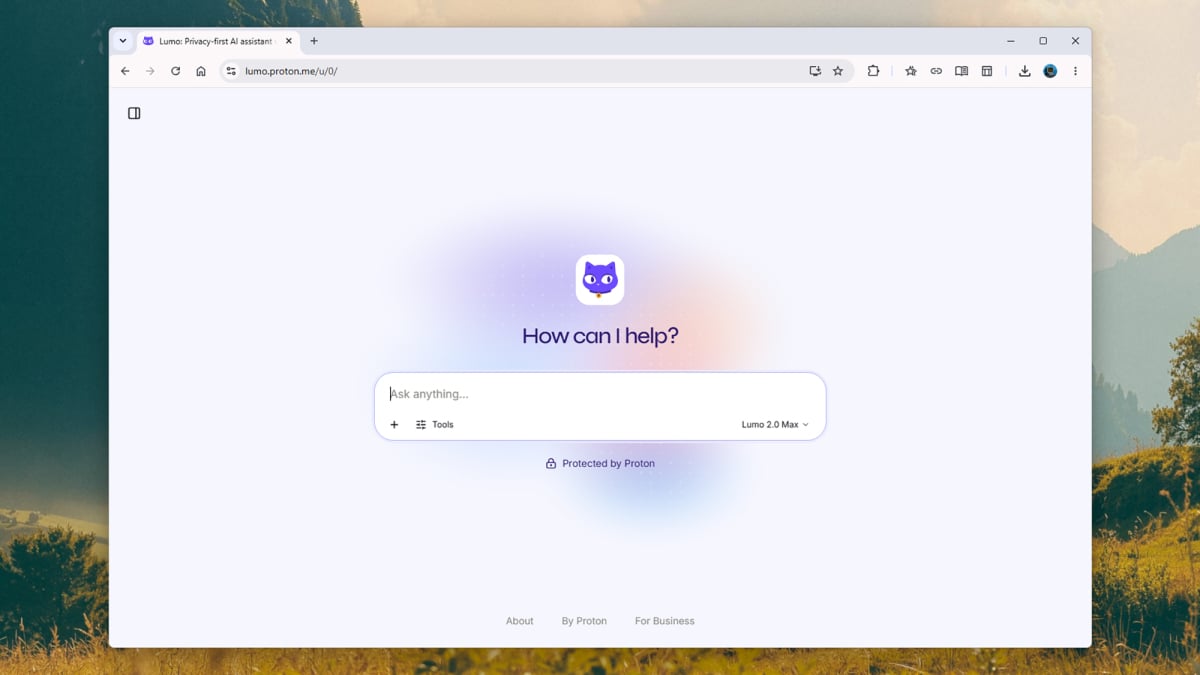
Opening Lumo feels refreshingly simple. The interface is clean, friendly, and direct. It does not overwhelm you with a dozen buttons, model names, tool menus, and upgrade nudges. The overall design feels very Proton: calm, polished, and slightly European in the way a well-organized airport lounge feels European.
Compared with ChatGPT, Lumo’s tone is a little more conservative. ChatGPT often feels like a hyper-capable coworker who drank espresso and read the entire internet before breakfast. Lumo feels more like a careful research assistant who is excellent with confidential paperwork and would probably remind you to lock your laptop before leaving the café.
For everyday prompts, Lumo answered clearly. I tested it with email rewrites, article outlines, travel questions, privacy questions, basic coding tasks, and document-style analysis. It handled most of them well, especially when the request was structured and practical. Where ChatGPT often shines is in polish, flexibility, and long-form creative flow. Where Lumo shines is in giving the user confidence that the chat itself is not becoming part of a massive data appetite.
Lumo vs ChatGPT: Privacy Comparison
The most important difference between Lumo and ChatGPT is not the color of the interface or the personality of the assistant. It is the privacy model.
Lumo’s Privacy Strengths
Lumo is built around four big promises: no server-side chat logs, zero-access encrypted saved history, no training on user conversations, and no data sharing with third parties. Proton also says prompts are transmitted securely, saved conversations are encrypted so Proton cannot read them, and guest sessions can disappear when closed. The “Ghost Mode” feature is especially useful for sensitive one-off questions because it prevents the current conversation from sticking around.
This matters for anyone working with private material. A journalist drafting questions for a source, a lawyer reviewing a sensitive memo, a founder analyzing an unreleased pitch deck, or a regular person trying to understand a difficult medical bill may all prefer a chatbot that treats the conversation as private by design.
ChatGPT’s Privacy Controls
ChatGPT is not privacy-free. It includes Temporary Chat, memory controls, account data controls, deletion options, and opt-outs for training. OpenAI also states that business products such as ChatGPT Team, ChatGPT Enterprise, and API services do not train on customer data by default unless a customer opts in. For many users, these controls are enough, especially when they understand how to use them.
The key difference is that ChatGPT’s consumer experience gives users controls, while Lumo’s consumer experience centers privacy as the default promise. That distinction is subtle but important. One is “you can adjust the privacy settings.” The other is “the product was designed so we cannot see your chats.”
Performance: Is Lumo Smarter Than ChatGPT?
This is where the comparison becomes more complicated. Privacy is one thing. Raw AI capability is another. ChatGPT has had years of massive usage, model development, plugin-style integrations, multimodal features, and broad ecosystem support. It is extremely strong at brainstorming, reasoning, coding help, writing assistance, image understanding, voice interaction, research, and step-by-step problem solving.
Lumo 2.0 narrows the gap. Proton says the updated assistant is significantly faster than earlier versions, supports advanced reasoning modes, works with images, searches the web more effectively, and can use memory and Projects for longer-running work. In practical use, Lumo feels much more capable than a basic privacy chatbot. It can summarize, rewrite, compare, explain, analyze, and help plan tasks in a way that feels genuinely useful.
Still, ChatGPT remains more mature in many areas. It often produces richer creative drafts, better nuanced explanations, more polished strategy documents, and more flexible follow-up responses. When I wanted an article outline with multiple angles, ChatGPT gave me more variety. When I wanted a very careful privacy-sensitive rewrite of a confidential email, Lumo felt like the safer place to do it.
Writing Test: Emails, Blog Drafts, and Tone
For writing, I gave both tools a simple task: rewrite a blunt business email into something professional but still firm. Lumo did well. It cleaned up the tone, removed unnecessary sharpness, and kept the message direct. ChatGPT’s version was smoother and offered more optional variations, such as friendly, concise, executive, and diplomatic versions.
For blog writing, ChatGPT had the advantage. It created stronger hooks, more natural transitions, and more creative phrasing. Lumo was clear and useful but sometimes safer than necessary. That is not always a weakness. If you are writing a privacy policy summary, “safe and careful” is a feature. If you are writing a viral LinkedIn post, safe and careful can sound like oatmeal wearing a tie.
My takeaway: use ChatGPT when style, voice, and creative range matter most. Use Lumo when the content contains sensitive details, internal strategy, private correspondence, client notes, or anything you would not want sitting in a less privacy-centered system.
Research and Web Search: Useful, But Verify Everything
Lumo 2.0’s improved web search is one of its most important upgrades. Earlier AI assistants often struggled with current events unless web browsing was enabled, and even then they could summarize confidently while quietly stepping on a factual rake. Proton says Lumo 2.0 can pull live results, cite sources, and use current data such as news, weather, and financial information.
In testing, Lumo’s web-style responses felt more grounded than older privacy tools. It was willing to cite sources and explain where its claims came from. That helps reduce hallucinations, although it does not eliminate them. No AI assistant deserves blind trust, especially for medical, legal, financial, or breaking-news information.
ChatGPT’s search experience remains highly polished. It is excellent at blending web results with conversational explanation. But again, the privacy tradeoff matters. If the question is “What happened in tech news today?” ChatGPT is hard to beat. If the question is “Summarize this confidential investor update and compare it to today’s market conditions,” Lumo’s private architecture becomes much more attractive.
File Uploads and Document Work
File handling is one of the most important AI use cases. People upload PDFs, contracts, tax forms, internal memos, resumes, school papers, product roadmaps, meeting transcripts, screenshots, and spreadsheets. That is also exactly why file uploads are risky.
Lumo can analyze uploaded files and integrate with Proton Drive while keeping files protected through Proton’s encrypted ecosystem. This makes it appealing for users who already rely on Proton Drive or who want to keep sensitive documents away from mainstream AI platforms. For example, you might ask Lumo to summarize a lease, extract action items from a private meeting note, or rewrite a client proposal without feeling like you tossed the document into the internet’s communal soup pot.
ChatGPT is extremely strong with documents, especially when interpreting complex files, extracting themes, comparing drafts, and generating polished summaries. But for sensitive documents, the choice depends on your risk tolerance and account settings. If privacy is the priority, Lumo has the cleaner pitch.
Image Features: Lumo Catches Up
With Lumo 2.0, Proton added image recognition, image analysis, image generation, and image editing. That puts Lumo closer to the mainstream AI assistant feature set. You can upload an image, ask questions about it, generate a visual from a prompt, or request edits in the same conversation.
ChatGPT remains stronger and more established for image-related creative workflows. It has a larger ecosystem, more user familiarity, and generally more refined multimodal behavior. However, Lumo’s image features are important because they extend privacy protections beyond text. Images can be sensitive too. A screenshot can reveal names, emails, addresses, account numbers, private messages, location clues, and workplace secrets. Lumo treating image work as private is a meaningful advantage.
Memory and Personalization: Helpful or Creepy?
Memory is one of AI’s most useful and most unsettling features. When an assistant remembers your writing style, preferred format, recurring projects, and personal context, it becomes much more helpful. It also starts to feel like a digital raccoon living in your filing cabinet.
ChatGPT offers memory controls that let users review, edit, delete, or turn off memories. Lumo 2.0 adds user-controlled memory and Projects, allowing it to carry context across sessions while keeping that context encrypted. The difference comes back to trust. If memory is useful, users need clear control over what is remembered and what is forgotten.
For my workflow, memory is valuable when working on recurring content projects, brand voice, SEO formatting, and research preferences. But I want memory to be obvious, editable, and easy to delete. Lumo’s privacy-first positioning makes its memory feature feel less risky, though users should still think carefully before letting any AI remember deeply personal details.
Where Lumo Is Better Than ChatGPT
Lumo is better than ChatGPT when privacy is the main decision factor. That includes sensitive writing, confidential brainstorming, private document summaries, personal questions, internal business work, and situations where you want fewer data-retention worries.
It is also better for users who prefer Proton’s broader ecosystem. If you already use Proton Mail, Proton Drive, Proton VPN, or Proton Pass, Lumo fits naturally into that world. Its encrypted Projects and Proton Drive integration are especially useful for people who want AI help without moving documents into a separate, less private system.
Lumo also has a philosophical advantage. Proton’s business identity is built around privacy, not advertising or data extraction. That does not automatically make every feature perfect, but it does mean the product’s incentives are easier to understand. When a company’s brand promise is “we cannot read your stuff,” it has a strong reason not to build features that require reading your stuff.
Where ChatGPT Is Still Better
ChatGPT is still better for overall capability, polish, flexibility, and creative range. It is the stronger general-purpose assistant for many users. It handles complex prompts gracefully, produces strong long-form writing, supports powerful multimodal workflows, and has a massive user ecosystem behind it.
If I need help turning messy notes into a sharp strategy memo, building a detailed content plan, debugging code, practicing a presentation, or exploring a creative concept from ten angles, ChatGPT still feels more powerful. It is faster to adapt to different styles and often better at anticipating what I need next.
That said, “better” depends on the job. A sports car is better than a safe in a race. A safe is better than a sports car if you need somewhere to store your passport. ChatGPT is the sports car. Lumo is the safe with a keyboard.
Who Should Use Lumo?
Lumo is a smart choice for privacy-conscious users, Proton customers, journalists, small business owners, legal professionals, consultants, students, researchers, and anyone who frequently works with sensitive text or files. It is also a good fit for people who have avoided AI tools because they dislike the idea of their conversations being stored, reviewed, or used for model training.
If your AI use is mostly casual, ChatGPT may still feel more capable and convenient. But if you often hesitate before pasting something into a chatbot, that hesitation is exactly the market Lumo is built for.
My Extended Hands-On Experience With Proton’s Privacy-First AI Chatbot
After spending more time with Lumo, the biggest difference was not one dramatic feature. It was the feeling of using the tool. With ChatGPT, I often think about the result first: how good is this draft, how accurate is this summary, how clever is this idea? With Lumo, I found myself thinking about the context: should I be more comfortable pasting this text here? Would I use this for a private client note? Would I summarize a personal letter? Would I upload a sensitive PDF?
That change in mindset matters. Most AI tools ask users to become amateur privacy officers. Before typing, you have to remember whether training is on, whether memory is active, whether chat history is saved, whether the company may review content, whether the file is confidential, and whether your boss would suddenly appear behind you like a sitcom character if you pasted the wrong thing. Lumo reduces that mental load. It does not make every risk vanish, but it starts from a more privacy-respecting position.
In daily use, I liked Lumo most for rewriting private messages, organizing thoughts, and summarizing text I would not want floating around casually. For example, if I had a tense email draft and wanted to make it calmer, Lumo was excellent. It did not overdo the corporate softness. It kept the meaning, removed the emotional splinters, and made the message sound like it was written by a reasonable adult who had slept eight hours, even if the original was written by someone fueled by coffee and mild betrayal.
I also tested it for personal planning prompts: creating a weekly schedule, comparing options for a project, and turning a messy brain dump into clear next steps. Lumo was practical and structured. It did not always produce the most dazzling wording, but it produced dependable answers. That is valuable. Not every AI response needs fireworks. Sometimes you just want the toaster to toast.
Where Lumo felt less impressive was highly creative writing. When I asked for punchy headlines, playful intros, or more colorful analogies, ChatGPT generally gave me more options and better rhythm. Lumo could do it, but I often needed to nudge it more. The same was true for complex strategic analysis. Lumo’s answers were good, but ChatGPT more often connected ideas in surprising ways.
The privacy features changed what I was willing to test. I would still avoid sharing passwords, Social Security numbers, bank account details, private health records, or anything truly dangerous to expose. Privacy-first does not mean “type your entire life into the box and hope for the best.” But I would be more comfortable using Lumo for sensitive-but-normal work: private emails, internal notes, unpublished drafts, file summaries, and questions I would not want attached to an advertising profile.
My final impression is that Lumo is not trying to replace ChatGPT for everyone. It is trying to give users a serious AI assistant when privacy is not optional. That is a meaningful lane. ChatGPT remains my pick for maximum power and creative range. Lumo is the assistant I would reach for when the prompt includes information I would rather keep close. The best AI tool is not always the smartest one. Sometimes it is the one that knows when to keep its digital mouth shut.
Final Verdict: Is Proton Lumo Better Than ChatGPT?
Proton Lumo is better than ChatGPT for privacy-first AI use. ChatGPT is better for general-purpose intelligence, creative flexibility, and mature feature depth. If your priority is maximum capability, ChatGPT remains the stronger all-around assistant. If your priority is confidential AI conversations, Lumo is one of the most compelling options available.
The real winner may be users. Proton’s Lumo pushes the AI market toward a better standard: powerful tools that do not treat personal data as the admission fee. In a world where people increasingly ask AI about work, money, health, relationships, and identity, privacy-first design is not a luxury feature. It is table stakes.
Note: This article synthesizes current public information from Proton, OpenAI, major technology reporting, and AI privacy/security guidance. It is written as an editorial review for web publication and does not include source links in the article body.