Most backups live in places you cannot physically point at: cloud accounts, hard drives, NAS boxes, thumb drives you “put somewhere safe,” and that one old laptop currently serving as a very expensive dust magnet. They are useful, until they are not. A ransomware attack, failed drive, locked account, flooded office, or forgotten password can turn a perfectly normal Tuesday into a scavenger hunt through digital ruins.
That is where a paper QR code backup becomes surprisingly clever. By converting a small file into hundreds of machine-readable QR codes and printing them, you create an offline copy that does not need electricity, Wi-Fi, a subscription, or a hard drive that decides to retire without notice. It is not glamorous. It is also not a replacement for a normal backup strategy. But for small, important files, it can be a wonderfully stubborn last-resort copy.
Think of it as putting your data into a tiny black-and-white quilt. It may look like a spreadsheet got into a fight with a crossword puzzle, but those little squares can hold real information. With enough planning, lots of QR codes can preserve encrypted documents, recovery instructions, configuration files, source code, contact lists, or other compact digital essentials for years.
What Is a Paper QR Code Backup?
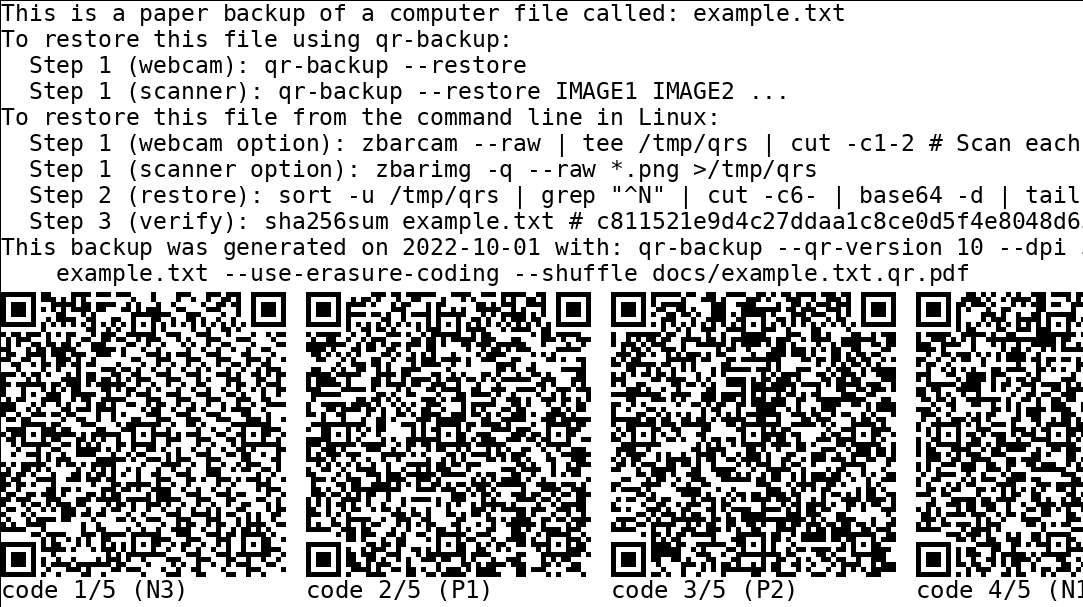
A paper QR code backup is exactly what it sounds like: a file is split into small chunks, each chunk is encoded into a QR code, and the resulting codes are printed on paper. Later, the pages can be scanned or photographed, the QR codes decoded, and the original file reconstructed.
A standard QR code can store only a limited amount of data. The maximum depends on the QR version, data type, and error-correction level. A very dense QR code can hold only a few kilobytes of binary data, not an entire movie, photo library, or decade of tax returns. That means a 500 KB archive may need hundreds of QR codes, while a 5 GB video collection would require enough paper to make a small tree feel personally betrayed.
For that reason, QR code paper backups are best for small but valuable files. Good candidates include:
- Encrypted password-manager exports.
- Recovery codes for critical accounts.
- Private encryption keys and public-key backup material.
- Small legal documents or emergency contacts.
- Configuration files for servers, routers, or home labs.
- Source code for a small project.
- Important text records, instructions, and inventory lists.
- Compressed archives containing irreplaceable notes.
The goal is not to print your entire digital life. The goal is to create an offline escape hatch for the information that would cause the most stress if every screen in your home suddenly became unhelpful.
Why Put Digital Data on Paper at All?
Paper has an unusual advantage in a digital world: it is stubbornly low-tech. A printed page cannot be remotely deleted, encrypted by ransomware, corrupted by a dying SSD, or made inaccessible because a company changed its pricing plan. It can burn, tear, fade, or get soaked by a leaky pipe, so paper is certainly not invincible. Still, it is independent of the usual digital failure points.
A solid backup strategy usually includes multiple copies on different types of media, with at least one copy stored elsewhere. A printed QR archive can become an additional offline layer in that plan. It is particularly useful when you want a copy that remains inaccessible to malware and does not depend on a cloud account.
Paper also has a psychological benefit. A labeled envelope in a fire-resistant document box is easier to remember than “I think I saved it in a folder called Final_Final_ReallyFinal.” If the backup is clearly labeled, dated, and accompanied by restoration instructions, it can be recovered by someone other than the person who created it. That matters more than most people realize.
Paper Is a Backup Layer, Not a Backup Religion
Do not throw away your hard drives and begin speaking only in toner. Paper QR backups are slow to create, slow to restore, and inefficient for large files. They are best treated as a final safety net for compact, high-value data.
Your primary backup system should still include reliable digital copies. Keep current files on your main device, maintain local backups on separate storage, and store an encrypted off-site copy through a reputable cloud or remote-storage service. Paper can then serve as a cold-storage backup: quiet, offline, and waiting patiently in a drawer like a tiny librarian with excellent survival instincts.
Choose the Right Files Before You Print Anything
The first rule of paper data backup is simple: do not print data merely because you can. Every additional byte becomes more QR codes, more pages, more chances for a printing problem, and more chances that Future You will sigh loudly while trying to scan page 47 of 63.
Start by making a short list of files that satisfy three conditions:
- They are small enough to make a paper archive realistic.
- They would be difficult or costly to recreate.
- They would be useful during a digital emergency.
For example, a text file containing your emergency contacts, account-recovery steps, encrypted password vault, and instructions for accessing a safe deposit box may be more valuable than thousands of vacation photos. The photos matter, of course, but printing them as QR codes is less “preparedness” and more “accidental office supply crisis.”
Before encoding anything, remove duplicates, temporary files, and unnecessary media. Convert documents to durable, widely supported formats when possible. Plain text, CSV, PDF/A, PNG, TIFF, and standard ZIP archives are generally easier to understand later than obscure proprietary formats that may require a forgotten application from 2014.
How to Create a QR Code Paper Backup
1. Organize the Files into One Small Archive
Create a folder containing only the items you want to preserve. Use clear filenames. Include a short README file explaining what each item is, when it was created, and what software may be needed to open it.
For example, your folder might contain:
emergency-contacts.txtrouter-settings.txtrecovery-instructions.pdfpassword-vault-encrypted.binREADME.txt
Then compress the folder into a ZIP or TAR archive. Compression may reduce the number of QR codes, especially for text-heavy files. Do not expect miracles with photos, videos, or already-compressed PDFs. Compressing a video twice is like putting a raincoat on a fish: technically possible, emotionally confusing, and not especially useful.
2. Encrypt Sensitive Material Before Encoding It
Anything printed as a QR code can potentially be scanned by anyone who gets access to the paper. A QR code is not secret merely because it resembles a chessboard designed by robots.
If the archive contains passwords, private keys, financial records, recovery codes, personal documents, or confidential business data, encrypt it before generating QR codes. Use reputable encryption software and a strong passphrase. Store the passphrase separately from the paper archive. Do not write the password on the first page unless your goal is to create a treasure map for the least ethical person in your household.
A sensible approach is to keep the encrypted QR pages in one secure place and the passphrase or recovery method in another. This creates separation: finding one piece alone should not provide access to everything.
3. Split the Archive into QR-Friendly Chunks
Because each QR code holds only a limited amount of information, the archive must be divided into chunks. A dedicated paper QR backup tool can automate this process. These tools typically split the file, add sequence numbers, generate QR codes, create printable pages, and include restoration instructions.
Look for a tool that supports the following features:
- Automatic chunk numbering.
- Checksums or cryptographic hashes.
- Redundancy or erasure coding.
- PDF output sized for U.S. Letter paper.
- Clear restoration instructions.
- Optional encryption support.
- Testing and verification after restoration.
Redundancy matters because QR-level error correction can help when a code is slightly smudged or damaged, but it cannot magically restore an entire missing page. A better paper archive adds extra chunks so that the original file can still be rebuilt even when a few QR codes are unreadable or lost.
4. Include a Manifest and Human-Readable Instructions
Every paper QR backup should include a first page that a human can understand without scanning anything. Add the archive name, creation date, file size, encryption status, number of pages, and a checksum for the final file.
Also include a plain-language note such as:
This paper archive contains an encrypted digital file. Scan every QR code in page order, reconstruct the archive, verify the checksum, and decrypt using the passphrase stored separately.
This may feel overly formal today. Ten years from now, it may be the reason the archive is recoverable instead of becoming a mysterious pile of decorative squares.
Printing QR Codes So They Still Work Later
QR codes are forgiving, but they are not magical. A page that looks sharp to your eyes may still fail to scan if the squares bleed together, the contrast is weak, or the printer turns black modules into fuzzy gray potato shapes.
Use High Contrast and Plenty of White Space
Print black QR codes on clean white paper. Avoid gradients, decorative colors, tiny logos, patterned backgrounds, or “creative” branding inside the code. This is not the moment to make your backup look like a craft beer label.
Leave a clear white border around every QR code. That blank area helps scanners recognize where the code begins and ends. The QR codes should be large enough for reliable scanning with an ordinary smartphone camera or flatbed scanner.
Prefer Laser Printing and Good Paper
A laser printer is generally a safer choice than a low-quality inkjet for dense QR codes because toner tends to create crisp edges. If you use an inkjet printer, make test prints first and check for bleeding, streaking, faded blacks, or inconsistent alignment.
Use bright, clean, acid-free paper when possible. Avoid cheap paper that is thin, highly textured, or likely to yellow quickly. Store pages in a dry, dark place away from direct sunlight, high humidity, heat, and curious children with markers.
Test Every Page Before Storing It
Never assume a QR page works just because it came out of the printer. Scan a sample from every page. Better yet, test a complete restoration before filing the archive away.
Your testing checklist should include:
- Can each QR code be detected quickly?
- Can the complete file be reconstructed?
- Does the reconstructed file match the original checksum?
- Can the archive be decrypted successfully?
- Can the restored documents actually be opened?
This step is not optional. A backup that has never been restored is not a backup. It is an optimistic theory with a folder name.
How to Store a QR Code Archive
Once the pages are printed and tested, treat them like important records. Keep them in a labeled envelope, document sleeve, binder, or archival storage box. Store them somewhere dry and secure, such as a fire-resistant safe, locked filing cabinet, or safe deposit box.
Consider making two paper copies and storing them in separate locations. One might stay at home, while another is kept in a secure location with a trusted family member or in a safe deposit box. Geographic separation matters because a backup sitting next to the original device will not help much if both are destroyed in the same flood, fire, or extremely determined coffee spill.
Label the archive clearly. Include the date, archive version, page count, and whether the data is encrypted. Avoid labels that reveal too much sensitive information. “Emergency Archive 2026” is usually wiser than “ALL MY PASSWORDS AND PRIVATE KEYS.”
Security Risks You Should Take Seriously
Paper QR backups are offline, but offline does not automatically mean secure. Anyone who can photograph or scan the pages may be able to copy the data. That makes encryption essential for anything confidential.
Be especially careful with cryptocurrency wallet seed phrases, private keys, government documents, medical records, and password-manager exports. Paper may protect data from ransomware, but it does not protect it from theft, coercion, house guests, or a cleaning crew with excellent curiosity and a smartphone.
Use a strong encryption passphrase that is memorable to you but difficult for others to guess. Keep a second copy of the passphrase recovery method in a separate secure location. Also document the encryption method. A perfectly preserved encrypted file is still useless if nobody knows how to decrypt it.
Finally, update the archive when important information changes. A backup containing expired recovery codes, old passwords, or a dead email address is like keeping an emergency flashlight with no batteries: technically responsible-looking, practically disappointing.
When a QR Code Backup Makes the Most Sense
A paper QR archive is especially useful for people who need a physical, offline copy of small digital assets. It can work well for developers, photographers, researchers, families, small-business owners, privacy-conscious users, and anyone responsible for records that must survive a device failure.
It is also a useful preparedness project. If you have ever wondered what would happen if your laptop disappeared, your phone stopped working, and your cloud account became inaccessible on the same day, a paper QR backup gives you a realistic answer: you would still have a path home.
Note: A QR code paper backup should supplement encrypted digital backups, not replace them. Keep multiple copies, use different storage methods, test restoration regularly, and update the archive whenever critical information changes.
Real-World Experiences: What It Feels Like to Back Up Data on Paper
The first time you create a paper QR backup, it feels equal parts clever and ridiculous. You start with a tiny folder of important files, run it through a tool, and suddenly your printer begins producing pages that look as though an alien accountant has taken over your office. Each page is covered in little black squares. You know there is useful information inside them, but your eyes see only a highly organized swarm of digital ants.
That first printout teaches an important lesson quickly: QR code backups are not about convenience. A cloud backup is convenient. An external SSD is convenient. A paper archive is what you make when you are willing to trade convenience for independence.
One common experience is underestimating how quickly file size becomes paper volume. A small text archive may fit on a few pages. Add a handful of PDFs, an encrypted password vault, and a few configuration files, and suddenly you have a thick packet that needs page numbers, labels, and a serious storage plan. It is not difficult, but it is surprisingly physical. You begin to think about paper quality, printer toner, humidity, envelopes, and whether your safe has enough room for a tiny data bunker.
Another experience is discovering that scanning is not always as effortless as the marketing photos suggest. A bright room, a steady hand, and a clean camera lens make a difference. Slightly curled paper, glare from overhead lights, or a QR code printed too small can turn a five-second scan into an awkward dance involving your phone, the kitchen table, and several deeply judgmental glances at the printer.
This is why experienced users test early. They print one page, scan it, and see what happens before producing a stack of 80 pages. A small test can reveal whether the QR codes need to be larger, whether the printer needs darker output, or whether the chosen layout is too dense. The goal is not to create the maximum number of codes per page. The goal is to create codes that can still be read when you are stressed, tired, and possibly recovering from a disaster that has already ruined your day.
The most satisfying moment comes during a full restoration test. You scan the pages, reconstruct the archive, verify the checksum, decrypt the file, and open the original documents. The result is oddly reassuring. You are holding printed paper in one hand and a restored digital file in the other. The two belong to completely different technological eras, yet they are working together.
People also tend to become better organizers after making a paper backup. Because every unnecessary byte creates more codes and more pages, you become ruthless about clutter. Duplicate documents disappear. Random screenshots lose their claim to immortality. Filenames improve. A README file suddenly feels like a heroic act of civilization.
There is also a humbling side. A paper archive makes you confront the fact that recovering data requires more than possessing it. You need instructions. You need software. You need passwords. You need the patience to scan every page. You need to know whether the archive is encrypted and how to verify that it was rebuilt correctly. In other words, a QR code backup turns “I saved it” into “I can actually get it back.” That is a much higher standard, and it is the one that matters.
After living with a paper QR backup for a while, most people do not become obsessed with printing every file they own. Instead, they identify a small collection of digital essentials: recovery information, emergency contacts, key documents, account instructions, and the encrypted records that would be painful to lose. That focused approach is exactly where paper works best. It becomes a quiet backup of last resort, waiting in a labeled envelope for the day you hope never arrives.
Conclusion: Build a Backup That Can Outlast a Bad Day
Backing up data on paper with lots of QR codes is not the fastest or prettiest way to preserve information. It is, however, one of the most independent. By compressing, encrypting, splitting, printing, testing, and safely storing small but important files, you create an offline copy that is difficult for malware, account lockouts, and hardware failures to destroy.
Use paper QR backups for the digital information that matters most, not for everything you own. Keep your regular digital backups running, store encrypted copies in separate locations, and test every recovery plan before an emergency forces you to learn under pressure. Your future self may never thank you out loud, but at least Future You will not be trying to reconstruct a password vault from memory at 2:00 a.m.