When your Roblox account disappears, a mystery charge lands on the family credit card, or a moderation notice arrian obstacle course designed by an especially mischievous game developer.
The good news is that Roblox provides several legitimate contact channels. The less-good news is that each channel is designed for a different kind of problem. Sending a password-reset question to the press department, for example, is roughly as effective as asking a pizza delivery driver to repair your Wi-Fi.
This guide explains three reliable ways to contact Roblox: submitting the official support form, using Roblox’s reporting and appeal systems, and reaching the company through phone, mail, or specialized email channels. You will also learn what information to include, which method fits each problem, and how to avoid fake “Roblox support” scams.
The Quick Answer: How Do You Contact Roblox?
For most users, the best way to contact Roblox is through the official Roblox Support request form. It is intended primarily for account access, billing, gift card, subscription, technical, safety, and related customer-service questions.
Before contacting anyone, gather your Roblox username, verified email address, device type, purchase receipt, error message, and a short timeline of what happened. Support agents are good at investigating problems, but they have not yet unlocked the ability to read minds.
Way 1: Submit a Request Through the Roblox Support Form
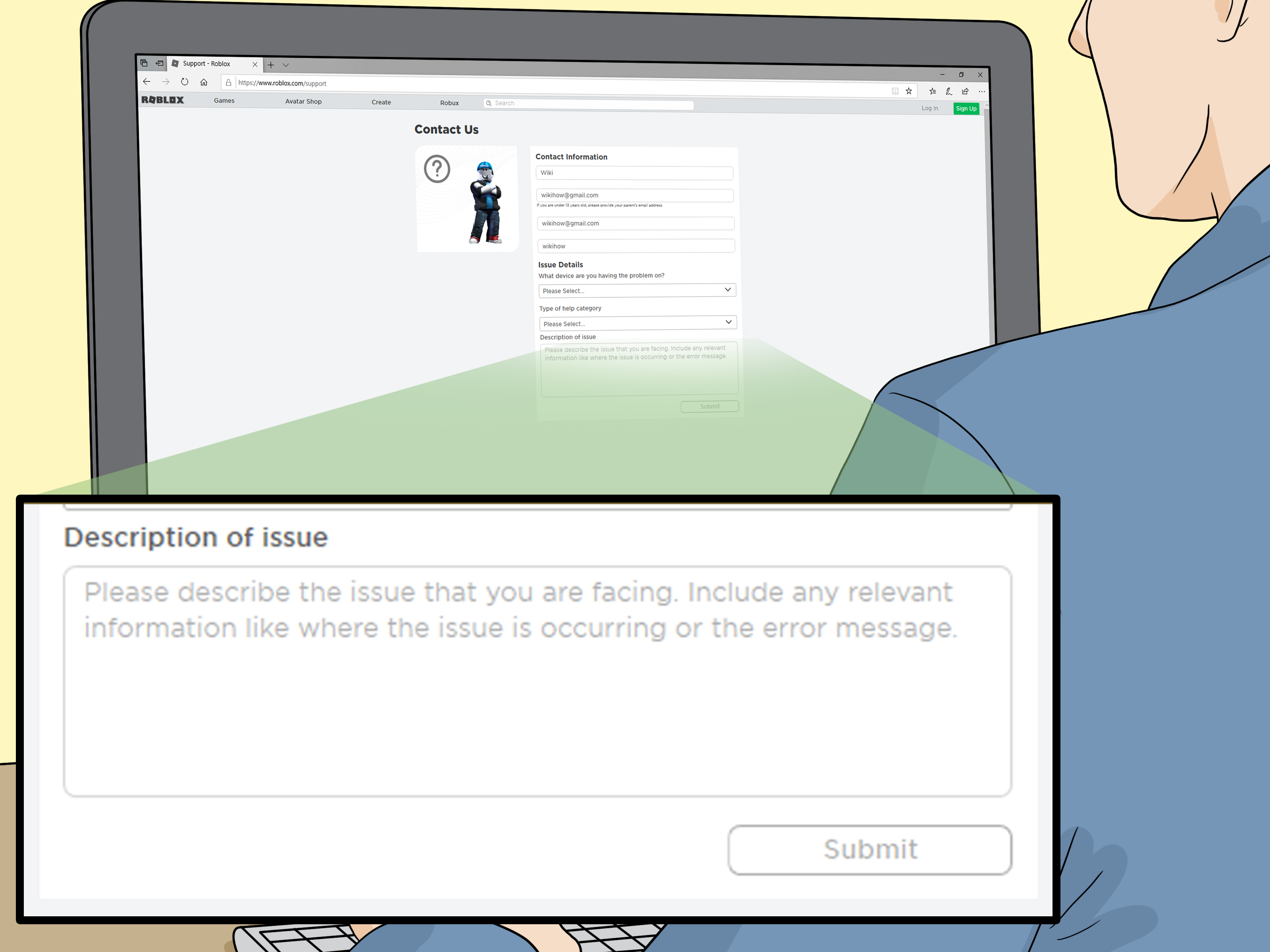
The official support form is the main contact method for ordinary Roblox users. It routes your request according to the issue category you select, making it more useful than sending a random email and hoping it reaches the right desk.
Problems the support form can help with
Use the Roblox customer support form when you need assistance with issues such as:
- A forgotten username or password
- A hacked or compromised account
- An email address or phone number problem
- Missing Robux, Premium benefits, or purchased items
- Gift card redemption or account credit
- Unauthorized charges billed directly by Roblox
- Technical problems on a computer, phone, tablet, or console
- Age, parental control, privacy, or account setting questions
- Creator, avatar item, or experience-related support
Roblox recommends checking its Help Center articles before opening a request. Many common problems, including forgotten passwords and usernames, can be solved automatically through account recovery tools. Users with a verified email address or phone number can generally request a password reset without waiting for an agent. to complete the Roblox support request
- Open the official Roblox Support page or the “Submit a request” section of the Help Center.
- Enter a working contact email address that you regularly check.
- Provide the Roblox username connected to the problem.
- Select the device or platform where the issue occurred.
- Choose the closest available support category.
- Write a clear description of the issue.
- Submit the form and monitor your inbox and spam folder for a response.
The exact fields and categories may change over time. The important part is choosing the category that most accurately describes the problem. Selecting “Billing” for a missing password will not summon the password department more quickly; it may simply send your ticket on an unnecessary sightseeing tour.
What to write in the description box
A useful support message explains what happened, when it happened, what account was involved, and what troubleshooting steps have already been attempted. Include exact error messages when possible.
For example:
My Roblox username is PlayerExample123. On July 9, I was signed out of my account and my password no longer worked. I tried the password-reset page, but no recovery email arrived. The account was previously connected to this contact email. I am using the Roblox app on an iPhone. Please help me verify ownership and recover access.
This is much more useful than writing, “My account is gone. Fix it!!!” Three exclamation points may accurately communicate panic, but they do not provide evidence.
How to handle a hacked Roblox account
If you believe your account was compromised, secure your device before attempting recovery. Roblox advises users to remove suspicious downloads or browser extensions, scan for malware, reset the password, and enable two-step verification. Otherwise, an attacker may simply return after the account is restored, like a raccoon discovering that the trash-can lid was never locked. contacting Roblox, mention previous email addresses, billing information, or purchase receipts that may help establish ownership. Never send your full password, two-step verification code, session cookie, or complete payment-card number.
How billing and refund requests work
First determine who processed the transaction. Purchases made directly through Roblox may be investigated by Roblox Support. However, purchases processed by Apple, Microsoft, Xbox, PlayStation, Amazon, Meta Quest, Samsung, or another platform generally must be refunded through that provider’s support system. Roblox states that it cannot directly refund transactions controlled by those outside payment services. direct Roblox charge, gather the transaction date, amount, payment method, billing name, and receipt. Roblox advises contacting its support team before disputing an eligible direct charge because a bank dispute can interfere with the company’s ability to issue a direct or immediate refund.
Way 2: Use Report Abuse or Submit a Moderation Appeal
Not every problem belongs in a general customer-service ticket. Roblox has dedicated systems for reporting unsafe behavior and challenging moderation decisions.
Use Report Abuse for players, messages, and harmful content
The Report Abuse feature is the appropriate way to notify Roblox about bullying, harassment, scams, inappropriate chat, unsafe voice communication, prohibited content, or other Community Standards violations.
Whenever possible, report the specific chat message, private message, experience, item, or piece of content involved. Roblox explains that reporting only a user’s profile may not give moderators enough context to see what the person actually did. ong report should:
- Identify the correct user or content
- Select the most accurate violation category
- Point to the specific message, behavior, or item
- Explain relevant context without adding unrelated accusations
- Avoid encouraging friends to submit duplicate or dishonest reports
You can also block a user to stop or limit further interaction. Reporting tells Roblox about a possible violation; blocking gives you an immediate personal boundary. Think of one as contacting the referee and the other as closing your front door.
Submit an appeal for a moderation decision
If Roblox warned, suspended, or banned your account, or removed content you created, you may be able to request a review through the moderation appeal process.
Roblox says appeals generally must be submitted within 30 days of the moderation action. Only the account owner may appeal, and duplicate appeals for a decision that has already been reviewed will not receive another review. Submitting an appeal also does not guarantee that the penalty will be reversed. fective appeal should remain calm and focus on facts:
I am appealing the moderation action applied to my account on July 8. I believe the uploaded image was incorrectly identified because it contained an original drawing rather than copyrighted or prohibited material. Please review the specific asset and the associated moderation notice. I understand the Community Standards and will comply with them.
Avoid insults, threats, repeated submissions, or claims that your uncle owns the internet. Moderators need a reason to reconsider the decision, not a dramatic season finale.
Know when Roblox cannot solve the problem
An experience creator may separately ban a player from that creator’s experience. Roblox Support states that it cannot remove bans issued directly by experience creators or contact the creator on a player’s behalf. If you can still use the rest of Roblox but receive Error Code 600 in one experience, the decision may belong to that experience’s creator rather than Roblox’s central moderation team.
Way 3: Contact Roblox by Phone, Mail, or Specialized Email
Roblox publishes a U.S. phone number and corporate mailing address, along with specific email addresses for departments such as privacy, press, investor relations, and copyright. These channels are legitimate, but they are not interchangeable with ordinary customer support.
Roblox phone number
The official U.S. number listed in Roblox policies and gift card terms is:
1-888-858-2569, also written as 1-888-858-BLOX. t assume that calling will immediately connect you with a live agent who can recover an account. The number appears in official materials for matters including privacy, gift cards, and copyright notices. For routine account and billing help, the online support form remains the more clearly designated customer-service channel.
If you call, prepare a short explanation, your username, a callback number, and a reference number from any existing support request. Never leave your password, verification code, or full payment-card details in a voicemail.
Roblox mailing address
Roblox lists the following corporate address:
Roblox Corporation3150 S. Delaware Street
San Mateo, CA 94403
United States
For a privacy request, official policies direct mail to the attention of the Roblox Privacy Manager. Copyright and legal notices may require different attention lines and specific information. Follow the instructions in the policy related to your issue instead of mailing a general letter titled “Please Help.” l mail is most appropriate when a law, contract, or formal policy specifically requests written notice. It is usually not the fastest way to solve a forgotten password or missing Robux problem.
Official department email addresses
Roblox publishes several specialized addresses:
- [email protected] for appropriate privacy-policy questions and requests
- [email protected] for qualifying copyright notices
- [email protected] for legitimate media inquiries
- [email protected] for investor relations questions
Press and investor relations teams are not customer-support shortcuts. Sending a stolen-account complaint to every Roblox email address you can find does not create a super-ticket. It creates several unrelated inbox messages, most of which will need to be redirected or ignored.
Which Roblox Contact Method Should You Choose?
| Problem | Best Contact Method |
|---|---|
| Forgotten password or username | Account recovery tools, followed by the support form |
| Hacked account | Secure the device, reset credentials, and submit the support form |
| Missing Robux or Premium benefits | Roblox Support form |
| Unauthorized direct Roblox charge | Roblox Support form with receipts |
| Apple, Xbox, PlayStation, or Amazon charge | The payment platform’s refund support |
| Bullying, scams, or inappropriate content | Report Abuse on the specific content or communication |
| Roblox account moderation | Moderation appeal within the allowed period |
| Ban from one creator’s experience | Follow the creator’s available appeal process |
| Privacy rights request | Support form, privacy email, phone, or formal mail as directed |
| Media or investor inquiry | Press or investor relations email |
Tips for Getting a Better Response From Roblox Support
Use the email connected to the account
An email address already verified on the account can make ownership easier to establish. For users under 13, Roblox recommends having a parent or guardian submit certain requests and maintaining a parental recovery email where available. ude proof without oversharing
Receipts, transaction identifiers, previous usernames, device information, and exact error messages may be useful. Passwords, authentication codes, session cookies, and full card numbers should never be included.
Keep one clear case organized
Reply to the existing support conversation when providing additional information. Opening several tickets about the same incident can split the evidence among different cases and make the history harder to follow.
Check the sender carefully
Scammers may pretend to be Roblox employees and offer account recovery through social media, messaging apps, videos, or unofficial websites. A legitimate support representative does not need your password or a temporary verification code. Never install remote-access software or paste browser information into a message because someone promises free Robux or instant recovery.
Real-World Contact Experiences: What Common Roblox Cases Teach Us
The following experience-based examples are composite scenarios drawn from common support situations. They are not promises about a particular response time or outcome, but they show why preparation often matters more than writing a long, emotional message.
Experience 1: The hacked account with almost no evidence
Imagine that a player loses access after downloading an unofficial browser extension that promised to reveal “secret” avatar items. The password changes, the recovery email disappears, and the player immediately sends Roblox a one-line message: “I got hacked. Give me my account back.”
The problem is not that the player sounds upset. The problem is that the request gives support almost nothing to investigate. A better approach starts with removing the extension, scanning the device, changing the email password, and gathering old Roblox purchase receipts. The player then submits one organized request containing the username, previous contact email, approximate date access was lost, device type, and transaction evidence.
The lesson is simple: account recovery is partly a support problem and partly an identity-verification problem. The more credible account history you can provide without exposing secrets, the easier it is for the support team to understand the case.
Experience 2: The charge that Roblox did not process
Consider a parent who discovers several Roblox purchases on an Apple receipt. The parent contacts Roblox and asks for an immediate refund. Roblox may help explain the transaction, but because Apple processed the payment, the refund request belongs in Apple’s purchase-support system.
This distinction can initially feel like being sent from one counter to another at an airport. However, it reflects who actually controls the transaction. The fastest path is to identify the merchant shown on the receipt before submitting a request. A charge billed directly by Roblox follows one route; a charge billed by an app store, console company, or marketplace follows another.
After handling the immediate purchase, the parent can require a password or approval for future transactions and review Roblox parental controls. That turns an unpleasant billing surprise into a useful security upgrade rather than a recurring family subscription to financial chaos.
Experience 3: The angry moderation appeal
A creator receives a moderation notice after uploading an image and responds with a furious appeal containing insults, capital letters, and no asset information. Even if the original decision was mistaken, the appeal does not clearly explain why.
A stronger version identifies the moderated asset, quotes or summarizes the notice, explains the content’s purpose, and provides relevant context. It also arrives within the appeal window and comes from the account owner’s valid email address.
The practical lesson is that an appeal is not a courtroom television drama. It is a request for a second review. Calm facts give the reviewer something concrete to evaluate; anger mostly gives the keyboard a demanding workout.
Experience 4: The report that targets the wrong thing
Suppose a player receives a threatening private message but reports only the sender’s profile. Moderators may see the username without seeing the exact communication that triggered the report. Reporting the specific message provides stronger context and makes the complaint more actionable.
Users should also block the person, save relevant non-sensitive details, and tell a trusted adult when a child’s safety may be involved. Serious threats, exploitation, or immediate danger may require contacting local authorities in addition to using Roblox’s internal tools.
Across all four experiences, the pattern is consistent: choose the correct channel, document the facts, protect the account, and avoid flooding multiple departments. A short, organized request usually communicates more than a page of panic.
Conclusion
There are three practical ways to contact Roblox, but the official support form should be the starting point for most account, billing, technical, and purchase questions. Report Abuse and moderation appeals are better for unsafe behavior or enforcement decisions, while phone, postal mail, and specialized emails should be reserved for issues that genuinely belong to those channels.
Whichever method you choose, include accurate account details, describe the problem chronologically, attach relevant transaction information, and never reveal passwords or verification codes. Roblox Support may not have a magical “undo everything” button, but sending the right information to the right team gives your case the best possible start.