You know the moment: a plumber, recruiter, doctor’s office, or mysterious “maybe important” number called weeks ago, and now you need it. You open the Phone app, scroll through a small civilization of robocalls, and discover that the entry is nowhere to be found.
An older iPhone call log may still be available. Start with the Phone app for calls stored or synced on the device. Use your wireless carrier’s account portal for older cellular records. If the entry was deleted, check whether a dated backup or a trusted backup-reading tool can recover it. The right method depends on whether the call was cellular, FaceTime, or made through an internet app.
What Does iPhone Call History Include?
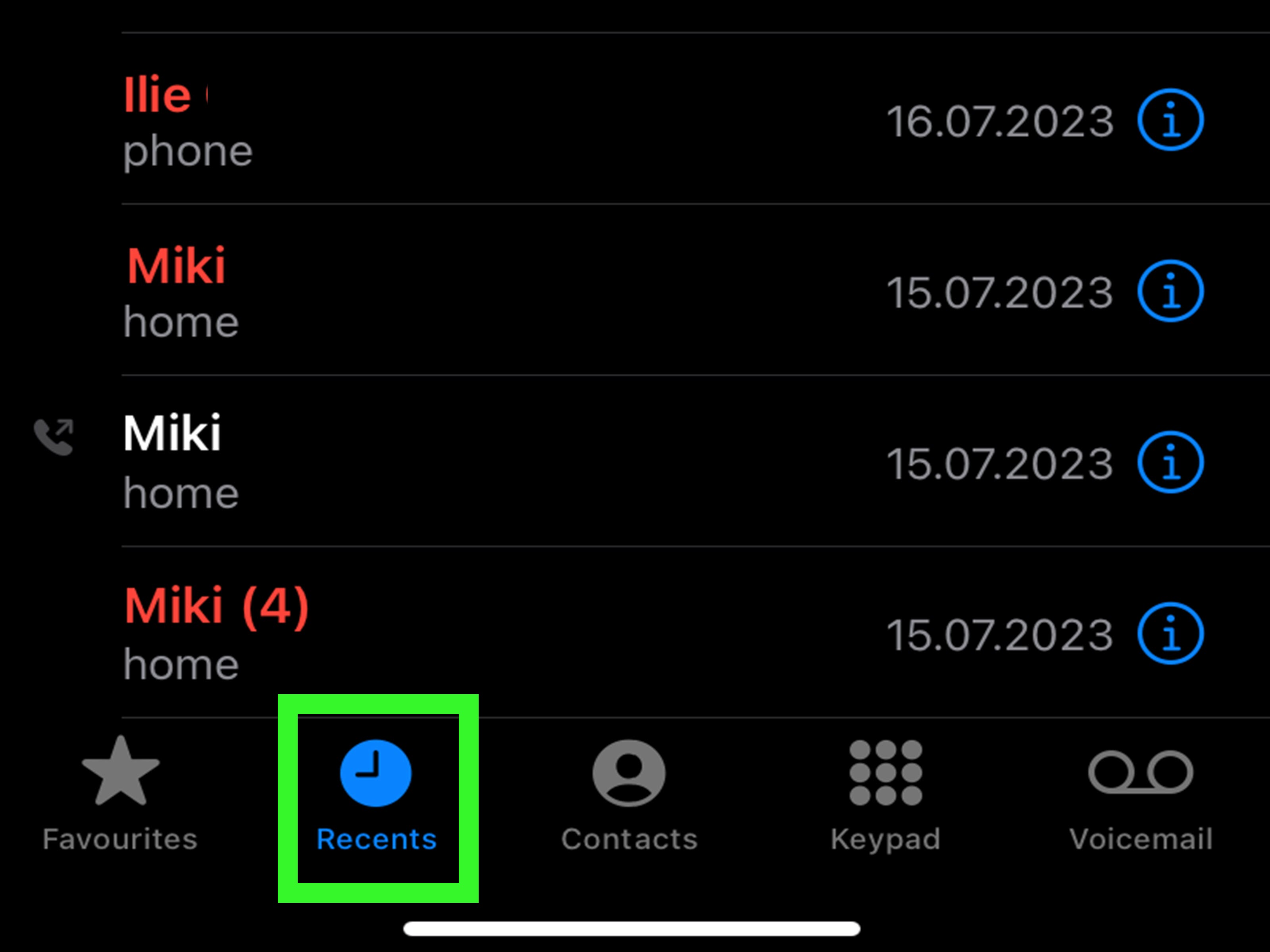
The iPhone’s call history can combine standard cellular calls, carrier Wi-Fi calls, and FaceTime activity. Depending on your iOS version and Phone app layout, you may see a Unified call list or the familiar Classic Recents screen. Apple’s current instructions refer to Calls in Unified layout and Recents in Classic layout.
Do not treat the visible list as a permanent billing archive. A call may be missing because it was deleted, the available history changed, or another device synced data through iCloud. Calls placed in WhatsApp, Signal, Messenger, Teams, and similar apps are internet activity, not ordinary carrier voice calls.
Before searching, note the approximate date, time, caller name, area code, direction of the call, and service used. Those clues can save an impressive amount of scrolling.
Way 1: Check the Phone App
This is the fastest and safest method because it does not erase anything or require third-party software.
Steps to View Call Details
- Open the Phone app.
- Tap Calls in Unified layout or Recents in Classic layout.
- Use the filter control to view Calls, Missed, or another available category.
- Scroll to the approximate date or look for the contact or number.
- In Unified layout, tap the call or contact. In Classic layout, tap the information button beside the entry.
- Review the time, call type, duration, and related history shown for that caller.
Apple confirms that details open by tapping an entry in Unified layout or the information button in Classic layout. The Phone app also allows individual or multiple entries to be deleted, so a missing call may have been removed rather than merely pushed farther down the list.
Check the Contact and FaceTime
If the number belongs to a saved contact, open the contact card and check alternate numbers. Businesses often call from a scheduling desk or central switchboard rather than the number you saved. Check FaceTime separately when you remember video, an Apple Account email address, or a FaceTime notification. A FaceTime call may appear on Apple devices but not as a conventional voice call on your carrier bill.
When This Method Will Not Work
The Phone app cannot display a record that is no longer available in its history. Apple states that recovering deleted call history requires restoring the iPhone from a backup created before the deletion. There is no standard “Recently Deleted” folder for calls like the one in Photos.
Way 2: Use Your Carrier’s Call Records
For a cellular call from weeks or months ago, the carrier account is often the best answer. The iPhone stores a device-oriented history; the carrier maintains network and billing records that may remain available after an entry disappears from the phone.
General Steps
- Sign in to your carrier’s official website or app.
- Select the correct line on a multi-line account.
- Open Usage, Talk, Call details, or Bill details.
- Choose the billing period containing the date you need.
- Filter the list or download the record when available.
Major U.S. carriers follow this general pattern. AT&T says talk, text, and data history may be available for up to 16 bill periods and can be printed or downloaded. T-Mobile provides current-cycle call usage and says eligible postpaid customers can print up to one year of phone records. Verizon offers tools for current and past call or usage details, although availability varies by account and billing history.
What Carrier Records Show
A carrier log may include the other number, date, start time, direction, and duration. Exact fields vary by provider and account type. AT&T describes its Talk view as calls made over its network, which explains why FaceTime, WhatsApp, and similar data-based calls are not ordinary Talk records.
Carrier records are especially useful when you know the month but not the number. Instead of scrolling through every recent call, you can choose a billing cycle and search a smaller table.
Privacy and Access
You generally must be the account owner, an authorized manager, or an approved user. Verizon notes that owners and managers can access certain call-history information for lines on the account. On a family or business plan, ask the account owner for legitimate access rather than attempting to enter someone else’s account.
Way 3: Recover or Inspect an Older Backup
Use this route when the call was deleted and the carrier cannot supply it. The essential requirement is a cloud-synced copy or backup that predates the deletion. A backup made afterward may preserve the newer state in which the call is already gone.
Check iCloud Phone and FaceTime Sync
Apple can sync Phone and FaceTime data, including call history and carrier voicemail, through iCloud. When enabled, the data is stored in the cloud and can become available on supported Apple devices signed in to the same Apple Account. Apple also says iCloud Backup mainly copies information that is not already syncing to iCloud.
Open Settings, tap your name, choose iCloud, and review the Phone and FaceTime options shown on your device. If history remains in iCloud, signing in and allowing synchronization may restore what is still available. However, iCloud.com is not a normal browser-based call-log table like a carrier portal.
Restore From iCloud
Apple’s standard restore process requires a new or erased iPhone. At the Hello screen, follow setup to Transfer Your Apps & Data, select From iCloud Backup, sign in, and choose a backup dated before the history disappeared.
A restore is a full-device operation. It can replace newer information, so first make a current backup and separately protect recent photos, files, authenticator access, and app data. Confirm the old backup date before erasing anything.
Restore From a Mac or PC
For a computer backup, connect the erased or replacement iPhone to the computer. On a current Mac, select the iPhone in Finder and choose Restore from this backup. On older macOS versions or Windows setups using iTunes, select the device and choose Restore Backup.
Inspect a Backup Without Restoring the Phone
Some reputable desktop utilities can read an existing local backup and export call history. For example, iMazing documents viewing call logs and exporting them to Excel or CSV on a Mac or PC. This may be less disruptive when you need one number rather than a complete device rollback.
Use third-party tools cautiously. Download from the developer’s official site, review costs before scanning, keep backups local when possible, and avoid any service that demands an Apple Account password without a clear reason. Software promising to resurrect every deleted call in three clicks deserves the same skepticism as an email from a “prince” requesting gift cards.
Which Method Should You Choose?
| Situation | Best Method | Limitation |
|---|---|---|
| The call is recent | Phone app | Cannot show a record no longer available |
| The cellular call happened months ago | Carrier account | Usually excludes FaceTime and app calls |
| The call was deleted and an older backup exists | Backup restore or inspection | A full restore can overwrite newer data |
Frequently Asked Questions
Can I Recover Deleted Call History Without a Backup?
Check the carrier first. A cellular call may remain in usage records after deletion from the iPhone. If the carrier has no record and no older synced copy or backup exists, recovery is unlikely.
Can I View Call History on iCloud.com?
Not as a standard web call-log page. iCloud can sync Phone and FaceTime data, but Apple’s documented access model uses compatible devices signed in to the same Apple Account. For a browser-searchable cellular record, use the carrier portal.
Why Is a Remembered Call Missing From the Carrier Log?
It may have used FaceTime or another internet calling app, occurred on a different line, or failed before producing the type of network record displayed in your account. Confirm the date, line, and calling service first.
Conclusion
To view old call history on an iPhone, begin with the simplest source and move outward. Search the Phone app first. For older cellular calls, use the official carrier portal. Turn to an iCloud or computer backup only when the first two methods fail and the backup predates the deletion.
The carrier method is usually the winner for ordinary cellular calls because it is searchable and does not require erasing the phone. Backup recovery can help, but handle it like moving a grand piano: plan the route, protect everything nearby, and do not improvise halfway through.
Real-World Experiences With Finding Old iPhone Calls
The Missing Recruiter Number
A job seeker receives several calls during a busy week. A recruiter leaves a vague voicemail, but the number is not saved. Two months later, the applicant wants to follow up and cannot find the entry in the Phone app. Installing a recovery program may feel like the obvious next step, but the call was cellular and the approximate month is known. The carrier’s usage page is more sensible. Selecting the correct line and billing period may reveal the incoming number and timestamp within minutes. The lesson: for an old cellular call, think “carrier record” before “data recovery.”
The Call Deleted During a Cleanup
Someone swipes away several spam calls and accidentally deletes an important contractor’s number. The mistake is noticed the next day. An iCloud backup exists, but it completed overnight after the deletion. Restoring it may simply reproduce the cleaned history. An older computer backup from the previous week is more promising. Rather than immediately erasing the phone, the safer approach is to protect current data and inspect the older backup first. The date and contents of a backup matter much more than the comforting presence of the word “backup.”
The FaceTime Mix-Up
A parent remembers a long family call and expects to see it on the wireless bill. The carrier portal shows nothing. After increasingly dramatic scrolling, the parent remembers that the call included video. It was FaceTime, not a standard cellular call. The carrier handled the data connection but did not list the conversation as ordinary voice usage. Checking the iPhone or another Apple device signed in to the same Apple Account is more relevant. This is why the most useful diagnostic question is often: which app actually placed the call?
The Shared-Plan Permission Problem
On a family plan, a user may see only a summary for their line while detailed records require account-owner or manager permissions. That can look like a technical failure when it is really an authorization rule. The correct move is to ask the account owner to retrieve the record or grant appropriate access. Random password attempts, unofficial lookup services, or using another person’s unlocked device create privacy and security problems far larger than the missing number.
People who routinely need historical call informationcaregivers, freelancers, property managers, and sales representativesusually benefit from one boring habit: save important callers immediately and add a short note. Export carrier records periodically when documentation matters. It is not glamorous, but neither is spending an afternoon deciding whether “Unknown Caller” was a new client or someone selling an extended warranty for a refrigerator you do not own.