TikTok comments can be hilarious, helpful, chaotic, oddly poetic, or all four at once. One minute someone is complimenting your dance transition; the next minute a stranger named “EggLord472” is debating your choice of socks like it is a Supreme Court case. Thankfully, TikTok gives users several ways to manage comments, including deleting comments, filtering keywords, limiting who can comment, and reviewing comments before they appear.
This guide explains exactly how to delete comments on TikTok, what you can and cannot remove, how to delete multiple comments on your own videos, and how to keep your comment section from turning into a digital junk drawer. Whether you are a casual user, creator, small business, or someone who simply regrets typing “lol” seven times under a video from 2021, this quick and easy guide has you covered.
Can You Delete Comments on TikTok?
Yes, you can delete comments on TikTok, but there are a few rules. You can delete comments you posted from your own account. You can also delete comments other people leave on videos that you uploaded. However, you cannot delete another person’s comment from someone else’s video unless you own that video. In that case, your options are usually to report the comment, block the user, or move along with your peace intact.
Think of it like a house party. If someone leaves muddy shoes in your living room, you can ask them to leave. If they leave muddy shoes in someone else’s living room, you can complain, but you probably cannot redecorate the house.
How to Delete a Comment You Posted on TikTok
Deleting your own TikTok comment is simple once you find it. The tricky part is often locating the comment, especially if it was posted weeks or months ago. Here is the basic method:
Step-by-Step: Delete Your Own TikTok Comment
- Open the TikTok app on your phone.
- Go to the video where you left the comment.
- Tap the comment icon to open the comment section.
- Find your comment.
- Press and hold your comment.
- Tap Delete.
- Confirm the action if TikTok asks you to confirm.
Once deleted, the comment is removed from the public comment section. It is not something you can casually undo with a magic “oops” button, so make sure you are deleting the right comment before tapping away like you are defusing a tiny social media bomb.
How to Delete Comments on Your Own TikTok Videos
If someone comments on your TikTok video and you want it gone, TikTok gives you control over your own comment section. This is useful for removing spam, rude replies, off-topic arguments, accidental personal information, or comments that make your video feel less welcoming.
Step-by-Step: Delete a Comment Someone Left on Your Video
- Open TikTok and tap Profile.
- Select the video that contains the comment.
- Tap the comment icon.
- Find the comment you want to remove.
- Press and hold the comment.
- Choose Delete.
This removes the comment from your video. The person who posted it may notice that it disappeared, but TikTok does not usually send a dramatic announcement with thunder sound effects. The comment simply vanishes from the thread.
How to Delete Multiple TikTok Comments at Once
For creators, one-by-one deletion can feel like trying to empty a swimming pool with a teaspoon. If a video gets a wave of spam or rude replies, TikTok offers bulk moderation tools on comments under your own videos. These tools help creators manage multiple comments faster instead of tapping through each one like a very tired woodpecker.
Step-by-Step: Delete Multiple Comments on TikTok
- Open the TikTok video you posted.
- Tap the comment icon.
- Press and hold a comment or tap the filter/settings option if it appears.
- Select Manage multiple comments.
- Choose the comments you want to remove.
- Tap Delete and confirm.
This feature is especially helpful when you are dealing with spam phrases, repeated emojis, copy-paste comments, bot-like promotion, or a comment section that has gone from “community discussion” to “digital raccoon fight.”
Can You Delete All Your TikTok Comments at Once?
As of now, TikTok does not provide a simple official “delete every comment I have ever posted” button for regular users. You can delete your comments manually by finding them and removing them one by one. Some third-party tools claim to mass-delete TikTok activity, but be careful. Giving unknown tools access to your account can create privacy, security, or account-safety risks.
The safest method is to use TikTok’s built-in controls. If you are trying to clean up your old activity, start with your most visible or most recent comments first. Search through notifications, activity history, and videos where you remember commenting. It is not glamorous, but neither is finding a six-month-old comment where you used the wrong “your.” We survive and grow.
How to Find Comments You Made on TikTok
If you want to delete your own comment, you first need to locate it. TikTok’s interface may vary slightly by device, app version, and region, but these paths are usually helpful:
Check Your Notifications
Tap Inbox and look for likes or replies to comments you made. If someone replied to your comment, TikTok may take you directly back to the thread. From there, press and hold your comment and delete it.
Use Activity Center
In many versions of TikTok, you can go to Profile, tap the menu icon, choose Settings and privacy, and look for Activity center. This area can help you review parts of your activity, depending on the features available to your account.
Return to Saved or Liked Videos
If you remember commenting on a video you liked or saved, check your liked videos or favorites. Open the video, tap comments, and look for your reply. This method works best when your TikTok memory is better than “it was a video with a cat, or maybe a blender.”
How to Turn Off Comments on a TikTok Video
Deleting comments is useful after the fact, but sometimes prevention is the better move. If you know a video might attract unwanted debate, spam, or personal questions, you can turn comments off.
Turn Off Comments Before Posting
- Create your TikTok video.
- Go to the posting screen.
- Look for the comment setting.
- Turn off comments before publishing.
Turn Off Comments on an Existing TikTok Video
- Go to the video on your profile.
- Tap the three-dot menu or more options button.
- Open Privacy settings.
- Turn off Allow comments.
Turning off comments does not always delete comments already posted. Instead, it prevents new comments from being added. If your goal is to remove existing comments, delete them manually or use TikTok’s multiple-comment management tools.
How to Filter Comments on TikTok
Comment filters are one of TikTok’s most useful moderation features. Instead of deleting the same annoying phrases over and over, you can tell TikTok to filter certain words or types of comments before they appear publicly.
How to Filter Spam and Offensive Comments
- Open TikTok and tap Profile.
- Tap the menu icon.
- Select Settings and privacy.
- Tap Privacy.
- Choose Comments.
- Turn on filters for spam, offensive comments, or selected comment types when available.
How to Filter Comments by Keywords
- Go to Settings and privacy.
- Tap Privacy.
- Select Comments.
- Find the keyword filter option.
- Add words or phrases you want TikTok to hold or hide.
Keyword filters are great for blocking repetitive spam, rude phrases, scammy promotions, spoilers, or words you simply do not want living rent-free under your videos. For example, a small business might filter fake giveaway phrases. A book reviewer might filter major plot spoilers. A food creator might filter the phrase “my grandma makes it better,” although emotionally, that one may still find a way through.
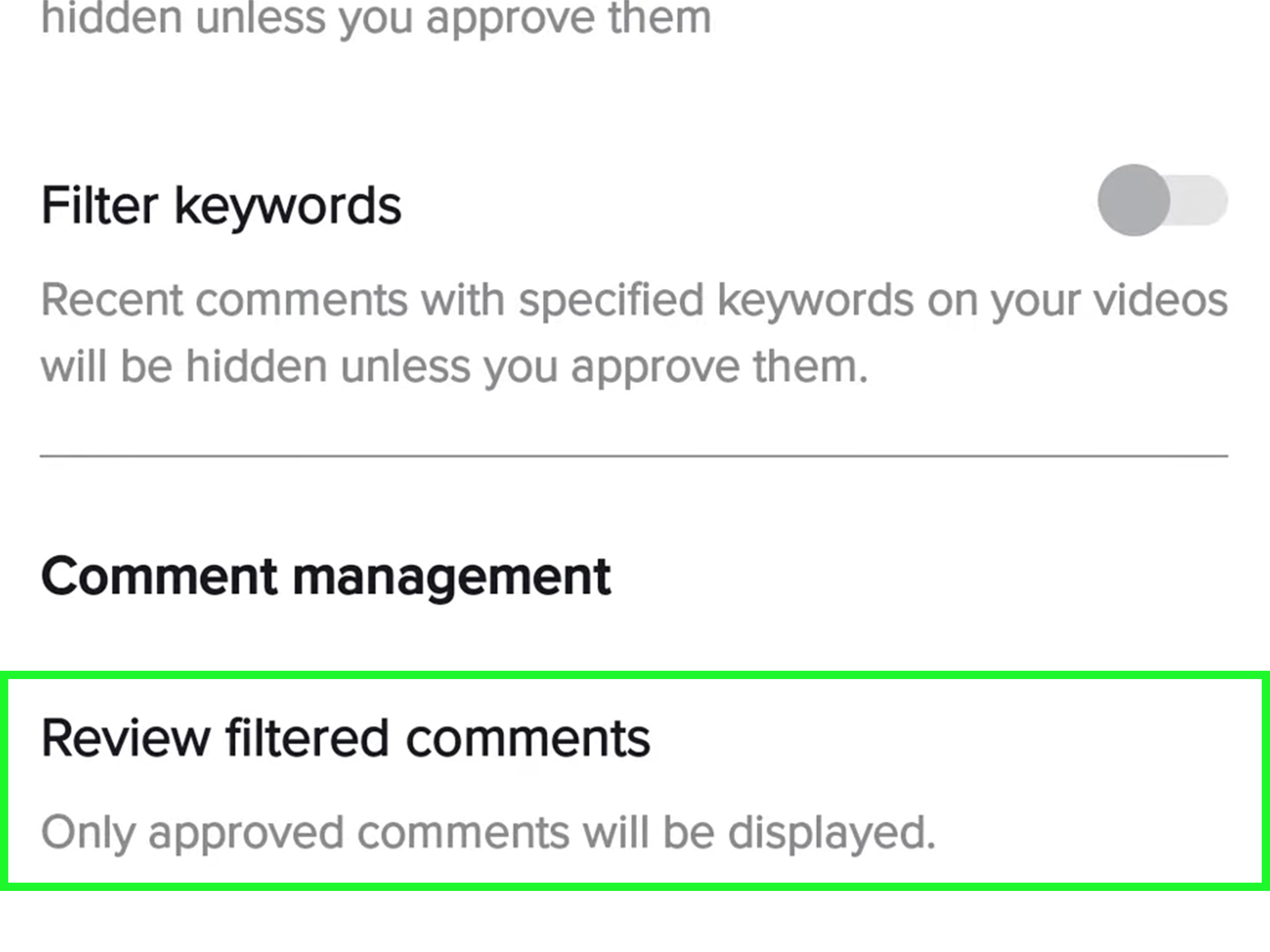
How to Review Filtered Comments
Some TikTok comment settings allow comments to be held for review. That means the comment does not appear publicly unless you approve it. This is useful when you do not want to block all discussion, but you do want a quick checkpoint before comments go live.
To review filtered comments, go to your comment settings or the comment management area for your video. If TikTok shows pending comments, you can approve or delete them. Approving lets the comment appear. Deleting removes it before the rest of your audience sees it.
Should You Delete, Hide, Filter, Report, or Block?
Not every bad comment needs the same response. Sometimes deletion is enough. Other times, reporting or blocking is smarter. Here is how to decide:
Delete the Comment When…
Delete a comment when it is spammy, off-topic, rude, repetitive, misleading, or distracting from the conversation. This is the basic cleanup option.
Filter Comments When…
Use filters when the same type of unwanted comment keeps appearing. Filters save time and help prevent future messes before they land in public.
Report the Comment When…
Report a comment if it appears to violate TikTok’s rules, such as harassment, hate, threats, scams, or unsafe content. Reporting sends the issue to TikTok for review.
Block the User When…
Block someone if they repeatedly bother you, derail your comment section, or make your TikTok experience worse. Blocking is not rude; it is digital housekeeping. You are allowed to close the window when a mosquito gets in.
Does Deleting TikTok Comments Hurt Engagement?
Many creators worry that deleting comments might reduce engagement. Technically, comments are a form of engagement, and active comment sections can help a video feel more lively. But not all engagement is good engagement. A comment section full of spam, insults, or suspicious links can make viewers leave faster, reduce trust, and turn a fun post into a public headache.
For creators and brands, healthy comments matter more than raw comment count. A smaller comment section with real questions, jokes, feedback, and community interaction is usually better than a huge thread filled with nonsense. Delete what damages the conversation. Keep what adds value, even when it includes fair criticism.
Best Practices for Managing TikTok Comments
Deleting comments is only one part of smart TikTok moderation. A better strategy is to create a comment environment that needs less cleanup in the first place.
1. Set Comment Rules Early
If your account is growing, decide what you will allow before problems appear. For example, you might allow respectful disagreement but remove insults, spam, personal attacks, and repeated self-promotion.
2. Use Filters Before You Need Them
Do not wait until your comment section looks like a garage sale hosted by bots. Add keyword filters for common spam phrases, inappropriate terms, or topics you know attract trouble.
3. Reply to Good Comments
Positive comments deserve attention too. Replying to helpful or funny comments encourages more of the behavior you want. It also shows viewers that your comment section is not just a pit where words go to wear sunglasses and fight.
4. Do Not Argue With Every Troll
Some comments are not invitations to debate; they are fishing hooks. Delete, report, or block when needed. Your time is better spent creating content than explaining basic manners to an account with no profile picture.
5. Check Comments After Posting
The first few hours after posting can bring the most activity. Check your comments early, remove obvious spam, and answer genuine questions while the video is still fresh.
Common Problems When Deleting TikTok Comments
The Delete Option Is Not Showing
If you do not see a delete option, you may be trying to delete a comment you do not control. Remember, you can delete your own comments and comments on your own videos. You generally cannot delete someone else’s comment on another creator’s video.
The App Looks Different From This Guide
TikTok updates its app often, so buttons and menu names may shift slightly. If you cannot find a setting, update the app, restart it, and check under Settings and privacy, Privacy, or the video’s Privacy settings.
The Comment Keeps Coming Back
If similar comments keep appearing, you may be dealing with spam accounts or repeated phrases. Use keyword filters, report suspicious comments, and block accounts that repeatedly post unwanted replies.
You Deleted the Wrong Comment
Unfortunately, deleted comments are not always recoverable. If it was your comment, you can rewrite it. If it was someone else’s comment, you may need to ask them to comment again, which is only slightly awkward and still better than accidentally deleting your grocery list.
Examples: When Deleting TikTok Comments Makes Sense
Example 1: A creator posts a skincare routine. Most comments are helpful, but a few promote suspicious products. Deleting the spam keeps the discussion focused and protects viewers from questionable links.
Example 2: A teacher posts a classroom organization tip. A comment includes personal information about a student. Deleting it quickly protects privacy and keeps the video safe.
Example 3: A small business launches a product video. A competitor or spam account floods the comments with repetitive promotions. Bulk deletion and keyword filtering help restore the conversation.
Example 4: You commented something embarrassing two years ago. Maybe it was not harmful, but it no longer represents you. Deleting your own old comment is a normal part of managing your digital footprint.
Experience-Based Tips: What It Feels Like to Clean Up TikTok Comments
Managing TikTok comments is one of those tasks that sounds simple until you actually do it. At first, you may think, “I’ll just delete the weird ones.” Ten minutes later, you are deep in the comment section, sorting spam from sarcasm, genuine criticism from random chaos, and one-word replies from people who apparently communicate only through vegetable emojis.
The biggest lesson is this: do not treat every unpleasant comment as an emergency. Some comments deserve deletion immediately, especially if they are hateful, unsafe, scammy, or invasive. Other comments are simply annoying. A mild disagreement, a clumsy joke, or a confused question does not always need to disappear. In fact, leaving some imperfect but respectful comments can make your account feel more real. A comment section that is too polished may look less like a community and more like a hotel lobby where nobody is allowed to laugh loudly.
Another practical experience is that filters save more energy than willpower. If your videos attract the same spam phrases again and again, keyword filtering is your best friend. You should not have to manually delete “check my bio” or suspicious giveaway comments 47 times. Set the filter once and let TikTok do some of the sweeping. It is like putting a doormat outside your digital front door.
For creators, timing matters. Checking comments shortly after posting helps you shape the tone early. When the first visible comments are friendly, funny, or useful, new viewers are more likely to join in the same spirit. When the first comments are spam or arguments, the section can slide downhill quickly. A quick cleanup in the first hour can prevent a bigger moderation job later.
It also helps to separate criticism from cruelty. A comment like “The audio is too low” may sting for half a second, but it is useful. A comment that attacks you personally or targets other viewers is different. Delete the harmful stuff. Learn from the useful stuff. Ignore the noise. This approach keeps you from turning moderation into emotional cardio, which nobody asked for.
If you manage TikTok for a brand or business, create a simple comment policy. Decide in advance what gets deleted, what gets answered, what gets reported, and what gets escalated to a team member. This prevents rushed decisions when a video suddenly gets attention. It also helps multiple people manage comments consistently, instead of one person deleting everything before coffee and another replying to trolls with the enthusiasm of a courtroom drama.
For personal accounts, deleting old comments can feel strangely refreshing. People grow. Opinions change. Humor ages like milk sometimes. Cleaning up old comments is not about pretending you never existed before today; it is about making your public activity better match who you are now. Start with comments that are public, searchable, or attached to videos getting new attention. You do not need to excavate your entire TikTok history in one sitting.
Finally, remember that comment moderation is not about controlling every word. It is about protecting the space around your content. A healthy TikTok comment section can be funny, messy, thoughtful, and lively. It does not need to be perfect. It just needs to be safe enough, useful enough, and welcoming enough that people want to stay. Delete what needs deleting, filter what keeps repeating, and do not let a stranger with a cartoon frog avatar ruin your afternoon.
Final Thoughts: Keep Your TikTok Comments Clean Without Losing Your Mind
Learning how to delete comments on TikTok is a small skill that makes a big difference. You can remove your own comments, delete unwanted replies on your videos, manage multiple comments, filter keywords, review hidden comments, turn comments off, report violations, and block repeat troublemakers. That gives you a full toolbox for keeping your TikTok experience cleaner, calmer, and more useful.
The best approach is not to delete everything negative. Instead, remove comments that are harmful, spammy, invasive, or clearly bad for the conversation. Keep fair questions, useful criticism, and fun community replies. TikTok moves fast, but your comment section does not have to be a runaway shopping cart. With the right settings and a few smart habits, you can keep it under control without spending your entire day playing comment janitor.