Some websites greet you with a banner. Some websites ask you to accept cookies. Google, being Google, occasionally hides a tiny arcade in plain sight and waits for curious visitors to poke the correct pixel. That is the charm behind the Google I/O Page Easter Egg, a playful Breakout-style mini-game tucked into the event experience for Google I/O 2021.
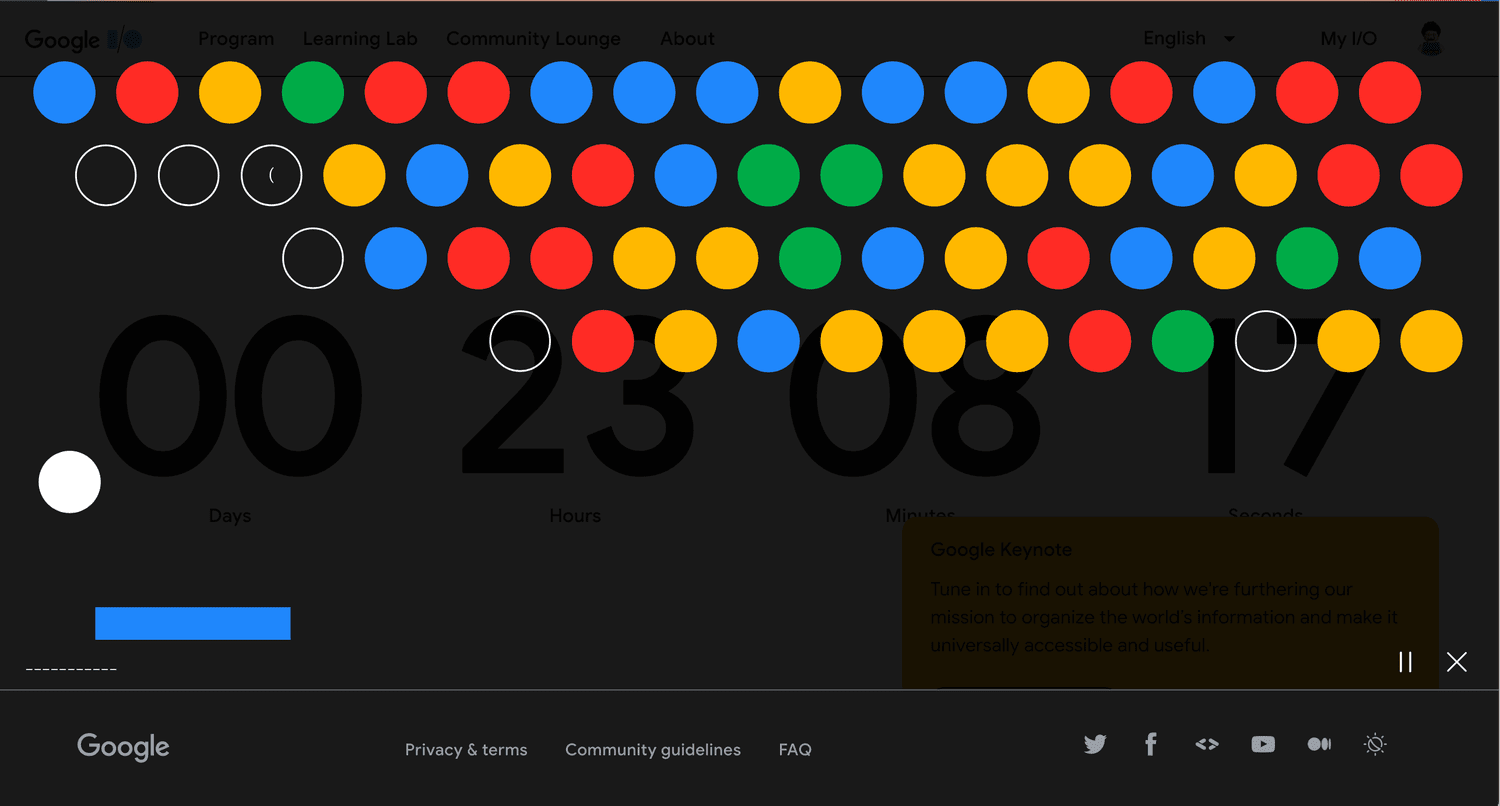
At first glance, the page looked like a polished landing page for Google’s developer conference: countdown timer, colorful dots, event information, and the usual tech-world excitement. But click one of those floating colored dots, and suddenly the page stopped behaving like a conference website and started acting like it had swallowed an arcade cabinet. A Breakout-inspired game appeared, inviting users to bounce projectiles, break colorful dots, reveal hidden characters, and discover a small developer-themed surprise.
For anyone who enjoys Google Easter eggs, retro games, developer puzzles, or the strange joy of finding a secret where a normal button should be, this one was a delightful little rabbit hole. Let’s break out the detailsyes, pun fully intended.
What Was the Google I/O Breakout Easter Egg?
The Google I/O Breakout Easter Egg was an interactive mini-game hidden on the Google I/O 2021 event page. Users noticed floating dots in Google’s familiar colorsblue, red, yellow, and green. Clicking one of those dots transported the visitor to a Breakout-style game at the bottom of the page.
The game was simple but addictive. The goal was to clear a field of dots using bouncing projectiles, similar to the classic brick-breaking formula popularized by Atari’s Breakout. Some dots contained letters or symbols. As players cleared the dots, the hidden message gradually appeared. The message spelled PIONEERS();, a playful developer-style phrase that could be entered in Chrome DevTools to unlock a badge connected to the broader Google I/O puzzle experience.
In other words, the Easter egg was not only a game. It was also a wink to developers: “Open the console. You know you want to.”
Why Google Hid a Breakout Game on the I/O Page
Google I/O is not an ordinary product event. It is Google’s annual developer festival, where the company announces updates across Android, Search, AI, Chrome, Maps, Cloud, Assistant, design, privacy, and more. In 2021, the event returned as a virtual and free online conference after the 2020 event was canceled during the pandemic period.
Because the 2021 event was digital, the website had to carry more personality than usual. There was no crowd wandering around Shoreline Amphitheatre, no hallway conversations, no developer badges swinging from lanyards, and sadly, no conference coffee strong enough to debug your soul. So the event page itself became part of the experience.
The Breakout mini-game helped make the page feel alive. It encouraged exploration, rewarded curiosity, and turned passive visitors into active participants. That is exactly what great Easter eggs do: they transform “I visited a page” into “I discovered something.”
How to Find the Google I/O Page Easter Egg
The original Google I/O 2021 Easter egg was tied to that year’s event page, so it may not be available in the same form today. Google often changes, retires, or archives event pages after conferences end. Still, the basic discovery process is part of the legend.
Step 1: Visit the Google I/O Event Page
During the active period for Google I/O 2021, users could visit the official I/O page and see a countdown experience. The page included colorful dots floating around the interface. These dots were not just decoration. They were tiny invitations wearing camouflage.
Step 2: Click a Colored Dot
Clicking a dot sent users down to a hidden game area. This was the “aha!” moment. One second you were checking event timing; the next second you were playing a browser-based Breakout game like your productivity had been politely escorted out of the room.
Step 3: Break the Dots
The game involved bouncing projectiles to clear 64 dots. Some dots revealed letters and symbols. As players cleared the board, the message formed piece by piece. It was not hard in the “sweaty gamer tournament” sense, but it did require attention and a bit of persistence.
Step 4: Discover the Hidden Message
After enough dots were cleared, the hidden phrase PIONEERS(); appeared. The parentheses and semicolon gave the message a developer flavor, as if the Easter egg had briefly put on a hoodie and started writing JavaScript.
Step 5: Use Chrome DevTools
The message was not just decorative. Users could enter it into Chrome DevTools as part of a badge-related puzzle experience. This extra layer made the Easter egg especially appealing to developers, because it mixed gaming, discovery, browser tools, and conference culture into one neat little package.
Why the Easter Egg Felt So Google
The Google I/O Breakout Easter egg worked because it reflected several things Google has long been known for: playfulness, engineering culture, and a love of hidden interactions. Google has a history of hiding small surprises in Search, Android, Chrome, Maps, and event pages. Some are jokes. Some are games. Some are puzzles. Some are the kind of thing that makes you wonder whether a very caffeinated engineer was allowed to ship something on a Friday afternoon.
But the best Google Easter eggs are not random. They usually connect to the platform, the audience, or the moment. The I/O Breakout game was perfect for a developer conference because it rewarded technical curiosity. A normal visitor might play the game and smile. A developer might play the game, notice the code-like phrase, open DevTools, and keep digging.
That layered experience is what made it memorable. It was easy enough for casual users but nerdy enough for people who enjoy reading source code the way others read cereal boxes.
The Breakout Connection: From Atari to Google
To understand why a Breakout-style game works so well as an Easter egg, it helps to know the history behind Breakout. Atari released the original arcade game in 1976. The concept was beautifully simple: a paddle, a ball, and a wall of bricks begging to be destroyed. The player kept the ball alive by bouncing it upward, clearing bricks one by one.
That simplicity made the game timeless. It is easy to understand in five seconds and difficult to stop playing after five minutes. The design also fits perfectly inside a browser page. Replace bricks with image thumbnails, dots, cards, or interface elements, and suddenly any webpage can become a tiny arcade.
Google had already celebrated this idea before. In 2013, Google created a famous Atari Breakout Easter egg in Google Images to mark the game’s 37th anniversary. Users could search for “Atari Breakout,” and the image results transformed into playable bricks. It was one of those internet moments where people planned to “just test it quickly” and then mysteriously lost half a lunch break.
The Google I/O version did not simply copy that experience. It borrowed the familiar Breakout structure and adapted it for the developer event. Instead of image thumbnails, players cleared colorful dots. Instead of merely chasing a score, they uncovered a message. That shift made the game feel like both a tribute and a puzzle.
Google I/O 2021: The Perfect Setting for a Digital Easter Egg
Google I/O 2021 was a major moment for Google’s developer community. The event was fully virtual and free, bringing developers and fans together through livestreamed keynotes, sessions, workshops, and online experiences. Major announcements included Android 12, the Material You design language, privacy improvements, updates to Google Photos and Maps, AI demonstrations, Wear OS news, and developer-focused tools.
In that context, the Easter egg had a specific job: make the online event feel less flat. A digital conference can be informative, but it can also feel like a long series of browser tabs wearing a business suit. Interactive elements make the experience more human. They give attendees something to explore between sessions and something fun to talk about online.
The Breakout Easter egg also matched the overall spirit of I/O. The event is about input and output, experimentation, building, testing, and discovering what technology can do. A hidden game on the page quietly said, “This is not just a schedule. This is a playground.”
What Made the Google I/O Easter Egg Clever?
It Used Visual Curiosity
The colorful dots looked decorative, but they behaved like clues. That is good design. Instead of shouting “Click me! Secret game here!” the page let curiosity do the work. Users who clicked around were rewarded.
It Had a Low Barrier to Entry
You did not need to install anything. You did not need to create a complicated setup. The game worked inside the page, making it accessible to anyone who found it. Browser-based fun is the best kind of fun because it does not ask you to download a mysterious file named something like “totally-not-malware.exe.”
It Rewarded Developers Specifically
The hidden message PIONEERS(); looked like code. The DevTools connection gave developers a second layer to explore. That made the Easter egg feel custom-built for the I/O audience rather than pasted onto the page as a generic gimmick.
It Connected to Google’s Easter Egg Tradition
Google has trained users to expect small surprises. From Search tricks to Android version Easter eggs, the company has a long habit of making digital products feel a little playful. The I/O Breakout game fit neatly into that tradition.
Why People Still Search for “Breakout the Google I/O Page Easter Egg”
Even years later, people search for this Easter egg because it sits at the intersection of several internet obsessions: Google secrets, retro games, hidden web features, developer puzzles, and nostalgia. It is also the kind of discovery that feels personal. If you found it on your own, you probably felt like you had uncovered a tiny backstage pass.
Search interest also continues because Google Easter eggs often disappear. A game available during one event may be gone when the page updates. That scarcity gives these moments a collectible quality. People document them, recreate them, write guides about them, and trade memories like digital baseball cards.
There is also a practical reason: users want to know whether the Easter egg still works. The answer depends on the current state of the Google I/O page. Since event pages change from year to year, old Easter eggs may not remain live forever. However, the story remains useful for understanding how Google designs interactive event experiences.
Tips for Finding Google Easter Eggs Like This One
Finding Google Easter eggs is part observation, part patience, and part “what happens if I click this suspiciously cute thing?” Here are a few safe and simple habits that can help:
Look for Unusual Motion
If a page has floating icons, animated shapes, blinking objects, or interactive-looking decorations, test them. Designers rarely animate things for no reason, although occasionally they do it because motion makes everyone feel fancy.
Try Keyboard Inputs
Some older Google I/O Easter eggs used sequences of I and O inputs. Since the conference name itself contains those letters, it became a natural playground for code-like patterns. Keyboard experiments can reveal hidden effects on playful pages.
Check the Browser Console
Developer-focused Easter eggs sometimes leave clues in the console. Chrome DevTools is especially relevant because I/O is heavily developer-oriented. A hidden message that looks like code is usually not asking to be admired from a distance. It wants to be tested.
Follow the Community
Tech communities, Android news sites, developer blogs, and social platforms often discover these secrets quickly. Once one person finds an Easter egg, the internet behaves like a detective agency with too much coffee.
What Brands Can Learn from the Google I/O Breakout Easter Egg
The Google I/O Easter egg is not just a fun trivia item. It is also a lesson in digital engagement. Brands often spend huge amounts of energy trying to make users “interact” with content. Google did it with a few colorful dots and a game mechanic nearly five decades old.
The lesson is simple: interaction works best when it feels like discovery, not homework. Nobody wants to “engage with a branded activation experience.” People do want to click a mysterious dot and accidentally find a game.
Another lesson is audience alignment. The I/O Easter egg made sense because the audience included developers, designers, tech journalists, and Google fans. The hidden DevTools connection gave the experience credibility. It did not feel like random decoration. It felt like an inside joke shared with the right crowd.
Finally, the Easter egg shows the power of small delight. Not every digital experience needs to be massive. A tiny game, a hidden badge, or a clever message can make a page memorable. Sometimes the smallest feature becomes the thing users talk about most.
Common Questions About the Google I/O Breakout Easter Egg
Is the Google I/O Breakout Easter egg still available?
The original Easter egg was connected to the Google I/O 2021 event page, so it may not work on current versions of the site. Google updates event pages regularly, and many temporary Easter eggs are retired after the event period ends.
Was it the same as Google Atari Breakout?
No. Google’s Atari Breakout Easter egg appeared in Google Images in 2013 and transformed image results into bricks. The Google I/O Easter egg used a Breakout-style mechanic on the event page and included a hidden message tied to the I/O puzzle experience.
What did the hidden message say?
The hidden message was PIONEERS();. The code-like format made it especially appealing to developers and connected the game to Chrome DevTools and badge discovery.
Why are Google Easter eggs popular?
They are popular because they make technology feel playful. They reward curiosity, create shareable moments, and remind users that even giant platforms can have a sense of humor.
Personal Experience: Playing With the Google I/O Breakout Easter Egg
Discovering the Google I/O Breakout Easter egg felt like walking into a serious tech conference and finding a pinball machine hiding behind the registration desk. The page looked professional, colorful, and polished, so the first instinct was to treat it like a normal event website. Check the date, scan the schedule, maybe pretend you are definitely going to watch every session live instead of saving twelve tabs “for later.” Then the dots started looking suspicious.
Clicking one of the dots was the moment the page changed personality. Suddenly, the polished event interface turned into a mini-game, and the brain switched from “I am here for developer knowledge” to “I must destroy every dot on this board.” It was not loud or complicated. It was better than that: simple, quick, and oddly satisfying. The game understood the ancient law of the internet: if you give people a bouncing object and something to break, they will keep playing until the job is done.
The best part was the gradual reveal. Clearing dots was fun by itself, but seeing letters and symbols appear gave the whole thing a puzzle-box feeling. It made the player wonder whether the game was hiding more than a score. The phrase PIONEERS(); was a perfect little reward because it looked meaningful without overexplaining itself. For a developer audience, that tiny semicolon did a lot of work. It practically whispered, “You know where this goes.”
Opening Chrome DevTools after playing made the experience feel more personal. It was no longer just a webpage trick; it became a conversation between Google and the people who enjoy taking websites apart to see how they tick. That is why the Easter egg worked so well. It respected the curiosity of its audience. It did not just hand users a button labeled “fun.” It gave them a clue and trusted them to follow it.
The game also made the virtual conference feel warmer. Online events can become a blur of livestreams, tabs, chat windows, and calendar reminders. A hidden game interrupts that pattern in a good way. It says, “Pause for a second. Explore. Play.” That small invitation can make a digital event feel less like a broadcast and more like a place.
From a content and user experience perspective, the Easter egg is a reminder that delight does not need to be huge. A feature can be small and still memorable if it arrives at the right moment. The Google I/O Breakout Easter egg did not need cinematic graphics, a leaderboard, or a dramatic soundtrack. It needed curiosity, a familiar game mechanic, a secret message, and a reason for developers to smile.
And honestly, that is the magic of the whole thing. The Easter egg was not important because it changed the future of technology. It was important because it made a technical event feel playful. It turned a conference page into a toy, a toy into a puzzle, and a puzzle into a shared memory. That is a pretty good outcome for a few colorful dots minding their own business on a webpage.
Conclusion
The Google I/O Page Easter Egg remains a great example of how smart interaction can turn an ordinary event page into something worth remembering. By hiding a Breakout-style game inside the I/O 2021 experience, Google gave visitors more than a countdown and a schedule. It gave them a reason to click, explore, laugh, and share.
For developers, the hidden PIONEERS(); message added an extra layer of charm. For casual users, the game was a quick burst of retro fun. For anyone studying digital experience design, it was a tiny masterclass in audience-aware engagement. The page did not force interaction. It invited discovery, and that made all the difference.
Whether the original game is still playable or preserved only through screenshots, articles, and memory, its lesson remains fresh: the web is better when it leaves room for surprise. A hidden game might not be essential, but neither is whipped cream on hot chocolate. Still, when it is there, nobody complains.