Some retro computer projects politely whisper, “Remember me?” FauxTRS kicks open the beige plastic door, fires up a Raspberry Pi, flashes a pair of decorative floppy-drive LEDs, and says, “I brought the 1980s back, but I also remembered Bluetooth.” That is the charm of this project: it is not merely a tiny computer case, not merely a nostalgic desk ornament, and definitely not a “Trash 80.” FauxTRS is a carefully designed, 3D-printable tribute to the Tandy Radio Shack TRS-80 family, especially the Model III and Model 4 era, rebuilt for modern makers who love old computers but do not love cracked plastics, tired power supplies, and mysterious smells from capacitors that have seen things.
At its core, FauxTRS is a scale replica-style enclosure created by Joe Pasqua to evoke the feel of a classic TRS-80 all-in-one machine. It is powered by a Raspberry Pi, uses a modern display, accepts an off-the-shelf keyboard and touchpad, and runs TRS-80 emulation software to recreate the experience of using one of the most important personal computer lines of the late 1970s and early 1980s. It is not an exact copy, and that is part of the point. FauxTRS is less like a museum mannequin and more like a tribute band that actually knows the songs.
What Is FauxTRS?
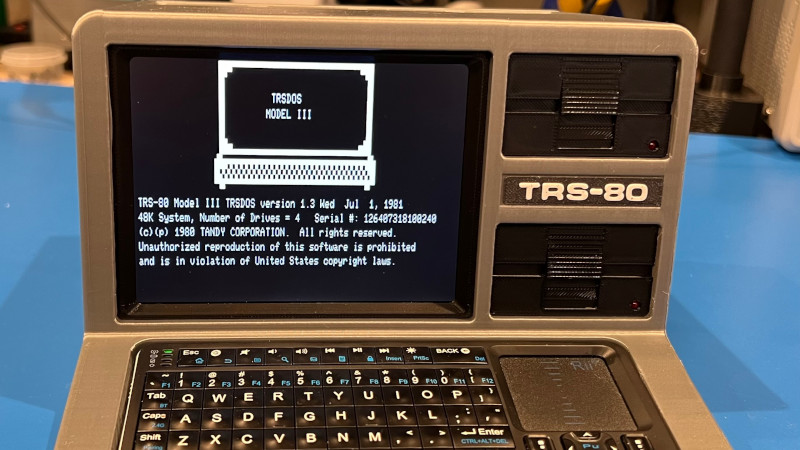
FauxTRS is a 3D-printable retrocomputing project designed to look and feel like a small TRS-80 Model III or Model 4-inspired computer. The enclosure includes mounting locations for a Raspberry Pi, a compact display, internal electronics, and decorative details that make the machine look delightfully old-school without pretending to be a fragile antique. The finished build resembles a miniature all-in-one computer: screen on one side, keyboard area below, and classic computer attitude everywhere.
The magic is in the balance. A simple Raspberry Pi in a generic plastic box can emulate old systems perfectly well, but it does not feel like sitting in front of a vintage computer. FauxTRS gives the emulator a body. It turns software nostalgia into a physical object. When the screen lights up with a TRS-80 environment, the little machine suddenly makes sense. Your desk stops looking like a modern workspace and starts looking like a corner of a Radio Shack display from an alternate universe where USB-C and Z80 nostalgia became friends.
Why The TRS-80 Still Matters
To understand why FauxTRS is so appealing, it helps to understand why the TRS-80 mattered in the first place. The original Radio Shack TRS-80 Model I arrived in 1977, a year that also gave the world the Apple II and Commodore PET. Unlike many hobbyist computers of the time, the TRS-80 was sold as a ready-to-use system through Radio Shack stores. That meant regular people could walk into a shop, see a computer, ask awkward questions, and leave believing the future might fit on a kitchen table.
The Model I came with a Zilog Z80 processor, a keyboard, a monitor, cassette storage, and BASIC. By modern standards, its specifications look tiny enough to fit in a digital breadcrumb. But in 1977, a complete system that ordinary users could buy and use was a big deal. The TRS-80 helped move computing from specialist garages and university labs into homes, schools, and small businesses. It gave countless people their first experience with programming, word processing, accounting, games, and the wonderful terror of typing a program from a magazine only to discover one missing semicolon had ruined the afternoon.
About That “Trash 80” Nickname
The TRS-80’s nickname, “Trash 80,” has followed it around for decades like a mischievous younger sibling. Some people used the phrase affectionately. Others used it to poke fun at Radio Shack’s budget-friendly image, the early Model I’s limitations, or the machine’s monochrome personality. But dismissing the TRS-80 as trash misses the larger story. This was a computer line that introduced many users to personal computing, created a huge software ecosystem, and proved that mass-market microcomputers could sell far beyond the hobbyist crowd.
FauxTRS plays with that old joke by proving the opposite. Here is a machine inspired by the TRS-80 that is approachable, functional, creative, and surprisingly stylish. It takes the shape language of an old computer and gives it modern reliability. There is no need to hunt for a working CRT, no need to recap a power supply before breakfast, and no need to hope a 40-year-old keyboard matrix feels generous today. FauxTRS says: keep the personality, reduce the smoke risk.
The Design: A Small Machine With Big Beige Energy
FauxTRS is best described as a 40%-scale homage rather than a replica. That distinction matters. A replica tries to copy every measurement and surface detail. A homage captures the spirit. FauxTRS borrows the visual cues that made the Model III and Model 4 memorable: the wedge-like all-in-one body, the display area, the keyboard position, and the strong “serious computer” face. It looks enough like the old Tandy machines to trigger instant recognition, but it remains its own project.
The display is small, modern, and practical. The keyboard opening is designed for a compact wireless keyboard with a touchpad, which makes the finished unit easier to use than a purely ornamental build. Decorative floppy drives complete the look, and LEDs can add the illusion of disk activity. Are those drives actually loading a dusty copy of TRSDOS from a floppy? No. Do they make the machine look like it might demand a disk labeled “SYSTEM” in all caps? Absolutely.
A Raspberry Pi At The Heart
The Raspberry Pi is an excellent choice for a project like FauxTRS because it is compact, affordable, well-supported, and powerful enough to emulate vintage machines without breaking a sweat. A TRS-80 emulator does not need modern gaming hardware. It needs stable performance, video output, keyboard input, and enough flexibility to live inside a custom enclosure. That is Raspberry Pi territory.
Inside FauxTRS, the Pi acts as the modern engine behind the vintage dashboard. It can run a TRS-80 emulator, boot into a retro environment, and support the display and input devices. The result is a machine that gives users a convincing Tandy-style experience while still benefiting from modern storage, modern power, and modern convenience. It is retrocomputing without the “will this 1983 power switch betray me?” suspense.
Emulation Makes The Past Usable
Emulation is often the difference between admiring old computers and actually using them. A preserved TRS-80 is wonderful, but original machines are aging. Parts fail, displays dim, disks degrade, and repairs require patience, knowledge, and occasionally the emotional resilience of a lighthouse keeper. FauxTRS uses emulation to make the experience more accessible.
Projects like trs80gp and SDLTRS show how much care has gone into preserving the TRS-80 software environment. Modern TRS-80 emulators can support multiple models, disk images, cassette behavior, video modes, and other period-specific details. That means FauxTRS can be more than a shell. It can become a working gateway into classic BASIC programming, old software libraries, text adventures, business applications, and the charmingly direct user experience of early personal computing.
Why Makers Love This Kind Of Project
FauxTRS sits at the intersection of several maker obsessions: 3D printing, Raspberry Pi projects, retrocomputing, preservation, and desktop gadgets that make visitors say, “Wait, what is that?” It is not only about building a computer. It is about building a conversation piece that actually does something.
For 3D printing fans, the enclosure is the star. Printing a case with the right angles, proportions, and fit requires planning. Parts need to align. The display must sit cleanly. The keyboard must fit comfortably. The Pi needs airflow, access, and cable routing. The final object should look intentional, not like a lunchbox had a disagreement with a soldering iron.
For retrocomputing fans, the appeal is emotional. FauxTRS captures the desk presence of an old machine without requiring original hardware. It respects the TRS-80’s design language while admitting that modern users may prefer HDMI, USB power, wireless input, and storage that does not sound like a tiny robot chewing crackers.
FauxTRS Compared With Restoring A Real TRS-80
Restoring an original TRS-80 is deeply rewarding, but it is not always beginner-friendly. A real machine may need cleaning, capacitor replacement, keyboard repair, disk-drive service, video troubleshooting, and careful handling of aging plastic. For collectors, that work is part of the joy. For newcomers, it can be intimidating.
FauxTRS offers a different path. Instead of preserving a specific vintage artifact, it preserves the experience. You can still type BASIC commands, explore old software, and enjoy the all-in-one shape that made the TRS-80 line so recognizable. But you can do it with replaceable modern components and printable parts. If something fails, you are more likely to order a new cable than begin a dramatic search for rare donor hardware.
This does not make FauxTRS better than a real TRS-80. It makes it different. A restored original is history. FauxTRS is history translated into a maker-friendly form. One belongs in a collection; the other belongs on a desk, ready to boot whenever nostalgia knocks.
Specific Examples Of What You Can Do With FauxTRS
A FauxTRS build can be used as a dedicated TRS-80 emulator station. Boot it directly into an emulator and use it to explore Model I, Model III, or Model 4 software. Load classic text adventures, experiment with BASIC, or examine how early productivity tools worked before icons took over the world and every app decided it needed a subscription.
It can also serve as a teaching tool. Students and hobbyists can see how early computers worked: limited memory, text-based interfaces, simple graphics, direct commands, and software that expected users to understand the machine rather than merely tap around until something sparkled. In an age of invisible cloud services, FauxTRS makes computing feel physical again.
Finally, FauxTRS can be a beautiful themed Raspberry Pi desktop. With the emulator closed, it is still a small Linux computer in a custom case. That makes it useful for tinkering, writing, coding, terminal work, or running other lightweight retro systems. The TRS-80 soul is the headline, but the Pi gives it range.
Why FauxTRS Feels Modern And Old At The Same Time
The best retro projects do not simply copy the past. They create a bridge to it. FauxTRS feels old because of its shape, proportions, screen placement, and Tandy-inspired personality. It feels modern because it is printable, modular, compact, and powered by widely available hardware. That mix is what makes the project so satisfying.
It also reflects a larger trend in retrocomputing. People are not only collecting vintage machines; they are recreating experiences. They build mini terminals, handheld emulators, cyberdeck-style computers, and scale replicas because the physical form of computing matters. A command prompt on a laptop is useful. A command prompt inside a tiny beige computer with fake floppy drives is useful and adorable. That is called progress, probably.
Build Considerations Before You Start
Anyone considering a FauxTRS build should think about parts, print quality, patience, and expectations. This is not a one-click software install disguised as a craft project. You need a 3D printer or access to printing services, suitable filament, a Raspberry Pi, a compatible display, input hardware, cables, fasteners, and time for assembly. Depending on your setup, you may also need to tweak display settings, emulator configuration, and boot behavior.
Fit and finish matter. Retro-inspired cases can lose their magic if panels warp, seams gap, or the display sits crooked. Printing slowly and carefully may be worth it. Sanding, painting, or choosing the right filament color can also improve the final look. The TRS-80 aesthetic is not glossy spaceship silver. It is practical, squared-off, slightly severe, and proudly beige-adjacent. In other words, it has the confidence of office equipment that knows it can survive a tax season.
Hands-On Experience: Living With A FauxTRS-Style Build
The first experience that stands out with a FauxTRS-style project is the change in mood. A bare Raspberry Pi on a desk feels like a circuit board waiting for a purpose. Put that same Pi inside a carefully designed TRS-80-inspired case, and suddenly it feels like a machine with a job. The body changes the relationship. You are no longer just launching an emulator; you are sitting down at a tiny computer that appears to have opinions about floppy disks.
Assembly teaches patience in a very practical way. The screen must be positioned so it looks built-in, not taped on by a raccoon with a deadline. The keyboard must be easy to reach. Internal cables need to bend without fighting the case. Power access should be convenient. Ventilation should not be ignored just because the computer looks cute. A good build feels tidy inside and intentional outside.
Once the emulator is running, the experience becomes surprisingly focused. Modern computers constantly invite distraction. Notifications blink, browsers multiply tabs, and operating systems behave like they are auditioning for attention. A FauxTRS environment does the opposite. It narrows the world. You get text, commands, simple programs, and immediate feedback. Type a BASIC line, run it, break it, fix it, and learn. The machine does not flatter you. It simply waits for correct syntax, like a tiny beige schoolteacher.
The decorative details matter more than they should. Fake floppy-drive LEDs, a small display, and a compact keyboard create a ritual. Even when you know the “drives” are not real, they help the brain accept the illusion. That is the same reason model trains need tiny stations and miniature trees. The details tell the story. FauxTRS works because it is not only functional; it is theatrical in the best maker-project sense.
There is also a pleasant social effect. Put FauxTRS on a desk and people ask about it. Older users may remember Radio Shack, school computer labs, or typing BASIC programs from magazines. Younger users may ask why the screen looks so simple, why the computer has fake disk drives, or why anyone would intentionally build something that looks decades old. Those conversations are part of the project’s value. FauxTRS makes computing history visible, touchable, and less intimidating.
For daily use, the appeal depends on mindset. If you want maximum productivity, a modern laptop wins. If you want a focused programming toy, a retro learning station, a display piece, or a weekend build with personality, FauxTRS is far more memorable. It reminds us that computers used to feel like distinct machines, not identical slabs with different stickers. It also proves that retrocomputing does not have to be frozen in glass. It can be printed, assembled, booted, configured, and enjoyed.
Conclusion: Not Trash, Just Timelessly Nerdy
FauxTRS is definitely not a Trash 80. It is a clever tribute to a computer family that helped bring personal computing to ordinary users. By combining 3D printing, Raspberry Pi hardware, modern displays, and TRS-80 emulation, the project captures the look and spirit of classic Tandy machines while avoiding many of the headaches that come with aging original hardware.
More importantly, FauxTRS understands that nostalgia works best when it is usable. A poster of a TRS-80 is nice. A restored original is wonderful. But a small, printable, working TRS-80-inspired machine that can sit on your desk and boot into vintage software? That is the kind of project that makes retrocomputing feel alive. It honors the past without being trapped by it, which is exactly why FauxTRS deserves a place in the maker hall of fame, preferably on a tiny beige pedestal with blinking LEDs.