Some people collect stamps. Some people collect houseplants. Gamers collect cables, controllers, keyboards, RGB lights, backup mice, emotional damage from ranked matches, and at least one mystery adapter nobody remembers buying. That is why the call “Hey Pandas, Show Us You Gaming Setups” is more than a fun community prompt. It is an invitation to reveal the tiny universe where players escape, compete, stream, laugh, rage-quit, reconnect, and occasionally promise themselves they will finally organize those wires this weekend.
A gaming setup is not just a desk with a glowing keyboard. It is part cockpit, part entertainment center, part productivity station, and part personality test. A clean minimalist setup says, “I have discipline.” A triple-monitor RGB battlestation says, “I know my frame rates and I am not afraid of electricity.” A console corner with snacks, blankets, and a giant TV says, “Comfort is a competitive advantage.” And a laptop on a dining table with one heroic mousepad says, “The grind respects no furniture.”
Today’s best gaming setups blend performance, comfort, style, and practicality. Whether you play on PC, PlayStation, Xbox, Nintendo Switch, Steam Deck, mobile, or a chaotic combination of all of them, the perfect setup is the one that helps you play longer, feel better, and enjoy the experience without needing a treasure map to find your charging cable.
Why Gaming Setups Became Their Own Internet Genre
Gaming setups are popular online because they are instantly personal. A screenshot shows what someone plays. A gaming room shows how they live. The monitor size, chair choice, lighting, cable management, wall art, collectibles, plants, speakers, and snack placement all tell a story. Some setups look like a spaceship command center. Others look like a raccoon built a LAN party in a laundry room. Both are valid. One may simply require more dusting.
The rise of setup-sharing communities comes from the social side of gaming. Millions of Americans play video games, and modern gaming is no longer limited to one platform or one demographic. Players use desktops, laptops, consoles, tablets, phones, handhelds, VR headsets, and cloud gaming services. For many people, gaming is also a way to keep up with friends, spend time with family, or meet new people online. That makes the physical space around gaming feel more meaningful.
What Makes a Great Gaming Setup?
A great gaming setup does three things well: it performs smoothly, feels comfortable, and reflects the person using it. Expensive gear can help, but money alone does not create a great setup. A $5,000 desk can still look tragic if every cable is dangling like electronic spaghetti. Meanwhile, a budget setup with smart lighting, good ergonomics, and thoughtful organization can look better than a showroom rig.
1. A Display That Matches the Way You Play
The monitor or TV is the window into the game, so it deserves real attention. Competitive PC players often care about refresh rate, response time, and input lag because fast motion and quick reactions matter. A 144Hz, 240Hz, or higher-refresh monitor can make shooters, racing games, and esports titles feel more fluid. Story-driven players may prefer a 4K OLED or QD-OLED display for deeper contrast, rich colors, and cinematic detail.
Console gamers should pay close attention to HDMI 2.1, 4K support, variable refresh rate, and low input lag. A gaming TV with proper Game Mode can make the difference between “I definitely pressed dodge” and “why is my character now decorative floor art?” For smaller rooms, a 27-inch or 32-inch monitor may be ideal. For couch gaming, a 55-inch to 65-inch TV often creates that glorious “main character in a home theater” feeling.
2. A Desk That Does Not Betray You
The gaming desk is where dreams, keyboards, controllers, drinks, and questionable posture collide. The best desk is wide enough for your display, input devices, speakers, microphone, and accessories without forcing everything into a tiny rectangle of stress. Depth matters too. If your monitor is so close that you can count individual pixels with your eyelashes, your desk may be too shallow.
Standing desks are increasingly popular among gamers who also work from the same space. Height presets, cable trays, monitor arms, and accessory hooks can turn a cluttered desk into a flexible command station. But a regular desk can work beautifully if it is sturdy, spacious, and organized. The golden rule is simple: your desk should support your play style, not wobble every time you reload.
3. A Chair Built for Humans, Not Just Marketing Photos
A gaming chair should be comfortable after two hours, not just impressive for two minutes. Look for adjustability, lumbar support, seat depth, armrest comfort, and breathable materials. Some racing-style chairs look dramatic but may not fit every body type. Many gamers prefer ergonomic office chairs because they are designed for long sessions and better posture.
Your feet should rest flat on the floor or on a footrest, your knees should sit around hip level, and your back should feel supported. If your chair makes you feel like a folded lawn chair by the end of a dungeon run, it is not a chair. It is a side quest.
Ergonomics: The Secret Upgrade Nobody Brags About Enough
RGB lighting is fun, but ergonomics is the upgrade your future spine will applaud. A good gaming setup should reduce strain on your neck, wrists, shoulders, eyes, and back. The monitor should usually sit directly in front of you, about an arm’s length away, with the top of the screen near or slightly below eye level. Your keyboard and mouse should be close enough that your elbows stay relaxed and your wrists remain neutral.
Gamers often spend long stretches in the same position, especially during raids, ranked matches, or “just one more turn” strategy sessions that somehow become sunrise. Taking short breaks, stretching, blinking, adjusting brightness, and standing occasionally can keep your setup from becoming a glamorous pain machine.
The PC Gaming Setup: Performance Meets Personality
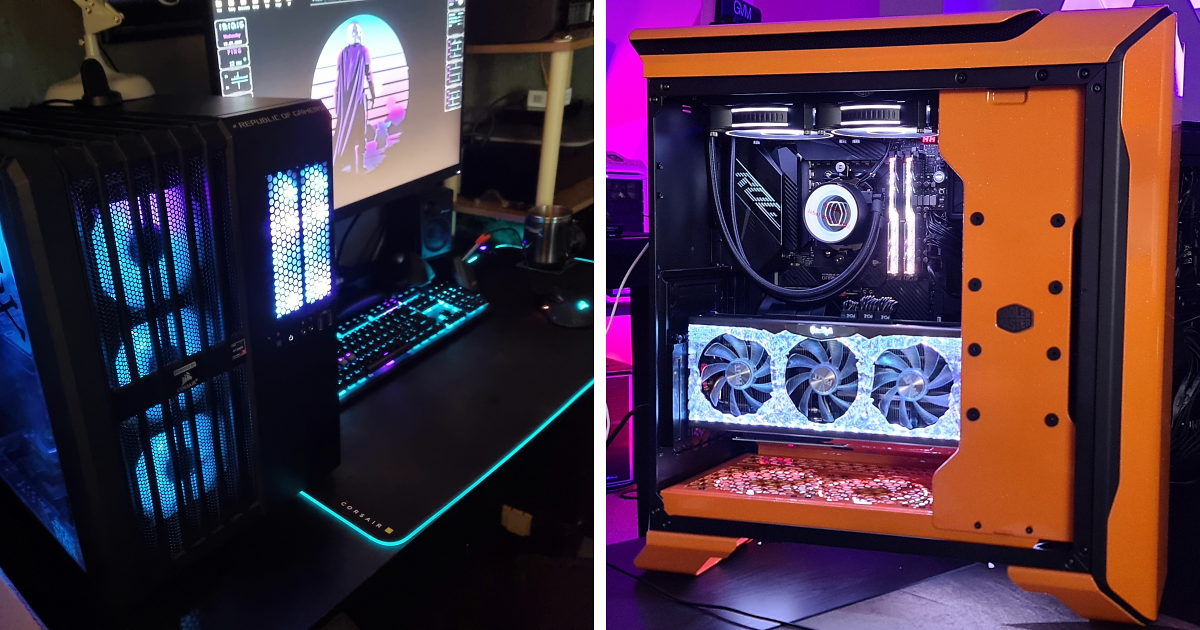
A PC gaming setup usually has the most customization. You can choose your case, GPU, CPU, cooling, keyboard, mouse, headset, monitor, lighting, software, and theme. Some players build stealthy black rigs with silent fans. Others build glass-sided aquariums of glowing hardware that look like a cyberpunk city block.
For performance, the best setup depends on resolution. A 1080p gamer can build a strong, affordable rig without chasing the most expensive graphics card. A 1440p setup benefits from a stronger GPU and a high-refresh monitor. A 4K setup needs more horsepower, especially for demanding AAA titles with ray tracing. Storage matters too. Modern games are enormous. A fast SSD is no longer a luxury; it is the thing standing between you and loading screens long enough to reconsider your life choices.
Peripheral choices are personal. Mechanical and magnetic-switch keyboards are popular because they can feel fast, responsive, and satisfying. A lightweight mouse helps in competitive shooters, while MMO and productivity players may prefer extra side buttons. A good headset or speaker system adds immersion, but microphone quality matters if you play with friends or stream. Nobody wants to be the teammate who sounds like they are broadcasting from inside a soup can.
The Console Gaming Setup: Couch Comfort With Serious Specs
Console setups are often built around comfort. The essentials are a responsive TV or monitor, stable internet, charging docks, a controller-friendly seating arrangement, and easy access to storage. Since many console players enjoy local multiplayer, couch co-op, sports games, fighting games, and family sessions, the room layout matters as much as the hardware.
A good console setup keeps controllers charged, cables hidden, ventilation clear, and games organized. If you use a PS5, Xbox Series X, Xbox Series S, Nintendo Switch, or newer handheld-console hybrids, storage expansion may become important fast. Modern game libraries can fill internal storage with alarming enthusiasm. One day you have space. The next day a single update eats 90GB and asks if you would like to delete joy.
The Streaming Setup: Look Good, Sound Better
If your gaming setup doubles as a streaming station, audio should be your first serious upgrade. Viewers may forgive a basic webcam, but poor audio can chase them away faster than a lag spike in a boss fight. A clear USB or XLR microphone, boom arm, pop filter, and basic room treatment can make a huge difference. Even a few soft surfaces, curtains, rugs, or foam panels can reduce echo.
Lighting comes next. A simple key light aimed at your face can make a webcam look much better. Backlighting or accent lighting can separate you from the background and give your stream a polished look. A 1080p webcam is enough for many beginners, while 4K webcams or mirrorless cameras are better for creators who want a more professional image. Just remember: personality still beats pixels. A boring stream in 4K is simply boring with excellent resolution.
Lighting: The Difference Between Cozy and “Police Interrogation Room”
Gaming lighting should create atmosphere without blasting your eyes. RGB strips, smart bulbs, monitor backlights, wall panels, and desk lamps can all add style. Bias lighting behind a monitor can reduce harsh contrast in a dark room and make long sessions feel easier on the eyes. Warm lighting can make a cozy setup feel inviting, while cool lighting can create a futuristic mood.
The trick is restraint. A little RGB says “immersive.” Too much RGB says “my room is sponsored by a laser tag arena.” Choose a color palette, place lights intentionally, and avoid reflections on glossy monitors. Lighting should support the game, not compete with it for main character energy.
Cable Management: Where Heroes Are Made
Cable management is the most ignored part of a gaming setup because it is boring, annoying, and suspiciously difficult for something that should be simple. Yet it can transform a desk instantly. Cable trays, Velcro ties, adhesive clips, sleeves, raceways, under-desk baskets, and labeled cords can turn chaos into calm.
Start by unplugging anything you do not use. Route power cables separately from display and peripheral cables when possible. Use shorter cables where practical. Mount power strips under the desk. Leave enough slack for standing desks or monitor arms. Label important cords so you do not unplug the router while trying to move a lamp. That specific mistake has ended friendships.
Small Gaming Setups Can Still Be Amazing
Not every gamer has a dedicated room. Some people game in a bedroom corner, dorm room, shared apartment, studio, or family living room. Small setups can be excellent when every item earns its place. A compact desk, monitor arm, wall shelf, wireless controller dock, laptop stand, foldable chair, or pegboard can create more usable space.
Vertical storage helps. So does choosing multi-purpose gear. A laptop can connect to a monitor and keyboard when docked, then disappear into a backpack. A console can sit inside a media cabinet if ventilation is good. A handheld can turn a bed, couch, or travel bag into a gaming zone. The best small gaming setup is not about having less. It is about wasting less.
Aesthetic Gaming Setup Ideas Worth Stealing
Here are a few setup styles that work especially well:
Minimalist Black Setup
Matte black desk, black monitor arm, clean keyboard, hidden cables, and one soft desk lamp. It looks sharp, hides clutter, and makes RGB accents pop without turning the room into a carnival ride.
Cozy Console Cave
Large TV, soft couch, warm lighting, blanket basket, charging station, and a small shelf for controllers. This setup is perfect for RPGs, sports games, platformers, and pretending you will not fall asleep during cutscenes.
White and Pastel Setup
White desk, pastel keycaps, soft LED lighting, cute desk mat, plants, and matching accessories. It feels bright, friendly, and very dangerous to anyone holding an open soda.
Creator Battlestation
Dual monitors, microphone arm, camera, key light, stream deck, acoustic panels, and a tidy backdrop. It says, “I may miss shots, but at least my content pipeline is organized.”
Retro Gaming Corner
CRT-style display or retro-inspired monitor, old consoles, cartridge shelves, arcade stick, and nostalgic posters. Bonus points if blowing on a cartridge is part of the sacred ritual, even if science quietly disapproves.
What to Show When Sharing Your Gaming Setup
If you are answering the community call “Hey Pandas, Show Us You Gaming Setups,” take photos that show both the whole space and the details. A wide shot helps people understand the layout. Close-ups show the keyboard, mouse, controller collection, PC build, lighting, wall art, or cable management. Natural light can help, but avoid glare on screens. Clean the desk first unless your brand is “snack archaeology.”
Include a short description with your platform, favorite games, favorite accessory, and one thing you would upgrade next. People love setups because they spark ideas. Someone may copy your monitor arm arrangement, ask about your chair, admire your controller shelf, or feel deeply comforted that your cable situation is also fighting for its life.
Budget Gaming Setup Tips
A strong gaming setup does not need to start expensive. Spend first on the pieces that affect comfort and performance: display, chair, desk stability, mouse, keyboard, audio, and storage. Buy used or refurbished when it makes sense. Upgrade slowly. Add lighting and decor after the functional pieces are solid.
A budget setup can look premium with a large desk mat, matching colors, cable sleeves, clean wallpaper, a monitor stand, and a few intentional decorations. Plants, posters, framed art, shelves, and soft lighting are often cheaper than new hardware and can make the space feel complete.
Common Gaming Setup Mistakes
The first mistake is buying for looks before function. A beautiful chair that hurts after one match is not a win. The second is ignoring ventilation. Consoles and PCs need airflow, and stuffing them into tight cabinets can lead to heat, noise, and performance issues. The third is placing the monitor too high, too low, or too close. Your neck should not have to negotiate with your screen.
Another mistake is overloading the desk. A setup should feel ready, not crowded. If there is no room to move your mouse, write a note, place a drink safely, or rest your arms, the desk is working against you. Finally, do not underestimate internet stability. A gorgeous setup with terrible Wi-Fi is like owning a sports car with square tires.
Personal Experiences: What Gaming Setups Teach Us
Gaming setups have a funny way of growing with us. Many players start with whatever is available: a family computer, a borrowed controller, a laptop that runs games with the enthusiasm of a tired toaster, or a console plugged into the only TV in the house. At first, the setup is not about aesthetics. It is about access. Can the game run? Can the controller connect? Can the chair survive another evening? If yes, congratulationsyou are gaming.
Over time, the setup becomes more intentional. Maybe the first upgrade is a proper headset because friends keep saying, “Your mic is doing the robot thing again.” Maybe it is a better mouse because aiming feels like dragging a brick through peanut butter. Maybe it is a second monitor, and suddenly you understand why people talk about dual-screen life like they joined a secret society. One screen for the game, one screen for chat, guides, music, or pretending to be productive.
The best setup experiences are not always tied to the most expensive gear. Sometimes the most memorable gaming nights happen in imperfect spaces. Four friends crowded around a TV. A laptop balanced on a cooling pad. A controller passed around during a boss fight. A chair that squeaks every time someone gets eliminated. These details become part of the story. Nobody remembers the exact cable brand. Everyone remembers the night someone won with one health point and screamed loud enough to scare the cat.
A gaming setup also teaches patience. Cable management alone can humble the strongest among us. You begin confidently with clips, ties, and a plan. Thirty minutes later you are under the desk holding a power brick, questioning physics. But when it is finished, the reward is real. The desk looks cleaner. The room feels calmer. You know where everything goes. For at least three days, you become the kind of person who says, “Please do not move that cable.”
There is also a comfort lesson. Many gamers eventually realize that posture matters. A better chair, correct monitor height, a footrest, or a wrist-friendly keyboard position can change the entire experience. Gaming should feel immersive, not like a battle against your own furniture. Once you experience a setup that supports your body, it is hard to go back to the old shrimp posture of doom.
Finally, a gaming setup is a creative space. It can be sleek, chaotic, cozy, colorful, retro, futuristic, budget-friendly, luxurious, tiny, or ridiculous in the best way. What matters is that it feels like yours. The posters, figurines, lighting, keyboard sound, controller stand, wallpaper, and snack drawer all say something. They say this is where you unwind. This is where you compete. This is where you hang out with people who may live across town or across the world. This is where a regular evening can become an adventure.
Conclusion
“Hey Pandas, Show Us You Gaming Setups” works because everyone’s gaming space has a story. Some setups are polished enough for a tech magazine. Some are charmingly held together by hope, zip ties, and one suspiciously warm power strip. But each one reflects how people play, relax, connect, and express themselves.
The best gaming setup is not the most expensive one. It is the one that fits your space, supports your body, matches your platform, keeps your gear organized, and makes you excited to sit down and play. Whether you are building a PC battlestation, designing a cozy console corner, upgrading a streaming desk, or simply cleaning up cables before sharing photos online, the goal is the same: create a space that makes gaming feel better.
So, Pandas, show us the glowing towers, the tiny desks, the controller walls, the cozy couches, the clean cable runs, the cursed cable nests, the budget builds, the dream rooms, and the setups with exactly one plant doing its best. Every gaming setup deserves its moment on the leaderboard.
Note: This article is written in original American English for web publication and synthesizes real gaming setup, ergonomics, display, streaming, and gaming community information without copying source text.