Missed the punchline? Blinked during the selfie? Opened a Snap while half-asleep and now regret everything? Good news: Snapchat does let you replay a Snap, but only if you move fast and know where to tap. The not-so-good news: Snapchat is still Snapchat, which means the rules are strict, the window is short, and “I’ll check it later” is usually how Snaps vanish into the digital mist.
This guide explains exactly how to replay a Snap on Snapchat, how Snapchat+ Replay Again works, when you can rewatch Stories, why some Snaps cannot be replayed, and what to do if the replay option does not appear. We will keep it practical, honest, and just dramatic enough for an app represented by a ghost.
What Does “Replay a Snap” Mean on Snapchat?
On Snapchat, a “replay” means opening a direct photo or video Snap one more time after you have already viewed it. This is different from watching a Story again, checking Memories, or viewing saved Chat media. A replay is specifically tied to a Snap someone sent directly to you in Chat.
The key thing to understand is timing. Snapchat allows you to replay a Snap right after you view it, while you are still on the Chat screen. If you leave the Chat screen, open another conversation, close the app, or wander off emotionally and physically, the replay may no longer be available.
Think of replay like a second sip of coffee before the cup disappears. You get one more chance, but only while the cup is still in your hand.
How to Replay a Snap on Snapchat
Here is the basic step-by-step process for replaying a Snap on Snapchat:
Step 1: Open the Snap
Go to the Chat screen and tap the Snap from your friend. Watch the photo or video as usual. Try to actually pay attention this time, because Snapchat is not known for giving unlimited second chances.
Step 2: Stay on the Chat Screen
After viewing the Snap, do not leave the Chat screen. This is the most important rule. If you swipe away, open another screen, go back to the camera, or close Snapchat, the replay option can disappear.
Step 3: Press and Hold on Your Friend’s Name or Chat
Right after you finish viewing the Snap, press and hold on that friend’s chat. Snapchat should reload the Snap if it is eligible for replay.
Step 4: Tap the Snap to Watch It Again
Once the Snap reloads, tap it immediately to replay it. You can now rewatch the Snap one more time. If it was a video, listen closely. If it was a photo, observe carefully. If it was a chaotic blurry ceiling shot, congratulations, you have successfully replayed modern art.
Can You Replay a Snap More Than Once?
For regular Snapchat users, the standard replay option generally gives you one replay right after viewing a Snap. Once that replay is used, the Snap is usually done. You cannot keep replaying the same direct Snap over and over like a favorite movie scene.
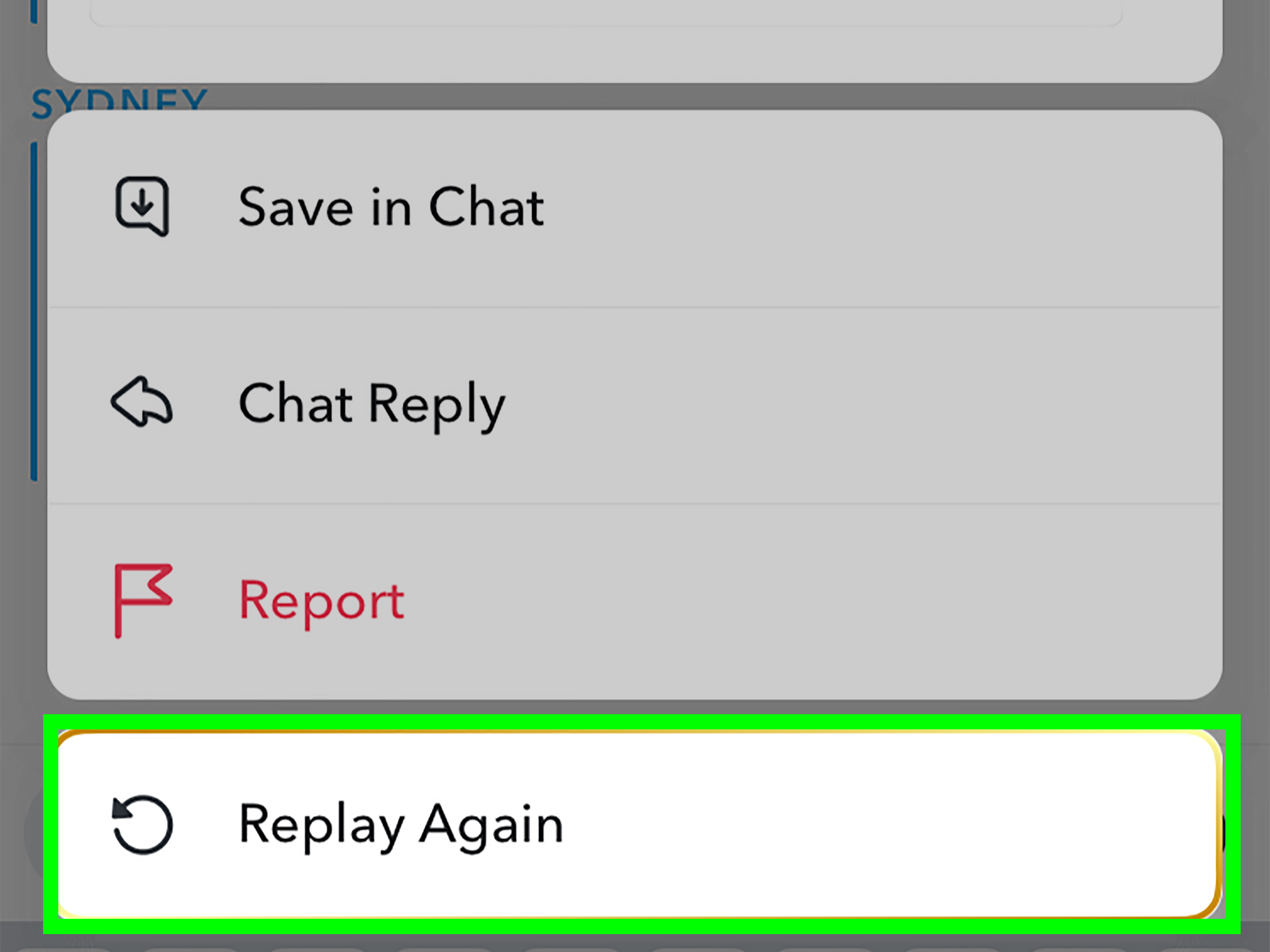
However, Snapchat+ subscribers may have access to a feature called Replay Again. This feature allows eligible subscribers to replay a Snap twice right after viewing it. In simple terms, regular replay gives you a second look, while Snapchat+ Replay Again may give you a third look.
How Snapchat+ Replay Again Works
If you have Snapchat+, the process is similar:
- View the Snap.
- Stay on the Chat screen.
- Press and hold on the friend’s chat to replay it.
- Tap the Snap to watch it again.
- To replay it again, press and hold on the same friend’s chat once more, then tap the Snap again.
The same timing rule applies: if you leave the Chat screen before replaying, the chance may be gone. Snapchat+ gives you an extra replay opportunity, not a time machine.
Why You Cannot Replay Some Snaps
If Snapchat refuses to let you replay a Snap, it is not necessarily a glitch. Several things can prevent the replay option from appearing.
1. You Left the Chat Screen
This is the most common reason. Snapchat’s replay feature is designed for immediate use. If you viewed the Snap and then left the conversation, Snapchat may remove the replay option. In other words, hesitation is the villain.
2. The Snap Was Set to One Time Only
Some Snapchat+ Snap Modes include a One Time Only setting. If the sender uses that mode, the Snap can only be viewed once and cannot be replayed. No tapping technique, secret menu, or suspicious “Snap recovery” website should be trusted to change that.
3. You Already Used the Replay
If you already replayed the Snap, the option may not appear again unless you have a Snapchat+ feature that allows another replay. Standard replay is limited, so do not waste it on a half-glance while your thumb is doing gymnastics.
4. The App Did Not Load Correctly
Sometimes Snapchat acts like it has been personally offended by your Wi-Fi. If Snaps are not loading, update the app, check your internet connection, restart your phone, or clear the Snapchat cache from settings. This will not bring back a Snap you already lost, but it can help prevent future loading problems.
5. The Snap Expired
Opened and expired Snaps are typically not retrievable. Snapchat’s whole identity is built around temporary messages, so once a Snap is gone, there usually is no official way to recover it.
Does Snapchat Tell Someone When You Replay Their Snap?
You should assume that replaying a Snap is visible to the sender. Snapchat includes replay indicators for sent Snaps, and the app is built around showing status updates such as opened, replayed, screenshotted, and saved activity. So if you replay someone’s Snap, do not treat it like a secret mission.
This is not a bad thing. Most people do not care if you replay a Snap. Sometimes it simply means you missed the message, wanted to read text on the image, or needed a second look because the video moved faster than your brain could process. Very relatable.
Still, it is good Snapchat etiquette to replay respectfully. If someone sends something personal, funny, or private, do not screenshot, screen record, or share it without permission. Snapchat content can feel casual, but real people are still behind the Snaps.
How to Rewatch a Snapchat Story
Replaying a direct Snap is different from rewatching a Story. A Story is a collection of Snaps posted for friends or followers to view. Friends can usually watch a Story unlimited times while it remains available, commonly for 24 hours unless the poster’s settings or Snapchat+ features change the duration.
To Rewatch a Friend’s Story
- Open Snapchat.
- Go to the Stories screen.
- Tap your friend’s Story tile.
- Watch the Story again while it is still available.
While watching a Story, you can tap to move to the next Snap, tap the left side to go back, swipe down to exit, or swipe up to reply. Stories are much more forgiving than direct Snaps. Direct Snaps are like “you had to be there.” Stories are more like “fine, watch my brunch video twelve times.”
Can You Replay Your Own Snaps?
Snapchat+ may offer access to a feature that lets you replay your own sent Snaps after sending them. If available on your account, you can press and hold on a Snap you sent and tap “Replay.” This can be useful when you want to double-check what you sent, especially if your memory of the moment is suspiciously vague.
That said, availability can depend on your Snapchat+ subscription, account, app version, and feature rollout. Snapchat often tests and updates features, so two users may not always see the exact same options at the same time.
Can You Replay Old Snaps?
Usually, no. If a direct Snap was opened, expired, and not saved in Chat or Memories, it generally cannot be replayed later. Snapchat is not designed like an email inbox where every message sits around waiting to be rediscovered years later.
There are a few related situations to understand:
Saved Snaps in Chat
If a Snap is saved in Chat, it may remain visible as Chat media. This is different from replaying a disappearing Snap. Saving depends on the Snap type, conversation settings, and user actions.
Snaps Saved to Memories
Memories are for Snaps and Stories you save yourself. If you saved your own Snap to Memories, you can view it again from the Memories section. That is not a direct Snap replay; it is a saved copy in your own account.
Expired Direct Snaps
If the Snap expired and was not saved, there is usually no official way to bring it back. Avoid apps, websites, or downloads claiming they can recover someone else’s expired Snaps. At best, they are unreliable. At worst, they are privacy and security nightmares wearing a fake helpful mustache.
Snapchat Replay Tips That Actually Help
Open Snaps When You Can Focus
Do not open an important Snap while crossing a room, carrying groceries, talking to three people, and pretending you are “just checking something real quick.” Open it when you can actually watch it.
Keep Your Finger Calm
Many users lose the replay option because they immediately swipe away after viewing. After a Snap ends, pause. Stay in the chat. Press and hold. Then replay.
Update Snapchat Regularly
Replay features, Snapchat+ options, and Snap Modes can change. Keeping the app updated helps you avoid bugs and missing features.
Ask the Sender to Resend It
If you missed something important, the simplest solution is often the most human one: ask your friend to send it again. Try, “I accidentally tapped out too fast. Can you resend that?” It is less mysterious than trying to decode the universe through a vanished Snap.
Do Not Rely on Third-Party Apps
Apps or websites that promise unlimited Snap replays are risky. They may violate Snapchat’s rules, compromise your account, or put your privacy in danger. Use Snapchat’s built-in features instead.
Common Replay Problems and Quick Fixes
The Replay Option Does Not Show Up
You may have left the Chat screen, already used the replay, received a One Time Only Snap, or encountered a temporary app issue. If the Snap is gone, you probably cannot recover it, but you can prevent the problem next time by staying on the Chat screen after viewing.
The Snap Will Not Load
Check your internet connection first. Switch from mobile data to Wi-Fi or vice versa. If that does not help, restart Snapchat, update the app, or restart your phone. For repeated issues, clearing the Snapchat cache may help.
You Have Snapchat+ but Cannot Replay Again
Make sure your subscription is active and your app is updated. Also remember that Replay Again must be used right after viewing the Snap. If you leave the Chat screen, the extra replay may still disappear.
You Want to Replay a Story, Not a Direct Snap
Go to the Stories screen and tap the Story again while it is still available. Stories can usually be rewatched multiple times during their active period.
Snap Replay Etiquette: Don’t Be Weird About It
Replay is a normal Snapchat feature, but it comes with social context. Replaying a funny video is harmless. Replaying a private or emotional Snap may feel more noticeable. Taking screenshots or recordings without permission can damage trust, even if the app technically lets people capture what appears on their screen.
A good rule: if you would feel awkward explaining why you saved or shared something, do not save or share it. Snapchat may feel casual, but privacy still matters. The best replay behavior is simple: rewatch for clarity, laugh at the joke, reply like a normal person, and avoid turning someone’s temporary message into permanent drama.
Frequently Asked Questions About Replaying Snaps
Can I replay a Snap after closing Snapchat?
Usually, no. If you close the app or leave the Chat screen before replaying, the replay option may disappear.
Can I replay a Snap from yesterday?
Not if it was a direct Snap that expired and was not saved. Stories and Memories work differently, but old direct Snaps usually cannot be replayed later.
Can Snapchat+ replay any Snap forever?
No. Snapchat+ Replay Again may allow an additional replay, but it still has timing limits. It does not create unlimited access to expired Snaps.
Can I replay a One Time Only Snap?
No. One Time Only Snaps are designed to be viewed once and cannot be replayed.
Is replaying the same as screenshotting?
No. Replaying means viewing the Snap again inside Snapchat. Screenshotting captures an image of the Snap on your device. Snapchat may show screenshot-related indicators, and you should always respect the sender’s privacy.
Real-Life Experiences: What Replaying a Snap Feels Like in the Wild
Anyone who uses Snapchat long enough develops at least one replay-related life lesson. Mine would be this: never open a Snap while distracted unless you are emotionally prepared to miss the entire point. Snapchat does not care that your toast popped up, your dog barked, your friend yelled your name, or your brain briefly left the building. The Snap appeared, the Snap vanished, and now you are staring at the chat like it personally betrayed you.
The replay feature is most useful in those tiny everyday moments where your attention slips. Maybe a friend sends a video from a concert, but the first viewing is just flashing lights, bass, and your own confusion. You replay it and finally catch the singer, the joke, or the friend screaming lyrics with Olympic-level confidence. Or maybe someone sends a photo with text on it, and the first time you are too busy looking at their face, the background, or the suspiciously large iced coffee. Replay gives you a second chance to read the actual message.
One common experience is the accidental speed-tap. You open a Snap, your thumb gets ambitious, and suddenly it is over. This is especially painful when the Snap looked important. Maybe it was a screenshot of plans, a quick update, or a dramatic “look what just happened” moment. That is when knowing the replay rule matters. Do not panic-swipe. Do not leave the chat. Press and hold right away, reload the Snap, and give it the respectful attention it deserved the first time.
Another familiar situation is the group-chat detective moment. Someone sends a Snap that everyone reacts to, and you missed the reason. The chat starts filling with “NO WAY,” “I’m crying,” and “that’s insane,” while you sit there with the confidence of a person who understood absolutely nothing. A replay can save you from asking, “Wait, what happened?” and revealing that you were mentally somewhere else during the main event.
Then there is the emotional replay. Sometimes a Snap is not just funny; it is meaningful. A friend sends a sweet message, a quick update from a trip, a pet doing something adorable, or a small moment they wanted to share with you. Replaying it can feel like taking one more second to appreciate the connection. That is the nice side of Snapchat: it is fast, casual, and temporary, but the moments can still matter.
The biggest lesson is to treat replay as a helpful backup, not a guaranteed archive. If a Snap matters, respond quickly, ask for clarification, or ask the sender to resend it. If you are sending something important, consider whether Snapchat is the best place for it. Temporary messages are great for jokes, reactions, and daily life, but not always ideal for details someone needs later.
In the end, replaying a Snap is less about hacking the app and more about understanding its rhythm. Snapchat rewards quick attention. Stay in the chat, press and hold, replay immediately, and do not count on the ghost to be generous twice.
Conclusion: Replay Fast, Rewatch Smart
Learning how to replay a Snap on Snapchat is simple once you know the rule: view the Snap, stay on the Chat screen, press and hold on your friend’s chat, then tap the Snap to watch it again. Regular users usually get one replay, while Snapchat+ users may be able to use Replay Again for an additional viewing. Stories are different because they can usually be watched multiple times while they are available.
The most important takeaway is that Snapchat replay is time-sensitive. If you leave the Chat screen, the chance may disappear. If the Snap was One Time Only, it cannot be replayed. If it expired long ago, it is probably gone. So the next time a Snap flashes by too quickly, do not panic. Stay put, press and hold, and let the ghost give you one more look.