The internet is a weird neighborhood. One minute, you are searching for “how to remove coffee from a white shirt,” and the next, you are looking at a digital map of your Minecraft world, a tool that identifies furniture sold under different names, and a website that can generate a fantasy kingdom complete with suspiciously dramatic mountain ranges.
That is the appeal of viral “websites you need to know” lists. They feel like discovering a hidden drawer in your desk that contains snacks, cash, and a tiny wizard. A widely shared roundup from TikTok creator SetupSpawn, also known as Matty McTech, highlighted niche websites for everything from workouts and meal plans to travel ideas, shopping research, entertainment, and creative projects.
Why These Websites Feel Like Internet Cheat Codes
The most useful websites solve one small but annoying problem quickly. They do not promise to make you rich before lunch or turn your cat into a certified accountant. Instead, they reduce friction. They help you find a recipe copycat, compare a product, create a resume, organize a road trip, or finally answer the eternal question: “What movie can two people with wildly different taste watch together?”
That is why these tools can feel almost unfair. They save time usually wasted on browser-tab archaeology. Still, convenience should not make people careless. The Federal Trade Commission warns that scammers often imitate legitimate websites, retailers, employers, and online services to collect money or personal information. Use strong, unique passwords, enable multifactor authentication where possible, and do not hand over sensitive files or account credentials just because a website has a shiny button and an adorable mascot.
30 Websites That Can Make Everyday Life Easier
1. MuscleWiki
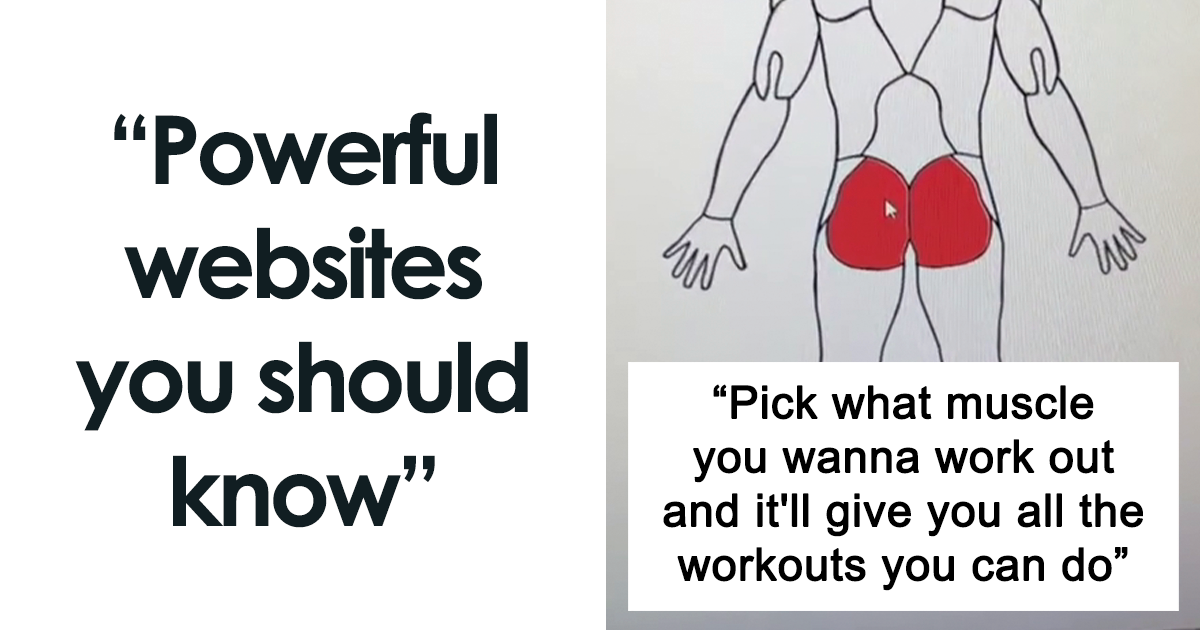
MuscleWiki is helpful for people who want exercise ideas without wandering around the gym pretending to be deeply interested in a water fountain. Select a muscle group, equipment type, or exercise goal, and the site provides movement suggestions. It is especially useful for beginners building a routine, though proper form and medical limitations still matter more than internet confidence.
2. VocalRemover
VocalRemover separates vocals and instrumentals from audio tracks. Musicians can use it to practice harmonies, karaoke fans can finally perform dramatic power ballads in peace, and creators can study arrangements. Only upload audio you own or are authorized to use. Splitting a song into pieces does not make copyright disappear like a magician’s rabbit. Copyright and licensing still apply to music and sound recordings.
3. Date Night Movies
Date Night Movies helps two people find movie recommendations based on separate preferences. One person can choose action thrillers while the other chooses romantic comedies, and the site looks for middle-ground options. It is useful for couples, roommates, families, and anyone who has spent 45 minutes browsing streaming apps only to rewatch the same sitcom.
4. Atlas Obscura
Atlas Obscura is made for travelers who are tired of seeing the same five tourist photos in every city guide. Search a destination to discover unusual museums, strange landmarks, hidden architecture, quirky food stops, and local oddities. Think less “standard itinerary” and more “why is there a museum dedicated to miniature chairs?”
5. Tailor Nova
Tailor Nova offers tools for creating custom clothing patterns. It can be useful for sewing enthusiasts who want to design garments around measurements and personal style instead of accepting that every store apparently believes all humans have identical proportions. Review pricing and pattern limitations before committing to a project.
6. CopyKat Recipes
CopyKat Recipes focuses on recreating popular restaurant dishes at home. It is perfect for anyone who has stared emotionally at a restaurant biscuit basket and thought, “I could probably make this.” The recipes are not official restaurant formulas, but they can provide approachable versions of familiar menu favorites.
7. Hemingway Editor
Hemingway Editor analyzes writing for readability, sentence complexity, passive voice, and wordiness. It will not turn every email into a Pulitzer Prize winner, but it can help writers catch bloated sentences before they grow a second paragraph. Use it as an editing assistant, not as a replacement for thinking clearly.
8. My90sTV
My90sTV creates a nostalgic channel-surfing experience with clips, commercials, music, and television-style programming from the 1990s. It is less a productivity tool and more a time machine powered by fluorescent colors, old sitcoms, and the sound of someone yelling, “Do not touch that antenna!”
9. Radiooooo
Radiooooo lets users explore music by country and decade. It is a fascinating way to discover what listeners in different places were hearing during the 1950s, 1970s, or 1990s. For writers, filmmakers, teachers, and curious music fans, it can make cultural research feel much more alive than scrolling through a generic playlist.
10. GPTExcel
GPTExcel can help generate spreadsheet formulas from plain-English requests. Instead of spending 30 minutes wondering why a formula keeps returning an error, users can describe the task, review the suggested formula, and test it in Excel or Google Sheets. Always verify the output before using it in financial models, payroll documents, or anything that could ruin your Tuesday.
11. WiFiSPC
WiFiSPC was featured as a way to locate publicly shared Wi-Fi details. However, this is one of the entries that deserves serious caution. Never attempt to access a private network without the owner’s permission, and avoid entering credentials into random Wi-Fi portals. A free connection is not worth becoming the star of your own cybersecurity cautionary tale.
12. University of Illinois Extension Stain Solutions
University of Illinois Extension Stain Solutions offers practical guidance for treating common stains. Wine, grease, grass, ink, mystery sauce from a late-night snack: the site can help identify reasonable cleaning steps. It is the kind of resource that feels boring until you spill coffee on a white shirt five minutes before leaving the house.
13. WornOnTV
WornOnTV helps viewers identify clothing and accessories seen on television shows. Search by show, character, or episode to find similar outfits or original items when available. It is handy for fashion fans who see a jacket on screen and immediately decide that their current wardrobe is emotionally insufficient.
14. Amazon Outlet
Amazon Outlet features discounted overstock and clearance items. Deals can be real, but “discounted” does not automatically mean “necessary.” Compare prices, read reviews critically, and check whether the same item appears elsewhere under a different brand name. The FTC recommends relying on trustworthy reviews and researching sellers before buying online.
15. Eat This Much
Eat This Much generates meal-planning ideas based on calorie targets, dietary preferences, and meal frequency. It can be useful for inspiration and grocery planning, but it is not a substitute for personalized medical nutrition advice. Healthy eating is about variety, nutrient-dense foods, and sustainable habits, not punishing yourself because an app thinks you should live on plain chicken and sadness.
16. Word Spinner
Word Spinner and similar rewriting tools can help rephrase a rough email, simplify a sentence, or explore different tones. They should not be used to disguise copied work, bypass plagiarism rules, or avoid learning how to write. The best use is as a draft-improvement tool: compare the result, keep what works, and make the final wording sound like an actual human being.
17. Make My Drive Fun
Make My Drive Fun was designed to suggest interesting stops between two destinations. It can be useful when planning a road trip that needs more than gas stations, granola bars, and arguments over directions. Double-check business hours, addresses, road conditions, and whether a suggested stop still exists before building your entire vacation around it.
18. FlowCV
FlowCV helps users build visually polished resumes and CVs. It can save time, particularly for people who hate formatting documents more than they hate job interviews. Keep the resume readable, use clear headings, and avoid overcrowding it with design flourishes that make the document look like a restaurant menu from 2008.
19. Spoken
Spoken compares furniture listings that may be sold under different names by different retailers. This can help shoppers identify similar or identical items before paying a premium for a product with a fancier title. It is a useful reminder that “coastal artisan cloud sofa” may simply mean “gray couch with a better publicist.”
20. LitSolutions
LitSolutions provides step-by-step help for certain textbook problems. Used responsibly, it can help students understand how a process works after attempting the problem themselves. Used irresponsibly, it becomes a very expensive way to learn nothing before an exam. Treat solution sites like a tutor, not a teleportation device for homework.
21. Craiyon
Craiyon generates images from written prompts. It can be fun for brainstorming concepts, visualizing story ideas, creating mood boards, or generating absurd scenes such as “a raccoon running a luxury hotel.” Review the platform’s terms, avoid using private images without permission, and do not mistake AI-generated images for verified evidence.
22. ImportYeti
ImportYeti organizes public shipping and supplier information for business research. Entrepreneurs, journalists, and curious shoppers can use it to explore supply-chain relationships and sourcing patterns. It can be especially useful when researching a brand before making a large wholesale purchase or evaluating competitors in a market.
23. Netflix Codes
Netflix Codes collects category codes that can help users browse narrow genres on Netflix. The platform’s catalog changes by country and over time, so a code is not a magic portal to every movie ever made. Still, it can be a fun shortcut when the regular homepage keeps recommending the same three titles like an overly confident waiter.
24. Side Hustle Stack
Side Hustle Stack lists platforms and ideas for freelance work, services, and side income. Treat every listing as a starting point for research, not as a promise of easy money. The FTC repeatedly warns that job scammers use online job boards, social media, fake recruiters, and “work from home” offers to steal money and personal information. Never pay upfront for a job or send sensitive identity documents to an unverified employer.
25. ReimagineHome
ReimagineHome uses AI to create visual design ideas for rooms and outdoor areas. Upload a photo of a dull backyard, for example, and explore concepts such as a pool, new landscaping, or different finishes. It is excellent for inspiration, but not for estimating construction costs. AI can add a pool to your photo in seconds; plumbers, permits, and budgets remain dramatically less cooperative.
26. Azgaar’s Fantasy Map Generator
Azgaar’s Fantasy Map Generator creates detailed maps for role-playing games, fiction writing, classrooms, and world-building projects. Users can edit cities, terrain, borders, and names. It is one of those rare creative tools that can turn “I have an idea for a fantasy novel” into “I now have 43 provinces and a tax dispute between two imaginary kingdoms.”
27. Hey It’s Free
Hey It’s Free compiles birthday freebies, promotions, samples, and deal opportunities. Offers can vary by location, membership requirements, and expiration date, so confirm details directly with the business. Free food is wonderful, but signing up for seven restaurant newsletters may cause your inbox to develop its own buffet.
28. IsThereAnyDeal
IsThereAnyDeal tracks prices for PC games across authorized digital stores. It can help gamers compare sales, set price alerts, and avoid buying a title at full price two days before a major discount. Check that a seller is legitimate and that the game key works in your region before purchasing.
29. FakeYou
FakeYou and similar voice-generation tools can create synthetic speech in various styles. This technology can be entertaining for parody, accessibility, or creative experiments, but it also carries obvious ethical concerns. Do not use it to impersonate real people, mislead others, create harassment, or fake consent. A joke stops being funny when it becomes deception.
30. Chunkbase
Chunkbase helps Minecraft players explore world seeds, locate structures, and plan adventures. It is useful for players who want to find villages, biomes, temples, or other features without blindly digging through an entire digital continent. It may reduce surprise, but it also reduces the odds of spending three hours trapped in a cave with one torch and no snacks.
How to Use Viral Website Lists Without Getting Burned
The smartest way to use a list like this is to pick one problem at a time. Do not open all 30 sites in one browser session unless your goal is to turn your laptop fan into a small weather system. Start with the tool that solves something you actually need this week: a resume builder for a job application, a road-trip planner for an upcoming vacation, a stain guide for a clothing emergency, or a spreadsheet helper for work.
Before signing up, ask three questions: What data am I sharing? What does the free version actually include? What happens if this website disappears next month? For sites that involve shopping, jobs, financial information, personal photos, audio uploads, or identity details, slow down and verify the company independently. Government resources such as the Occupational Outlook Handbook can help people research careers and job expectations before committing to a questionable “easy money” offer.
Real-World Experiences: What Happens When You Actually Use These Tools
The first experience most people have with a “secret website” is excitement. You find a tool that does something oddly specific, and for a few minutes, the internet feels like it was designed by a helpful wizard. A spreadsheet formula generator saves you from a tiny work crisis. A stain-removal guide prevents a shirt from becoming “casual only.” A movie recommendation tool ends a 30-minute streaming argument. Suddenly, your browser feels less like a distraction machine and more like a utility belt.
Then comes the second experience: reality. Not every viral website is perfect. Some tools are free only for a few uses. Some need an account. Some are overloaded with ads. Others provide suggestions that are helpful but incomplete. A meal-planning website might generate a neat-looking weekly menu, but it cannot know your allergies, budget, cooking skills, cultural preferences, or whether you have the emotional strength to meal-prep on a Sunday afternoon. The tool gives you a plan; you still have to buy groceries and remember where you put the garlic.
Creative tools can be especially fun. A fantasy-map generator may begin as a way to help a child prepare for a tabletop game, then somehow become a three-hour world-building session involving fictional rivers, haunted villages, and a kingdom named after the family dog. AI design tools can also help people visualize a room renovation before spending money. That is genuinely useful. But a generated backyard with a resort-style pool is a concept, not a contractor’s quote. The gap between an AI image and a real home project is usually filled with permits, measurements, drainage, and someone saying, “That will cost more than you think.”
Shopping and job tools create a different kind of experience: they can save money, but they can also invite bad decisions if used too quickly. Furniture-comparison platforms may reveal that several retailers sell nearly identical pieces at very different prices. That feels brilliant until you realize you now have 14 tabs open comparing couches, shipping fees, return policies, and shades of beige with names like “storm cloud,” “winter oat,” and “quiet regret.” Similarly, a side-hustle directory may spark ideas, but no website can replace research into a company’s reputation, payment terms, and legitimacy.
The best experience comes from using these websites as helpers rather than shortcuts. A writing editor can make your draft clearer, but you still need your own ideas. A study-solution website can explain a difficult process, but you still need to practice. A vocal separator can help you rehearse, but it cannot teach timing, breath control, or how to survive the moment someone hands you a microphone at a party.
Ultimately, the most valuable internet tools are not the ones that promise to do everything for you. They are the ones that make you more capable. They help you compare, learn, create, plan, repair, and decide. That is why websites like these feel almost illegal to know: not because they break the rules, but because they make ordinary problems feel a little less impossible.
Conclusion
The web is packed with useful tools hiding behind plain names and simple search boxes. From workout planners and recipe recreations to travel guides, resume builders, gaming deal trackers, and creative map generators, these 30 websites show how much practical help can fit inside a browser tab.
The key is to use them wisely. Verify offers, protect your personal information, respect copyright, avoid deceptive uses of AI, and remember that the best tool is usually the one that helps you learn or save time without creating a bigger problem later. Bookmark a few that match your real needs, and your future self may quietly thank you during the next spreadsheet meltdown, road-trip planning session, or mystery-stain emergency.