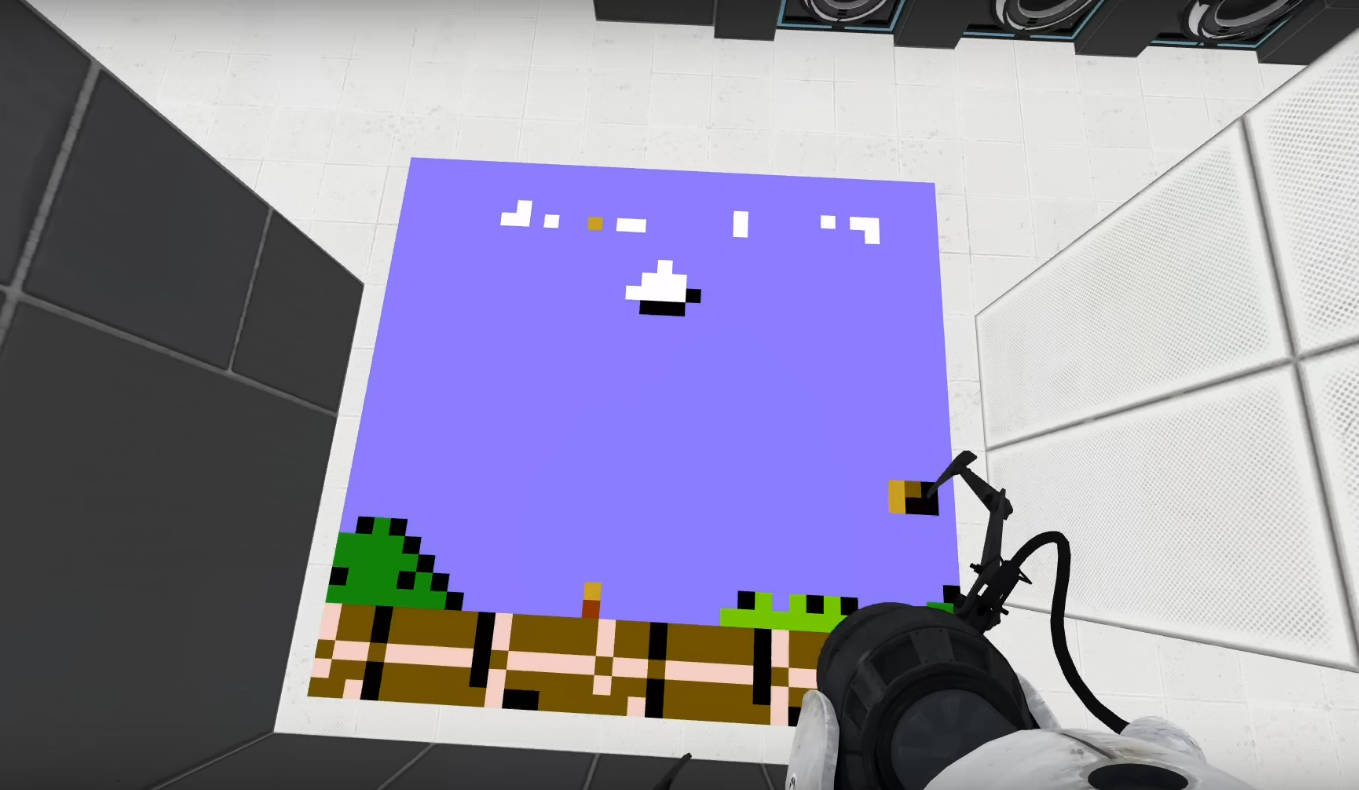
Some projects are useful. Some projects are beautiful. And some projects make you stare at your screen and whisper, “Wait… someone put an NES emulator inside Portal 2?” That is the delightful rabbit hole behind Open A Portal To An NES Emulator, a phrase that sounds like a gaming fever dream but describes a very real kind of technical magic: running Nintendo Entertainment System-style emulation in places where no sensible person would expect it.
At its heart, this topic is about more than nostalgia. Yes, the NES gave the world 8-bit heroes, jumpy plumbers, pixel-perfect platforming, and music that still lives rent-free in millions of brains. But an NES emulator is also a tiny museum of computer architecture. It recreates the behavior of a classic console by simulating its CPU, graphics chip, audio system, memory quirks, controller input, and cartridge mapping. When developers squeeze that into a browser, a game engine, or even a scripting environment like Portal 2’s Squirrel language, the result feels like opening a secret door in reality.
So let’s step through the portal. On one side: 1980s hardware. On the other: modern emulation, WebAssembly, browser-based retro gaming, game preservation, and wonderfully unnecessary engineering. Somewhere in the middle, a companion cube is probably judging your frame rate.
What Does “Open A Portal To An NES Emulator” Mean?
The phrase points to a clever software experiment: porting a small NES emulator into an environment associated with Portal 2. The original inspiration comes from a project that adapted smolnes, a compact NES emulator written in C, into Squirrel, the scripting language used by Portal 2. Instead of building a normal desktop emulator with a nice window and a friendly file menu, the creator pushed the concept into a game world that was absolutely not designed to become a retro console.
That is what makes the project so irresistible. Portal 2 already bends space with its famous linked doorways. An NES emulator bends time, pulling old console behavior into a modern machine. Put them together and you get a deliciously nerdy double trick: a game running another game, inside a game famous for making impossible spaces feel logical.
Technically, the project is also a lesson in constraint. Portal 2 cannot simply spawn unlimited objects or simulate every NES component with brute force. The smarter approach is to port emulator logic into script, reduce visual detail where needed, and accept performance compromises. The result may not be a silky-smooth living-room console experience, but it proves something more interesting: emulation is not just about playing old games. It is about describing hardware well enough that another environment can pretend to be it.
How An NES Emulator Works Without Wearing A Lab Coat
An emulator is not a video player. It does not replay a recording of an old game. Instead, it recreates the machine that would have run the game in the first place. The emulator reads the game program, interprets or recompiles the instructions, updates virtual memory, draws pixels, generates sound, and checks controller input over and over again. Do this accurately enough and the game behaves as if it were still sitting inside a gray plastic console under a tube TV.
The CPU: The Tiny Brain Behind The Buttons
The NES uses a Ricoh 2A03 CPU, derived from the MOS 6502 family. That little chip is the brain of the console. It runs game instructions, moves data, checks input, triggers changes in memory, and keeps the game world alive one cycle at a time. For emulator developers, the CPU is often the first mountain to climb because it has to execute instructions correctly and with believable timing.
Even simple-looking games depend on subtle behavior. A jump arc, an enemy pattern, a scrolling background, or a collision check can break if the emulator gets timing wrong. That is why NES emulation is both charming and maddening. The hardware is old enough to fit into a small technical manual, but weird enough to make developers mutter at hexadecimal values like they are negotiating with a haunted toaster.
The PPU: Where Pixels Become Personality
The NES Picture Processing Unit, usually called the PPU, handles graphics. It draws backgrounds, sprites, palettes, and scrolling effects. The classic NES lookchunky tiles, limited colors, flickering sprites, and screen transitions that feel like pure childhoodis not just an art style. It is the result of very specific hardware limits.
A good NES emulator must recreate those limits, not smooth them away. Too much perfection can make old games feel wrong. Sprite flicker, palette restrictions, and tile-based backgrounds are part of the texture. Emulation is a little like restoring an old diner: you can clean the counter, but if you replace the neon sign with a minimalist LED strip, you have missed the point.
The APU: The Glorious Beep Machine
The NES Audio Processing Unit creates the console’s famous sound. Its channels include pulse waves, a triangle wave, noise, and sample playback. That combination produced music and effects that were technically limited but emotionally unstoppable. A few square waves and a noise channel somehow convinced an entire generation that adventure had a soundtrack.
For emulator builders, audio can be especially tricky. Bad video timing is visible. Bad audio timing is personal. A tiny crackle, delay, or pitch issue can turn a heroic theme into a robot sneezing into a lunchbox. That is why some lightweight emulators prioritize visuals first and leave perfect audio for later.
Why Port An NES Emulator Into Portal 2?
The practical answer is: because it is possible. The honest answer is: because developers are wonderfully strange creatures. Give them a system with limits, and someone will immediately ask, “Can it run Doom?” or “Can it emulate an NES?” This is not wasteful curiosity. It is how programmers learn what systems can really do.
Portal 2 is especially funny as a host because the game is already about solving puzzles through constraints. You cannot go everywhere; you can only place portals on certain surfaces. You cannot ignore physics; you have to exploit it. Porting an emulator into that world feels thematically perfect. The developer is solving a real puzzle using the tools available inside another puzzle game.
The challenge comes from translation. C code and Squirrel script do not behave the same way. Pointers, arrays, memory access, integer behavior, and performance expectations all change. A compact emulator like smolnes may be small in code size, but small does not mean effortless. Porting it requires understanding both the original emulator and the host language deeply enough to make them shake hands without dropping all the pixels on the floor.
Browser-Based NES Emulators: The Modern Portal
While the Portal 2 experiment is delightfully eccentric, the web browser is the more common modern portal to NES emulation. Today, developers can build NES emulators in JavaScript, Rust, C, C++, or other languages, then run them in the browser. WebAssembly makes this especially attractive because it allows code written in systems languages to execute efficiently on the web.
A browser-based NES emulator usually works like this: the user opens a page, the emulator loads, a legal ROM or homebrew file is selected, and the game runs inside a canvas. Keyboard input or controller input maps to NES buttons. The emulator uses a timing loop, often connected to the browser’s animation system, to keep frames moving at a consistent pace.
This is where modern web technology becomes surprisingly retro-friendly. The original NES expected a television-like rhythm. A web emulator must coordinate CPU cycles, PPU frames, audio buffers, and user input while living inside a browser tab that may also be juggling ads, notifications, extensions, and someone’s twenty-seven open recipe tabs. It is a miracle your laptop does not sigh out loud.
WebAssembly Changed The Game
WebAssembly, often shortened to Wasm, gives developers a low-level, efficient execution format for web applications. In plain English: it helps serious code run in the browser without asking JavaScript to do every push-up alone. For emulators, that matters because emulation is repetitive, timing-sensitive, and computationally busy.
A Rust or C++ NES emulator compiled to WebAssembly can keep the core emulation logic fast while JavaScript handles browser integration, user interface, canvas drawing, and file loading. This separation is clean and practical. The emulator core pretends to be the NES; the web page pretends to be the living room.
That does not mean WebAssembly is magic dust. Developers still have to deal with browser security rules, audio latency, input handling, memory layout, and performance differences across devices. A blazing-fast desktop browser may run a demanding emulator beautifully, while an older phone may heat up like it is trying to toast a bagel. Still, WebAssembly has made browser emulation more realistic, portable, and pleasant than it used to be.
Accuracy Versus Playability
Every emulator lives somewhere on a spectrum between accuracy and convenience. A highly accurate emulator tries to reproduce hardware behavior as closely as possible, even the weird edge cases. A lightweight emulator may focus on getting popular games playable with fewer resources. Neither approach is automatically wrong. They serve different audiences.
If you are a preservationist, speedrunner, emulator developer, or hardware researcher, accuracy matters deeply. You want the same behavior across frames, inputs, and obscure cartridge tricks. If you are a casual player enjoying a homebrew platformer during a lunch break, you may care more about quick loading, save states, and responsive controls.
The Portal 2 NES emulator concept leans toward the experimental side. It is not trying to replace a polished desktop emulator. It is a proof of possibility. It says, “Look what happens when we take an old console, compress its behavior into code, translate that code into a strange host environment, and make the impossible just playable enough to be hilarious.”
The Role Of Mappers And Cartridges
One reason NES emulation is more complicated than “run the CPU and draw the pixels” is cartridge hardware. NES cartridges often contain mapper chips or circuits that extend the console’s abilities. Mappers help games use more memory, switch banks, save progress, or add special behavior. In other words, the cartridge is not always just a storage box. Sometimes it is part of the machine.
That is why emulator compatibility lists often mention mapper support. A simple emulator may run early games using basic cartridge layouts but fail with more advanced titles. Supporting more mappers means supporting more of the NES library, but it also means handling more quirks. Every mapper is another little goblin in the attic, and some of them are wearing tiny engineer hats.
Legal And Ethical Notes: The Not-So-Fun But Necessary Part
Emulation itself is a fascinating technical field, but ROM files can raise legal issues. A ROM is a copy of a game’s data. Downloading unauthorized copies of commercial games is not something publishers endorse, and companies like Nintendo have long taken a strong stance against piracy. For a public website, school project, or commercial article, the safest language is simple: use legal homebrew games, public-domain demos, original test ROMs, or software you have the right to use.
This distinction matters. An article about NES emulators should not become a treasure map to shady downloads. The better angle is preservation, education, and technical curiosity. Homebrew NES development is still alive, and many creators release original games or demos that run on real NES hardware and emulators. That keeps the scene fresh without turning copyright law into a boss battle nobody wanted to fight.
Why People Still Care About NES Emulation
The NES is not just old hardware. It is a shared cultural reference point. Its design limitations shaped how games looked, sounded, and felt. Developers had to make every byte count. Artists built worlds from tiles. Composers wrote unforgettable themes with a few audio channels. Designers created difficulty curves with no modern analytics dashboard whispering, “Players are leaving at level 2-3.”
Emulation keeps that history accessible. Old cartridges fail. Consoles break. CRT televisions become harder to find. Regional releases disappear. Documentation gets lost. Without emulation and preservation work, huge parts of game history would be trapped in aging plastic and fading memory.
That is why an oddball project like an NES emulator inside Portal 2 is more than a novelty. It reminds us that software can be portable in spirit even when the original hardware is gone. If a machine can be described precisely enough, it can be reborn in unexpected places. Sometimes that place is a browser. Sometimes it is a Raspberry Pi. Sometimes it is a puzzle game where a sarcastic AI once tried to ruin your day with science.
What Makes The Portal 2 NES Emulator So Charming?
Part of the charm is absurdity. Running an NES emulator in a normal emulator app is useful. Running one inside Portal 2 is theater. It is a technical magic trick performed for people who appreciate the punchline. The project combines retro computing, game modding, code porting, and the long-running internet tradition of making one system run inside another system for no reason except pure joy.
But beneath the joke is serious skill. Porting code across languages forces a developer to understand what the code actually means. You cannot rely on familiar syntax or memory behavior. You have to translate concepts. Pointers become arrays. Numeric assumptions become bugs. Rendering becomes a negotiation with performance. If the emulator finally displays a recognizable game screen, that is not luck. That is persistence wearing pixelated sunglasses.
Building A Web Page Around An NES Emulator
If you were creating a modern article or project page about an NES emulator, the user experience matters. A good emulator page should explain what the emulator does, what files are supported, what controls are available, and what kind of software users may legally load. It should also be honest about limitations, such as incomplete audio, unsupported mappers, save-state issues, or mobile performance problems.
For SEO, the page should naturally include terms like NES emulator, browser NES emulator, WebAssembly emulator, retro gaming, 8-bit console, game preservation, and homebrew NES games. The trick is to write for humans first. Search engines are useful, but they are terrible at enjoying chiptune bass lines.
A strong page might include screenshots, compatibility notes, a short technical explanation, and a responsible legal disclaimer. It should not promise “free Nintendo games” or encourage downloading unauthorized ROMs. That is bad for users, bad for publishers, and bad for any site that wants to sleep peacefully after hitting publish.
Performance Lessons From Tiny Emulators
Tiny emulators teach big lessons. They show how much can be done with compact code, careful trade-offs, and a deep understanding of hardware. They also reveal the difference between “works once” and “works reliably.” Getting a title screen to appear is exciting. Getting gameplay, scrolling, input, audio, and timing to behave consistently is the real marathon.
In the browser, performance depends on how much work happens per frame. At 60 frames per second, each frame has a small time budget. The emulator must run enough CPU cycles, update graphics, feed audio, and handle input before the next frame. If it misses the window, the user sees stutter or hears glitches. If it runs too quickly, the game feels like it drank six coffees and challenged physics to a duel.
Good emulator design often means batching work intelligently, minimizing expensive language-boundary calls, keeping memory access predictable, and avoiding unnecessary rendering. In other words, the best emulator is not merely accurate. It is disciplined.
Experiences Related To “Open A Portal To An NES Emulator”
The first time you see an NES emulator running somewhere unexpected, it feels like finding a secret room in a house you thought you knew. The screen may be tiny. The frame rate may wobble. The colors may look as if they were assembled from vintage candy wrappers. None of that ruins the moment. In fact, it makes the moment better because the whole appeal is that it should not be working at all.
That is the emotional core of “Open A Portal To An NES Emulator.” It brings back the feeling of early computing, when everything was a little fragile and therefore more exciting. Modern apps often hide complexity behind polished interfaces. Old-school emulation reveals the machinery. You become aware of frames, cycles, memory, inputs, sprites, and timing. You stop thinking of a game as a flat entertainment product and start seeing it as a living stack of decisions.
There is also a special pleasure in watching constraints become creative fuel. Portal 2 was not designed as an emulator platform, which is exactly why the project is fun. The developer had to work around object limits, scripting limitations, language differences, and rendering compromises. Each limitation forced a choice. Reduce resolution? Skip pixels? Rewrite data structures? Convert pointer-heavy logic? Suddenly, the project becomes a puzzle worthy of Aperture Science, minus the suspicious cake policy.
For anyone who grew up with the NES, browser-based or experimental emulation can feel oddly personal. You remember the physical rituals: blowing dust from a cartridge, pushing it down into the console, hoping the blinking screen would finally behave, and sitting too close to the TV because apparently childhood eyeballs were built for danger. An emulator removes the plastic ritual but preserves the interaction. Press a button, and a little world responds.
For younger players, NES emulation offers a different experience. It is a playable history lesson. The games are less forgiving, the graphics are simpler, and the design language is direct. There are fewer tutorials, fewer map markers, and absolutely no daily login reward begging for emotional commitment. You learn by trying, failing, and trying again. That can be refreshing in a gaming world where menus sometimes have more submenus than an airport has gates.
From a developer’s perspective, experimenting with an NES emulator is one of the best ways to understand how machines think. You learn that graphics are not “just images.” You learn that sound is math with attitude. You learn that input timing matters. You learn that old hardware had personality because limitations forced personality into every corner. Even bugs become educational. A broken sprite or silent audio channel is not merely an error; it is a clue.
The Portal 2 angle adds another layer of wonder because it turns emulation into performance art. A normal emulator says, “Here is an old console recreated on a new machine.” A Portal-based emulator says, “Here is an old console recreated inside a different game engine using a scripting language while everyone involved quietly questions reality.” That extra absurdity is valuable. It reminds us that programming is not only commercial work. It is also play, exploration, and occasionally a very elaborate joke with surprisingly good documentation.
The best takeaway is simple: opening a portal to an NES emulator is really opening a portal to curiosity. It invites readers to think about old hardware, modern browsers, preservation, code translation, and creative constraints. It also proves that technology culture is at its healthiest when people build things that are not strictly necessary. Nobody needed an NES emulator inside Portal 2. That is exactly why it is wonderful.
Conclusion
Open A Portal To An NES Emulator is more than a quirky headline. It is a perfect snapshot of retro gaming culture, software preservation, and hacker creativity. NES emulation already turns modern devices into time machines. Putting that idea into Portal 2, a browser, or another unexpected environment turns the time machine into a magic trick.
The NES remains important because it is simple enough to study and complex enough to respect. Its CPU, PPU, APU, mappers, timing rules, and cartridge quirks give developers a compact but serious challenge. Modern tools like WebAssembly make browser-based emulators more practical, while projects like smolnes-nut show that pure curiosity can push emulation into wonderfully strange places.
For players, it is nostalgia. For developers, it is education. For preservationists, it is cultural memory. And for everyone else, it is a reminder that sometimes the most delightful software projects begin with a question that sounds ridiculous: “Can we make this run inside that?” When the answer is yes, a portal opens.