Virtual reality looks like magic until you wear a headset for twenty minutes and suddenly realize your eyeballs have opinions. A VR display is not just a tiny screen strapped to your face. It is a carefully negotiated treaty between optics, pixels, software, motion tracking, human vision, ergonomics, and the nervous system. When that treaty works, a headset can make a training simulation feel believable, a game feel physical, or a remote meeting feel less like a grid of floating postage stamps. When it fails, users get blur, eye strain, nausea, or the unmistakable urge to remove the headset and stare lovingly at a flat wall.
The science behind VR display design matters because virtual reality asks the human brain to accept an artificial world as spatially real. That is a big request. Our eyes, inner ears, neck muscles, and visual cortex evolved for physical environments, not for rapidly rendered pixels delivered through lenses a few centimeters from the face. Good VR design respects that biology. Great VR design uses it.
This article explores how VR displays work, why visual comfort is so hard to achieve, and how designers decide which problems are actually worth solving. Because in VR, not every problem is equally important. A slightly awkward menu may be annoying. A display that causes motion sickness, misrepresents depth, or excludes users with different interpupillary distances is a business problem, a design problem, and a human problem all wearing the same headset.
Why VR Display Design Is a Human Vision Problem First
Traditional screens sit at a comfortable distance and mostly stay where they are. A laptop does not follow your face around the room, and a television does not need to update its perspective every time you nod at a potato chip. VR is different. A headset must create separate images for the left and right eyes, update them as the head moves, and make the visual scene feel stable in three-dimensional space.
That means VR display design begins with human perception. The device must support stereoscopic depth, peripheral awareness, motion consistency, visual clarity, and readable content. A headset that looks impressive on a spec sheet can still feel uncomfortable if the display, optics, tracking, and rendering pipeline do not work together.
The Near-Eye Display Pipeline
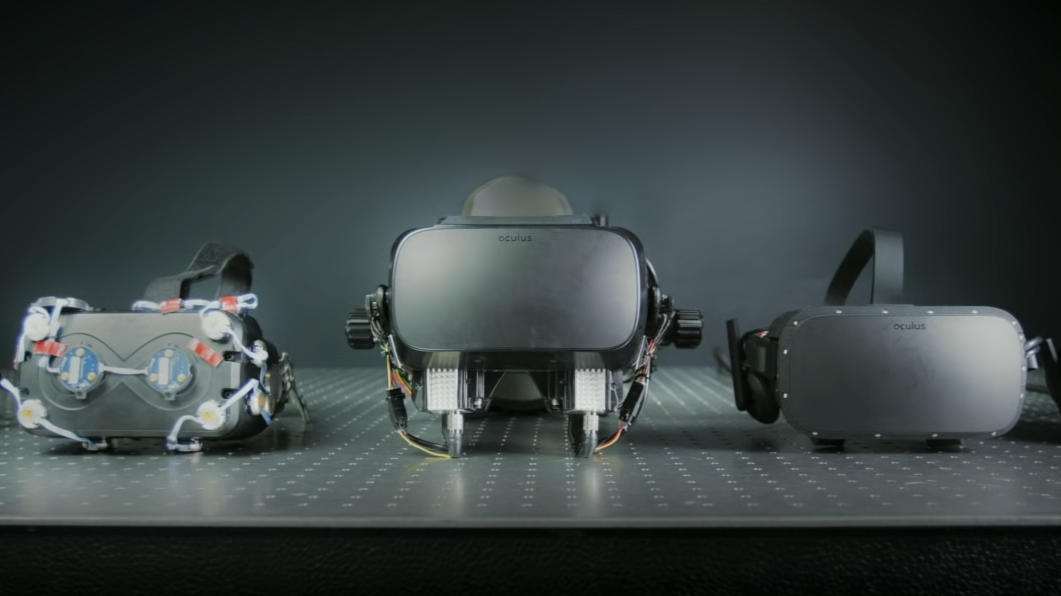
A VR headset typically combines a display panel, lenses, sensors, rendering software, and tracking systems. The panel produces the image. The lenses magnify and shape that image so the eyes can focus on it. Tracking systems measure head and sometimes eye movement. The software redraws the scene from the correct perspective. All of this must happen quickly enough that the user feels present rather than tricked.
The catch is that every improvement has a cost. Wider field of view can reduce sharpness if the display resolution does not increase. Higher brightness can drain battery and create heat. Pancake optics can make headsets slimmer but may require more light. Eye tracking enables foveated rendering but raises privacy and calibration questions. VR display design is a beautiful engineering buffet where every plate is somehow connected to another plate by a cable.
Pixels Per Degree: Why Resolution Alone Does Not Tell the Whole Story
Consumers often compare VR headsets by total resolution: 2K, 4K, 5K, and so on. That matters, but it is not the whole story. In VR, the more useful concept is pixels per degree, often shortened to PPD. Pixels per degree measures how many pixels are available across each degree of the user’s field of view. It is a practical way to describe perceived sharpness.
A headset can have a high-resolution panel and still look soft if those pixels are spread across a very wide field of view. Imagine spreading a tablespoon of peanut butter over one slice of toast. Good coverage. Now spread the same tablespoon over a picnic table. Technically still peanut butter, but emotionally disappointing. VR pixels work in a similar way.
Human visual acuity is often approximated around 60 pixels per degree for 20/20-like detail. Many consumer headsets are below that level, which is why small text can look fuzzy and distant objects may lack crisp edges. Designers must choose where clarity matters most. A flight simulator may need readable cockpit instruments. A fitness app may prioritize wide peripheral motion and stable frame rate. A virtual desktop needs sharp text more than dramatic explosions, unless your spreadsheet has been especially rude.
Field of View: Immersion’s Best Friend and Sharpness’s Rival
Field of view, or FOV, describes how much of the visual world the headset covers. A narrow FOV can feel like looking through binoculars. A wide FOV feels more natural because it engages peripheral vision, which helps users sense scale, motion, and presence. However, widening the FOV without increasing display resolution can lower angular resolution. The world gets bigger, but not necessarily clearer.
This is one of the central tradeoffs in VR display design. If a headset prioritizes maximum field of view, it may need more pixels, better optics, more processing power, and more careful thermal design. If it prioritizes clarity in the center, it may feel sharper but less immersive. The best design depends on the use case. Medical training, architecture review, gaming, education, therapy, and industrial simulation do not all need the same visual balance.
Refresh Rate, Persistence, and Latency: The Comfort Triangle
VR comfort depends heavily on timing. Refresh rate describes how often the display updates per second. Many VR systems target 90Hz or higher, while advanced systems may support 120Hz or more. Higher refresh rates can reduce flicker, improve motion smoothness, and help reduce simulator sickness for some users.
Latency is the delay between a user’s movement and the visual update that reflects it. In VR, even small delays can feel wrong. When the head turns, the visual world should respond immediately. If it lags, the brain notices. The inner ear says, “We moved.” The eyes say, “The world is catching up.” The stomach says, “I would like to file a complaint.”
Persistence is another key factor. It describes how long each frame remains visible. Low-persistence displays help reduce motion blur by flashing images briefly rather than leaving them continuously illuminated. Together, refresh rate, latency, and persistence shape whether motion feels clean or mushy. This is why VR developers are often told to maintain a stable frame rate rather than chasing occasional visual fireworks. A beautifully rendered scene that stutters is not immersive. It is a luxury nausea generator.
Optics: Fresnel, Pancake, and the Battle Against Bulky Headsets
The lens system is one of the most important parts of a VR headset. Early and lower-cost headsets often use Fresnel lenses, which are lighter and thinner than traditional lenses but can introduce visual artifacts such as glare, rings, and “god rays.” Newer premium devices often use pancake optics, which fold the optical path using polarization. This can make headsets slimmer and improve edge-to-edge clarity, but the design may lose light and require brighter displays.
There is no perfect lens, only a set of compromises that must be matched to the product goal. A lightweight headset for casual mixed reality may favor compact optics and balanced comfort. A professional simulator may tolerate more bulk if it gains clarity, wider FOV, or better color performance. In VR display design, optics are not just glass or plastic. They are the bridge between a flat panel and the user’s perception of a three-dimensional world.
Vergence-Accommodation Conflict: The Eye Problem That Sounds Like a Law Firm
One of the most famous challenges in VR display science is vergence-accommodation conflict, often called VAC. In the real world, when you look at a nearby object, your eyes rotate inward to converge on it and the lenses inside your eyes accommodate, or focus, at that same distance. Vergence and accommodation normally work together like a polite visual duet.
Most VR headsets break that relationship. They show stereoscopic images that make objects appear at different depths, so your eyes converge as if something is near or far. But the actual display is usually presented at a fixed focal distance through the optics. Your eyes may converge on a virtual object floating close to your face while still focusing on the display’s fixed optical plane. That mismatch can contribute to eye strain, fatigue, and reduced depth comfort.
Researchers and companies have explored varifocal displays, multifocal displays, light-field displays, and holographic approaches to reduce this conflict. Varifocal systems adjust the focal distance based on where the user is looking. Light-field and holographic approaches attempt to recreate more natural light cues. These solutions are promising, but they add complexity, cost, calibration needs, mechanical challenges, or computational demands. The problem is important because depth comfort affects whether VR can move from short sessions to everyday use.
Foveated Rendering: Using the Eye’s Weakness as a Superpower
The human eye sees the sharpest detail in the fovea, the small central region of vision. Peripheral vision is excellent at detecting motion and broad spatial context, but it is not great at reading tiny text or inspecting fine detail. Foveated rendering uses this biological fact to save computing power. If the system knows where the user is looking, it can render that area in high detail and reduce quality in the periphery where the user is less likely to notice.
This is one of the most elegant ideas in VR display design: stop wasting full-resolution effort where the eye cannot fully appreciate it. Dynamic foveated rendering can help higher-resolution displays run smoothly on limited hardware. It can also support wireless VR by reducing the amount of high-detail visual information that must be processed or transmitted.
However, foveated rendering depends on reliable eye tracking, low latency, smart image processing, and careful privacy practices. Eye movement data can be sensitive. It may reveal attention patterns, reading behavior, fatigue, and emotional response. A powerful display feature therefore becomes an ethical design challenge. That is a perfect example of why important VR problems are rarely just technical.
Color, Brightness, Contrast, and Dynamic Range
Display quality is not only about sharpness. Color accuracy, brightness, black levels, contrast, and dynamic range all influence presence. A dark horror game needs convincing shadows. A training simulation may need accurate color cues. A mixed reality interface must stay readable against the real world. A virtual cinema should not make every night scene look like soup.
OLED and micro-OLED displays can offer strong contrast and deep blacks, while LCD displays can be cost-effective and bright. MicroLED is often discussed as a promising future technology, especially for compact, high-brightness near-eye displays, but manufacturing challenges remain. The right display technology depends on the headset’s purpose, price point, optical path, power budget, and target audience.
Comfort Is a Display Feature, Not a Bonus
Comfort is sometimes treated like an accessory: nice padding, softer straps, maybe a stylish carrying case. In reality, comfort is part of the display experience. If the headset slips, optical alignment changes. If the interpupillary distance does not match the user’s eyes, clarity and depth can suffer. If the device is too front-heavy, neck fatigue can shorten sessions. If the interface places important controls too high, too low, or too far to the side, users may strain their eyes or neck.
Good spatial interface design keeps important content within a comfortable viewing zone. It avoids unnecessary camera motion, sudden acceleration, excessive peripheral movement, and forced head rotation. It also gives users control over locomotion settings, comfort modes, text size, contrast, and motion intensity. In VR, accessibility and comfort are not separate checklists. They are core quality signals.
What Makes a Problem Important in VR Design?
In product design, a problem is important when solving it creates meaningful improvement for users, the business, and the technology roadmap. In VR, importance is often determined by five questions:
1. Does the Problem Affect Human Comfort or Safety?
Problems that cause nausea, eye strain, disorientation, fatigue, or exclusion should rise to the top. A menu color issue can wait. A locomotion system that makes 30 percent of new users feel sick cannot. Comfort problems directly reduce adoption, session length, reviews, retention, and trust.
2. How Many Users Experience It?
Frequency matters. If a problem affects nearly everyone, it deserves attention even if each individual instance seems minor. A small blur in the center of the lens, repeated for every user during every session, becomes a major quality issue. In contrast, a rare edge case may be lower priority unless the consequences are serious.
3. How Severe Is the Impact?
Severity measures how badly the problem interrupts the experience. A cosmetic issue may look unpolished but still allow users to continue. A tracking error that breaks depth perception or a frame-rate drop that causes discomfort can end the session. High-severity issues deserve immediate design focus.
4. Is the Problem Blocking a Valuable Use Case?
Some problems matter because they prevent an entire category of use. If text is not sharp enough, VR productivity suffers. If depth cues are unreliable, medical or engineering training becomes less trustworthy. If headset fit excludes children, smaller adults, or people with glasses, the market becomes narrower than the marketing slide promised.
5. Is the Solution Feasible and Leverageable?
A problem becomes especially important when solving it unlocks multiple benefits. Better eye tracking may improve foveated rendering, social presence, accessibility, and input. Better optics may improve clarity, reduce headset size, and increase comfort. The best design investments often solve clusters of problems rather than isolated annoyances.
Specific Example: Pretty Graphics Versus Stable Motion
Consider a VR fitness app. The design team wants richer lighting, reflective floors, animated crowds, and particle effects when users hit a target. Fun? Absolutely. But if those effects reduce frame rate during fast movement, the app may become uncomfortable. In that case, the important problem is not “How do we make the scene more cinematic?” It is “How do we keep the experience smooth while preserving motivation?”
The solution might involve simpler shaders, fixed foveated rendering, reduced particle density, optimized models, or art direction that feels energetic without overwhelming the GPU. The best answer is not always more detail. Sometimes the best answer is disciplined restraint, which is less glamorous but much kinder to the vestibular system.
Specific Example: Text Clarity in a Virtual Workspace
Now consider a VR productivity app. Users want to read documents, manage dashboards, and write notes. The most important display problem may be text legibility. Wider field of view is nice, but if users cannot read comfortably, the product fails its primary job. A headset designed for work needs high pixels per degree, strong optical clarity, stable windows, comfortable focal distance, and thoughtful typography.
This is why problem importance depends on context. A racing game may prioritize motion response and peripheral immersion. A virtual desktop may prioritize sharpness and ergonomic window placement. A meditation app may prioritize gentle motion, low visual noise, and comfort. “Best display” is not universal. “Best for this user doing this task” is the real target.
The Future of VR Display Design
The next generation of VR displays will likely focus on higher angular resolution, wider field of view, thinner optics, better brightness, improved eye tracking, more efficient rendering, and better solutions for focal depth. But the future is not only hardware. Software will play a massive role through foveated rendering, super-resolution, reprojection, predictive tracking, adaptive comfort settings, and content-aware optimization.
The most successful VR systems will not simply chase the biggest numbers. They will balance clarity, comfort, immersion, accessibility, cost, battery life, privacy, and developer practicality. That balance is the real science behind VR display design. It is not about making one specification heroic. It is about making the whole experience feel natural enough that the technology disappears.
Practical Experiences Related to VR Display Design and Problem Importance
In practical VR design work, the most revealing moments often happen when users stop talking about features and start reacting physically. Someone leans forward to read small text. Someone squints at a distant object. Someone turns their whole torso because a button is placed too far to the side. Someone removes the headset after a smooth demo and says, “That was amazing,” while another person removes it after a choppy demo and says, “I need a chair.” Those reactions teach more than a dozen spec sheets.
One common experience in VR testing is that users rarely describe display problems in technical language. They do not usually say, “The angular resolution is insufficient for this task.” They say, “The words look fuzzy.” They do not say, “The motion-to-photon latency is disrupting my vestibulo-ocular reflex.” They say, “Something feels off.” A good designer learns to translate these human comments into technical hypotheses. Fuzzy text may point to pixels per degree, optical alignment, font size, lens sweet spot, or headset fit. “Something feels off” may point to latency, frame pacing, camera motion, tracking instability, or acceleration in the virtual camera.
Another practical lesson is that comfort must be tested early, not polished at the end like a garnish. Teams sometimes build a visually impressive prototype and assume optimization can come later. In flat-screen software, that may be survivable. In VR, performance and comfort are structural. If the entire concept depends on fast artificial movement, constant camera rotation, tiny interface elements, and heavy GPU effects, the team may discover late that the core experience is uncomfortable. That is an expensive way to learn that the body gets a vote.
A useful exercise is to rank every VR problem by user harm, task impact, frequency, and solution leverage. For example, if testers struggle to read labels, that problem affects comprehension, confidence, and session length. If many users feel discomfort during locomotion, that problem affects onboarding and retention. If only one decorative object flickers in a corner, it may be annoying but less urgent. This kind of prioritization prevents teams from fixing visible but low-impact issues while ignoring quiet problems that drive users away.
Designers also learn that the most important VR problems are often cross-disciplinary. A blurry interface might involve industrial design, optics, rendering resolution, typography, and calibration. Motion sickness might involve frame rate, animation design, locomotion mechanics, controller input, and user education. Eye strain might involve focal cues, brightness, contrast, session length, and IPD adjustment. Solving these problems requires engineers, designers, researchers, artists, and product leaders to speak a shared language. The headset may sit on one person’s face, but the solution sits across the entire team.
The best experience-related advice is simple: watch real users, measure what matters, and respect discomfort as data. If users repeatedly remove the headset, blink hard, rub their eyes, or avoid a feature, the problem is already speaking. The job is to listen before the app store reviews start shouting.
Conclusion
VR display design is where physics meets perception and where product ambition meets human biology. A great headset is not defined by one dazzling number. It depends on how resolution, field of view, optics, refresh rate, latency, focus cues, rendering, fit, and interface design work together. The real goal is not simply to make virtual worlds look impressive. The goal is to make them feel stable, readable, comfortable, believable, and useful.
That is also what makes a problem important. Important problems are the ones that affect comfort, safety, access, trust, task success, and long-term adoption. In VR, solving the right problem can be the difference between a five-minute demo and a technology people willingly use every day. The science is complex, yes. But the principle is refreshingly human: if the experience respects the user’s eyes, body, and attention, the virtual world has a much better chance of feeling real.
Note: This article is ready for web publication and contains no citation-placeholder strings, source-code references, or unnecessary contentReference elements.