There are two kinds of people in this world: those who check the Uber fare before leaving the house, and those who open the app outside a concert venue at midnight and whisper, “Why is it the price of a small refrigerator?” If you prefer the first groupand your wallet certainly doeslearning how to get an Uber fare estimate in advance is a small habit that can save money, stress, and several dramatic sidewalk monologues.
Uber prices are not pulled from a magic hat, although during peak hours it can feel that way. A fare estimate usually considers trip distance, estimated time, traffic, local demand, available drivers, ride type, tolls, taxes, surcharges, and fees. In many U.S. cities, Uber also shows upfront pricing before you request a ride, which means you can compare options like UberX, Comfort, UberXL, Black, or Reserve before committing.
The key word is “before.” You do not have to tap “Confirm” just to see what a ride might cost. Whether you are planning an airport transfer, a work commute, a date night, a doctor’s appointment, or a “please rescue me from this party” exit strategy, you can estimate the cost in advance in several easy ways.
Below are three practical methods to check an Uber price before booking, plus smart tips to make your estimate more accurate and avoid unpleasant surprises.
Why Getting an Uber Fare Estimate Matters
An Uber fare estimate helps you plan your transportation budget before the ride starts. That sounds simple, but it can make a real difference. A ride that costs $18 at 2:00 p.m. may cost much more during a storm, after a major sports event, near an airport, or during rush hour when demand climbs and driver availability drops.
Checking the estimate also lets you compare ride categories. UberX may be the budget-friendly choice, while Uber Comfort may cost more but offer a newer vehicle and extra space. UberXL can be worth it for a group, especially if splitting the fare makes the per-person cost lower than ordering two smaller cars. Meanwhile, premium options may be convenient for business travel, special events, or moments when you want the car to look less like it has survived three music festivals and a youth soccer season.
Fare estimates are especially useful for airport trips. Airports often involve extra fees, special pickup zones, heavy traffic, and toll roads. A quick estimate can help you decide whether to request Uber immediately, schedule a ride, use public transportation for part of the route, or compare with a taxi, hotel shuttle, or rental car.
1. Check the Fare Estimate Directly in the Uber App
The Uber app is the most convenient way to get a fare estimate because it uses your current pickup location, destination, available ride types, and real-time conditions. This is the best option when you are close to taking the trip or when you want the most practical, in-the-moment price preview.
How to check an Uber fare in the app
Open the Uber app and enter your destination in the “Where to?” box. Confirm or adjust your pickup location, then review the ride options shown on the screen. The app will display estimated prices for available services in your area. You can scroll through different ride types and compare the cost, estimated pickup time, and vehicle capacity.
The important part: do not tap the final request or confirm button unless you are ready to book. You can use the screen as a price-checking tool, then back out if you only wanted the estimate. Think of it as window shopping, except the window is your phone and the mannequin is a Toyota Camry five minutes away.
Why the app estimate is useful
The app gives you a more realistic look at current pricing because it reflects live conditions. If demand is high, the estimate should show that. If several ride types are available, you can compare them quickly. For example, you may discover that Uber Comfort is only a few dollars more than UberX, or that UberXL is cheaper than ordering two separate UberX rides for your group.
The app is also useful for checking pickup points. In crowded locations, malls, stadiums, airports, and downtown districts, choosing the wrong pickup spot can create delays. A small location adjustment may change the route, pickup time, and sometimes the estimate.
Example: checking a ride before dinner
Imagine you are going from your apartment to a restaurant across town. You open the Uber app at 5:30 p.m. and see UberX listed at $24, Comfort at $31, and UberXL at $39. Since dinner is not until 7:00 p.m., you wait 20 minutes and check again. The UberX estimate drops to $19. Congratulations: you just earned enough savings for an appetizer, or at least half of one if the restaurant uses fancy words like “artisan.”
2. Use Uber’s Online Price Estimator
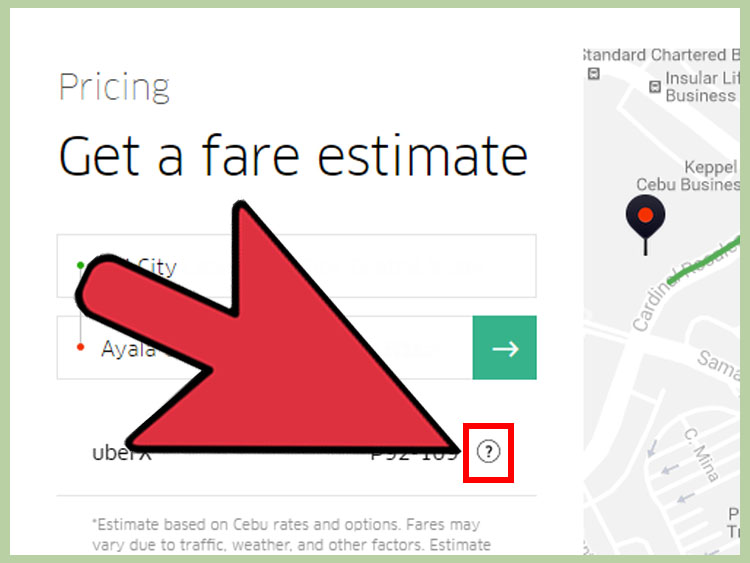
If you do not want to open the app, or you are planning from a laptop, Uber’s online price estimator is another simple option. This tool lets you enter a pickup location and dropoff location to see estimated ride costs where Uber operates.
When the online estimator works best
The online estimator is helpful when you are researching a trip in advance. For example, you might be planning transportation from a hotel to a conference center, from an airport to a downtown Airbnb, or from a wedding venue back to your house. Instead of pretending future-you will “figure it out later,” you can check the likely ride cost while making the rest of your plans.
This method is also convenient if you are helping someone else estimate a ride. Parents, travel planners, office managers, and group organizers can use it to get a general idea of transportation expenses without needing to request a ride from their own account.
How to use it well
Enter the full pickup and dropoff addresses whenever possible. A vague destination may produce a less accurate estimate. “Downtown Chicago” is not as useful as a specific hotel, museum, office building, or restaurant. The more precise your route, the more useful the estimate becomes.
Also remember that online estimates may change by the time you actually request the ride. Uber pricing can shift with traffic, weather, driver availability, and local demand. The online tool is excellent for planning, but it is still wise to check the app again before booking.
Example: estimating an airport transfer
Suppose you are flying into Los Angeles and want to estimate the cost from LAX to a hotel in Santa Monica. You can use the online estimator days before your trip to get a planning number. Then, when you land, check the app again because airport demand, pickup-zone traffic, and time of day can affect the final upfront price.
3. Use Uber Reserve or Scheduled Rides for Planned Trips
For trips where timing matters, Uber Reserve can be a useful way to see a price in advance and arrange your ride ahead of time. Depending on your city and available ride options, Uber Reserve may let you book a ride well before pickup. This is especially helpful for airport departures, early-morning appointments, business meetings, weddings, and other events where “I’ll just hope a car appears” is not a transportation strategyit is a suspense film.
How Uber Reserve helps with fare estimates
When you create a reservation, Uber shows pricing information before you confirm. Reserve pricing may include a reservation fee, and the price can vary based on location, time, ride type, and other factors. In many cases, reserving a ride gives you more confidence about pickup timing and cost than waiting until the last second.
To reserve a ride, open the Uber app, tap the Reserve option if available, enter your pickup and dropoff locations, choose your pickup time, select a ride type, review the estimated price, and confirm if everything looks right.
When to choose Reserve instead of a regular estimate
Use Reserve when being late would cause a bigger problem than paying a bit more. A 6:00 a.m. airport ride, a medical appointment, a train departure, or an important client meeting may be worth scheduling in advance. The extra planning can reduce the risk of scrambling for a driver during a busy time.
However, Reserve is not always the cheapest choice. Because it may include a booking or reservation fee, it can cost more than checking the app and requesting a standard ride on demand. The tradeoff is convenience and planning certainty.
Important note about fare changes
Even with upfront pricing, your final fare may change in certain situations. If you add stops, change the destination, take extra time at a stop, follow a significantly different route, encounter unexpected tolls, or experience major route changes, the final charge may be adjusted. In other words, the estimate is strong, but it is not a legally binding pinky promise from the transportation universe.
What Affects an Uber Fare Estimate?
Understanding what goes into an estimate helps you read the price more intelligently. Uber fares can vary based on several common factors:
Distance and estimated trip time
A longer route usually costs more, but time matters too. A short ride through heavy traffic may cost more than a longer ride on a clear road. That is why a 3-mile downtown trip can sometimes feel more expensive than expected.
Demand and driver availability
When many people request rides at the same time and fewer drivers are available, prices may rise. This often happens after concerts, sporting events, bar closing time, bad weather, holidays, and rush hour.
Ride type
UberX, Comfort, UberXL, Black, Green, Pet, and other ride categories may have different pricing. Availability depends on your city. Always compare options before booking because the cheapest choice is not always the best value for your situation.
Tolls, airport fees, taxes, and surcharges
Trips to airports, stadiums, seaports, event venues, or toll-heavy routes may include extra charges. Some fees are built into the upfront price when Uber predicts them, while others may vary depending on the actual route.
Pickup and dropoff accuracy
A tiny location mistake can affect the fare. If you set pickup on the wrong side of a large building, at the wrong terminal, or several blocks from your real location, the route and timing can change. Always double-check the pin before requesting.
Tips to Get a More Accurate Uber Estimate
Use exact addresses whenever possible. Instead of typing a neighborhood name, enter the specific destination. For airports, choose the correct terminal or pickup area if the app provides options.
Check the estimate close to your departure time. Looking the night before is useful for planning, but pricing can change dramatically by morning. For important trips, check once during planning and again before booking.
Compare ride types. Sometimes UberX, Comfort, and UberXL are closer in price than expected. If you have luggage, extra passengers, or want a quieter ride, paying slightly more may be worth it.
Avoid peak moments when possible. Leaving 15 minutes earlier or later can sometimes reduce the fare, especially after big events or during rush hour. This is not guaranteed, but it is worth checking.
Watch for added stops. Multi-stop rides can change the fare, especially if someone takes too long. We all have that friend who says, “I’ll be right out,” then apparently starts reorganizing their sock drawer.
Common Mistakes When Checking an Uber Fare Estimate
One common mistake is assuming the first estimate will last forever. Uber pricing is dynamic, so a fare can change if you wait too long. If you like the price and are ready to go, request the ride before conditions shift.
Another mistake is comparing an old receipt to a new estimate without considering time, traffic, and demand. The same route can cost different amounts on different days or even at different times on the same day.
A third mistake is forgetting airport and event surcharges. A ride from a quiet residential street is not the same as a pickup from a major airport after three delayed flights land at once. The app may still show the price in advance, but the number may be higher than a normal city ride.
Which Method Is Best?
The best method depends on your situation. For a ride you may take soon, the Uber app is usually the most useful because it shows current pricing and available ride options. For early planning, the online price estimator is convenient and easy to use from a computer. For important scheduled trips, Uber Reserve offers the strongest planning tool because you can arrange the ride in advance and review pricing before confirming.
If you are budget-focused, check the app before booking and compare ride categories. If you are time-focused, consider Reserve. If you are research-focused, use the online estimator while planning and confirm in the app later.
Real-World Experiences: What Riders Learn After Checking Uber Estimates in Advance
After using Uber fare estimates for a while, most riders learn the same lesson: the estimate is not just a numberit is a planning signal. It tells you when to leave, which ride type makes sense, whether a route is unusually expensive, and whether you should wait a few minutes before booking.
One useful experience comes from airport travel. Many riders check the price from home to the airport the night before and see a reasonable number. Then, at 7:30 a.m., the app shows a higher fare because commuters are also requesting rides. The lesson is not that the first estimate was wrong; it was simply based on different conditions. For early flights, checking Uber Reserve may be smarter because it helps plan pickup time and pricing before the morning rush begins.
Another common experience happens after concerts and sports games. Before the event, a ride to the venue may look affordable. After the event, thousands of people open Uber at the same time, and prices can rise quickly. Smart riders check the estimate, then walk a few blocks away from the busiest pickup zone, wait 10 to 20 minutes, or grab a snack while demand cools down. This is not glamorous, but neither is paying triple while standing next to a traffic cone named “Zone B.”
Group rides also teach a valuable lesson. A solo rider may automatically choose UberX because it looks cheapest. But for four to six people, UberXL can be a better value than requesting two separate cars. Checking the estimate for multiple ride types helps the group make a practical decision instead of arguing on the sidewalk while everyone’s phone battery slowly gives up on life.
Business travelers often benefit from checking estimates in advance because receipts and budgets matter. If a company reimburses rides, knowing the approximate fare helps avoid awkward expense reports. It also helps travelers decide whether to use Uber, a hotel shuttle, a rental car, or public transit for a particular route.
Families can also use estimates to plan better. Parents traveling with luggage, children, strollers, or car-seat needs may want to compare larger vehicles or alternative transportation. The cheapest fare is not always the best choice when comfort and logistics matter.
The biggest practical takeaway is simple: check early, check again, and compare. A fare estimate gives you control before the ride begins. It will not make traffic disappear or convince every driver in town to materialize instantly, but it will help you make smarter decisions with fewer surprises.
Conclusion
Getting an Uber fare estimate in advance is easy, useful, and surprisingly powerful for everyday planning. You can check the price directly in the Uber app, use Uber’s online price estimator, or reserve a ride in advance when timing matters. Each method serves a slightly different purpose, but all three help you understand the likely cost before you commit.
For the most accurate result, enter exact pickup and dropoff locations, compare ride types, watch for tolls and airport fees, and remember that demand can change quickly. The more intentional you are before tapping “Confirm,” the less likely you are to experience fare shock later.
In short, an Uber estimate is like checking the weather before leaving home. It may not control the storm, but it can help you decide whether to bring an umbrellaor in this case, whether to wait ten minutes, book UberX, reserve ahead, or start lovingly reconsidering the bus.