Imagine receiving the day’s headlines without unlocking a phone, refreshing a browser, or being ambushed by twelve notifications about a celebrity’s breakfast. Instead, a beige Apple II wakes up, a dot-matrix printer begins chattering, and breaking news slowly crawls onto continuous tractor-feed paper.
That wonderfully impractical scene became real when vintage-computing enthusiast Joshua Coleman transformed an Apple II Plus into a miniature old-school newsroom. His system uses modern networking equipment behind the scenes, but the headlines appear through technology that feels straight out of a smoky 1970s city desk. The result is part historical reenactment, part engineering experiment, and part extremely noisy newspaper subscription.
What Is the Apple II Breaking News Project?
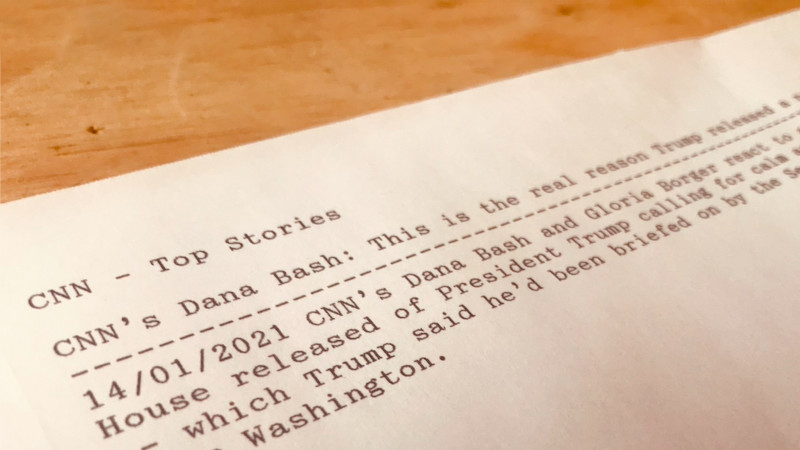
The project connects an Apple II Plus to a modern Macintosh through a serial link. The Mac reaches an online bulletin board system, or BBS, that supplies text-based news headlines. The Apple II displays those headlines as a terminal and simultaneously sends them to an Epson LQ-500 dot-matrix printer.
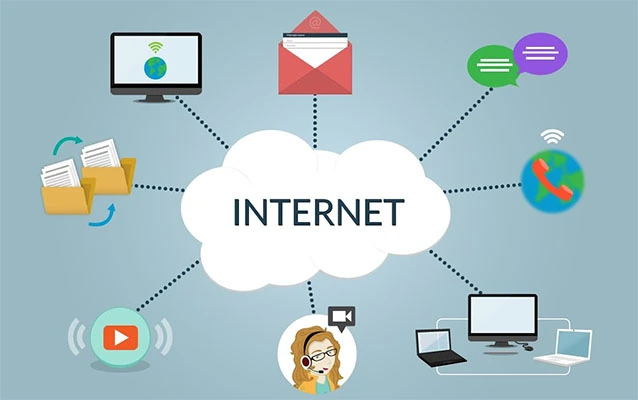
The Apple II does not browse the modern web by itself. Asking an unmodified machine from the late 1970s to process today’s websites would be like asking a pocket calculator to host a video conference. Instead, the modern computer handles the internet connection while the Apple II acts as a text terminal.
Whenever the news service refreshes its screen, the printer produces another headline. Leave the equipment running and the paper gradually becomes a physical stream of world eventscomplete with perforated edges, mechanical clatter, and the occasional reminder that ribbon alignment is apparently a lifestyle choice.
Why an Apple II Makes the Project Special
Introduced in 1977, the Apple II helped move personal computers beyond electronics clubs and into homes, schools, and businesses. The Computer History Museum describes it as a machine promoted for ordinary users, while the Smithsonian credits it with helping ignite the late-1970s personal-computer sales boom.
Its open expansion architecture is especially useful for retrocomputing projects. Owners could install cards for disk drives, additional display modes, printers, modems, and serial communications. That flexibility allowed the Apple II family to perform jobs far beyond games and BASIC programming.
In this newsroom setup, the computer becomes a bridge between eras. Its screen, keyboard, serial hardware, and printer interface remain authentically vintage, while a modern Mac quietly does the networking work that the Apple II cannot comfortably perform.
This arrangement also reflects how older computers were frequently used in professional environments. A terminal did not always need to store, process, or understand the information it displayed. It simply received characters from another system and presented them to a human operator. The Apple II newsroom recreates that relationship with a clever modern twist.
How the Apple II Newsroom Works
1. A Modern Mac Provides the Internet Connection
The modern Macintosh serves as the project’s network gateway. A USB-to-serial cable carries data from the Mac to a DB-25 connection on the Apple Super Serial Card installed inside the Apple II Plus. A null-modem adapter is required so the two computers can communicate correctly over the serial link.
On the Mac, a terminal session is opened at 9,600 baud. That speed is glacial beside broadband networking, but it is more than sufficient for plain-text headlines. Text travels through the connection one character at a time, which is precisely the kind of work serial terminals were built to handle.
2. The Apple II Becomes a Terminal
The Apple II runs Modem MGR, a communications program configured to use the Super Serial Card. Once connected, the Apple II can display a login prompt from the Mac and accept Unix commands as though it were a terminal directly attached to the newer computer.
The project also uses an 80-column display card. Standard Apple II text is comparatively wide and chunky, so the 80-column hardware makes terminal output easier to read and better suited to text services designed around conventional screen dimensions.
After logging in, the user launches a Telnet client and connects to the RetroCampus BBS. The service offers a pure ASCII interface along with international news selections that retrieve headline text. ASCII is the American Standard Code for Information Interchange, a foundational character-encoding standard that allows systems to represent letters, numbers, punctuation, and control characters consistently.
3. The Headlines Are Redirected to a Printer
The Apple II is also connected to an Epson LQ-500 through a compatible parallel printer interface card. The LQ-500 is a 24-pin impact dot-matrix printer, meaning its print head physically strikes an inked ribbon against the paper to build characters from patterns of dots.
Inside Modem MGR, printing can be toggled through the program’s menu. Once enabled, new terminal output is sent to both the monitor and the printer. As the BBS refreshes its headline display, the same text is automatically printed.
No complicated page-layout software is required. There are no browser extensions, cloud print queues, or mysterious drivers demanding a 900-megabyte update. The system receives text and prints text. Sometimes simplicity arrives wearing beige plastic and making the sound of an agitated woodpecker.
Essential Hardware for an Apple II News Printer
A recreation of the project requires several vintage and modern components working together:
- An Apple II Plus or another suitably configured Apple II model
- An 80-column display solution
- An Apple Super Serial Card or compatible serial interface
- A printer interface card
- A working dot-matrix printer
- Continuous tractor-feed paper and a usable ribbon
- A modern Mac, Windows PC, or Linux computer
- A reliable USB-to-serial cable
- The correct DB-9-to-DB-25 null-modem adapter
- Apple II terminal software such as Modem MGR
The exact arrangement can vary. A different vintage printer may work if the Apple II has the appropriate interface card and the software can redirect terminal output to it. Similarly, the modern gateway does not have to be a Mac; another computer can perform the same role if it supports serial terminal sessions and Telnet software.
The printer is responsible for much of the project’s personality. Epson’s LQ series used impact technology capable of producing text on continuous paper, while Apple also sold printers such as the Silentype and later ImageWriter models for its computer lines. The Smithsonian’s Apple II collection includes both the computer and an Apple Silentype printer, illustrating how closely early personal computing and physical output were connected.
Recreating the Sound of an Old Newsroom
The emotional appeal of the project comes from more than old hardware. It recreates the rhythm of an earlier information system.
Before digital dashboards and silent push notifications, wire-service machines delivered stories directly into newsrooms. Associated Press subscribers once received urgent reports through teletype equipment. Major alerts known as “flashes” could trigger a rapid series of bells, warning editors that an exceptionally important story had arrived.
Wire machines and ticker printers produced a steady physical stream of copy. Editors could hear that information was arriving, walk over to the machine, tear off the relevant section, and carry it to another desk. Historical accounts describe newsrooms filled with typewriters, telephones, shouted conversations, and continuously clattering wire-service machines.
The Apple II setup captures that atmosphere without pretending to be a historically exact recreation. It uses a dot-matrix printer rather than a traditional news teletype, and the headlines originate from modern online sources. Still, the experience is remarkably similar: remote information becomes paper automatically, and the sound of the machine announces that something new has happened.
Telnet, BBS Culture, and the Text-Based Internet
Telnet is central to the project because it allows interactive, text-oriented communication between networked systems. The protocol was formally standardized for communication through a virtual terminal connection over TCP.
Its text-first design makes it ideal for low-powered vintage computers. The Apple II does not need to decode high-resolution images, JavaScript applications, streaming video, or elaborate web fonts. It only needs to send and receive characters.
Bulletin board systems flourished before widespread public access to the World Wide Web. Users originally called BBS computers through modems to read messages, exchange files, and participate in online communities. Some systems later became reachable through Telnet, allowing modern network connections to imitate the experience of dialing a remote computer. Wired documented the growth of BBS networks such as FidoNet during the early online era.
The RetroCampus service used in the newsroom project supplies a menu designed for old terminals and computers. By choosing a pure ASCII mode, the Apple II receives content in a form it can display reliably. The service’s automatic headline refresh is what turns the setup from a manual news reader into a continuously operating paper feed.
Important Security and Reliability Limits
Telnet should be treated as a historical compatibility tool, not a secure method for handling private information. Traditional Telnet sessions do not provide modern encryption, so transmitted usernames, passwords, and commands may be exposed to interception.
The project’s creator specifically warned users not to reuse important credentials on hobbyist BBS services. A dedicated, non-sensitive username and password should be used whenever an account is necessary. Financial information, private messages, administrative credentials, and other sensitive data do not belong in a Telnet session.
Reliability is another practical concern. Vintage hardware can suffer from aging capacitors, dirty card-edge connectors, fragile disks, worn printer mechanisms, and serial adapters with questionable manners. A misconfigured baud rate can produce unreadable characters, while an incorrect cable can produce nothing at alla minimalist output style rarely appreciated during troubleshooting.
External BBS services and headline feeds may also change or disappear. Anyone recreating the project today may need to substitute another text service, run a local BBS, or build a small gateway that converts RSS or news API data into terminal-friendly text.
Why This Retrocomputing Project Still Matters
The Apple II news printer demonstrates that obsolete hardware can remain meaningful when it is assigned a job suited to its strengths. The Apple II cannot compete with a modern laptop in raw performance, but it remains perfectly capable of displaying characters, accepting keyboard input, communicating through a serial interface, and controlling a printer.
That is an important principle in retrocomputing: usefulness does not always require modernization. Sometimes the best project preserves the original behavior of a machine while carefully connecting it to newer infrastructure.
The setup also exposes the layers hidden inside modern technology. On a smartphone, receiving a headline appears instantaneous and almost magical. In the Apple II newsroom, every stage is visible. A service gathers text. A modern computer opens the network connection. Serial hardware moves the characters. Terminal software displays them. A printer turns them into dots on paper.
Networked printing experiments continue to attract makers because paper creates a different relationship with information. Wired has documented internet-connected thermal-printer projects that produced personalized headlines, schedules, messages, and miniature newspapers. The Apple II version follows the same basic idea but gives it an unmistakably retro personality.
Practical Ideas for Expanding the Project
A modern recreation does not have to stop with general news. Once a gateway computer can convert information into plain text, the Apple II and printer can present many kinds of useful data.
- Local weather forecasts printed each morning
- Sports scores delivered after games
- Calendar appointments and daily reminders
- Stock-market summaries using delayed public data
- Amateur radio bulletins
- Server-status reports for a home network
- Selected RSS headlines from favorite publications
- Short messages submitted by family members
A local gateway can also improve security. Instead of exposing the Apple II directly to public Telnet services, a Raspberry Pi or desktop computer could retrieve data securely through HTTPS, remove unsupported characters, wrap lines for an 80-column display, and provide the finished text over a trusted local serial connection.
That architecture preserves the vintage interface while placing modern security requirements on modern hardwarethe digital equivalent of letting the Apple II greet customers while a newer computer quietly handles the paperwork in the back office.
The Experience of Living With an Apple II Newsroom
The first noticeable difference between this system and an ordinary news app is anticipation. A phone displays headlines almost before you realize you asked for them. The Apple II newsroom makes information travel through a visible process. Characters appear on the monitor, the printer head moves into position, the ribbon meets the page, and a headline gradually forms from hundreds of tiny impacts.
That delay is not necessarily frustrating. It gives the information weight. A printed headline feels more deliberate than another temporary rectangle on a screen. You can tear it off, circle a sentence, hand it to someone across the room, or leave it beside a coffee mug until the coffee achieves protected historical status.
The sound becomes part of the interface. After a few sessions, you begin recognizing patterns. A short burst may indicate a menu or brief headline. A long, determined run suggests a larger update. Irregular noises may mean the printer is changing linesor that tractor-feed paper has decided to explore independence.
Setting up the equipment also encourages patience. Every component has to agree on communication settings. The terminal program must use the correct serial slot. The baud rate on both machines must match. The cable must be wired correctly. The printer card must occupy the expected slot, and the software must know where to send its output.
When the first clean headline finally prints, the satisfaction is disproportionate to the task. A modern computer can print news in seconds, yet that would feel routine. Making an Apple II do it feels like negotiating a successful treaty between two technological civilizations.
The system changes how a room feels as well. With the monitor switched off and the printer left active, the machine becomes an ambient information appliance. It sits quietly until fresh text arrives. Then the sudden mechanical chatter announces an update before anyone reads it. That physical interruption resembles the newsroom tradition in which bells, teletypes, and wire printers demanded editorial attention.
Continuous paper introduces its own rituals. Pages must be aligned with the tractor sprockets. Perforations need to be positioned correctly. Ribbons eventually fade. Finished reports accumulate in folded stacks that look surprisingly official, even when the headline is about a minor entertainment story.
The strongest impression is not that old technology was better. Modern devices are faster, quieter, more secure, and dramatically more capable. The lesson is that older systems made their work understandable. You could hear the printer, see the paper advance, inspect the cable, identify the interface card, and follow the route taken by every character.
Using an Apple II as a breaking-news printer therefore becomes more than a nostalgia exercise. It is a hands-on lesson in serial communication, terminal software, character encoding, network gateways, printing technology, and information history. It also creates something rare in modern computing: a machine whose limitations make the experience more memorable rather than merely less convenient.
Conclusion
“Apple II Prints Off The Breaking News” is a celebration of practical retrocomputing. By combining an Apple II Plus, serial communications hardware, terminal software, a modern internet gateway, a text-based BBS, and an Epson dot-matrix printer, the project recreates the atmosphere of a classic newsroom without requiring the vintage computer to perform modern web browsing.
The finished machine is slow, loud, mechanically demanding, and undeniably charming. More importantly, it shows how old computers can participate in modern life without losing their original identity. The Apple II remains an Apple II; it simply receives a little assistance from a newer machine hiding backstage.
In an era when breaking news usually arrives as a silent swipeable notification, there is something delightfully dramatic about hearing a printer suddenly spring to life. The headline may not be cheerful, but at least it arrives with tractor-feed paper and a proper entrance.