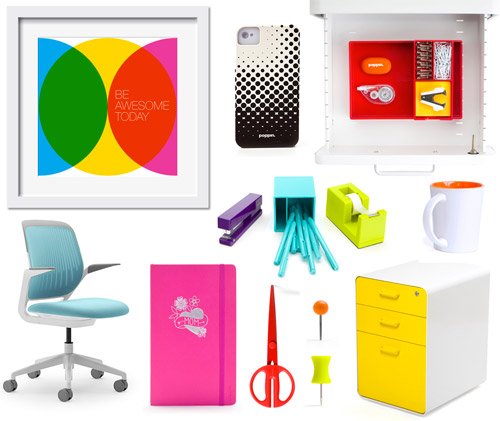
Some workspaces have the vibe of a gray Tuesday that never ends: sad stapler, sad pen, sad you.
But productivity doesn’t have to feel like a corporate training video from 2006. The idea behind
“Productivity With Pop” is simple: when your system is clear and your space feels fun,
you’re more likely to show up, start, and finish. Think: bright tools, punchy planning, and a workflow
that’s less “deadline panic” and more “I got this.”
The phrase “Productivity With Pop” even showed up in a classic “fab freebie” giveaway erapaired with
colorful desk gear meant to make your office feel less like Office Space and more like “okay, I can do
spreadsheets without losing my will to live.” That’s the spirit we’re channeling here: a practical, research-backed
productivity system… with a little sparkle on the edges.
What “Productivity With Pop” Really Means
Let’s be honest: most people don’t need a 97-step “morning routine” that requires a sunrise, a cold plunge,
and a journal made from ethically sourced clouds. Most people need three things:
- Clarity (What am I doing today?)
- Momentum (How do I start without negotiating with my soul?)
- Consistency (How do I keep going when motivation flakes?)
“Pop” supports all three. Visually, it’s color-coded cues and tools you actually want to pick up. Mentally, it’s short,
energizing work sprints. Emotionally, it’s making your plan feel friendly instead of punishing.
The “Fab Freebie” Concept: A Pop-Powered Mini Toolkit
This article is built around a “fab freebie” idea: a small set of simple, reusable templates and habits you can
use dailywhether you love paper planners, digital calendars, or a chaotic mix of both (no judgment).
The goal isn’t to create more pages to manage. The goal is to create less friction between “I should”
and “I did.”
What’s in the Fab Freebie Toolkit (Use These Sections as Templates)
- The Pop 3: three outcomes you want by day’s end
- Timebox Map: blocks on your calendar for focused work
- Pomodoro Playlist: short sprints + breaks
- Eisenhower Pop Grid: urgent/important sorting
- Microbreak Menu: tiny resets that don’t derail your day
- Desk Reset Ritual: a 2-minute cleanup that saves future-you
Step 1: Make Your Plan Visible (Paper and Pixels Can Be Friends)
Productivity falls apart when tasks live in five different places: sticky notes, three apps, your texts, and your brain
(which is already running 47 background tabs). Pick a “home base” for your daily plan:
- Paper if you want tactile cues, fewer notifications, and quick scribbles.
- Digital if you need search, recurring tasks, shared projects, or reminders.
- Hybrid if you want the best of both: calendar + a daily sheet for focus.
A practical hybrid: keep your calendar digital (so time is real) and keep your daily focus on paper
(so it’s in your face). Bonus: some research suggests longhand note-taking can encourage deeper processing than typing,
which is helpful when you’re trying to understand and remember what mattersnot just collect words like a squirrel hoarding acorns.
Step 2: Use Timeboxing (Because To-Do Lists Lie)
To-do lists are optimistic little fiction novels. They whisper: “Sure, you can do 18 tasks today. You’re basically a superhero.”
Timeboxing (also called timeboxing/time blocking) forces your plan to face reality: if it matters, it gets a spot on the calendar.
How to Timebox in 10 Minutes
- Write your Pop 3 (the three outcomes that would make today a win).
- Estimate time for each outcome (be generous; your future self deserves kindness).
- Block it on your calendar with start and end times.
- Leave buffer for admin and surprises (because life loves plot twists).
The magic isn’t that your schedule becomes perfect. The magic is that you stop pretending time is infinite
and start treating it like the resource it is.
Step 3: Try the Pomodoro Technique (Pop Sprints for Your Brain)
The Pomodoro Technique breaks work into focused intervals separated by short breaks. The classic version is
25 minutes of work + 5 minutes of break, then a longer break after a few rounds. It’s popular because it makes
starting easier (“just 25 minutes”) and helps fight mental fatigue with planned pauses.
Pop Upgrade: The “Three-Song Sprint”
If timers make you feel like you’re defusing a bomb, use music as your clock:
- Pick 3 songs (roughly 9–12 minutes total).
- Work only on one task until the third song ends.
- Take a microbreak (stretch, water, quick walk, breathe like a person).
- Repeat 2–4 times, then take a longer break.
This is “Productivity With Pop” in its purest form: structured focus, but with an energy boost that feels funnot grim.
Step 4: Stop Multitasking (Your Brain Isn’t a Blender)
“I’m great at multitasking” is usually code for “I’m constantly switching tasks and wondering why everything takes longer.”
Many psychology sources emphasize that what we call multitasking is often task-switchingand switching adds time, errors,
and mental wear-and-tear. Translation: your brain isn’t lazy; it’s paying switch fees like a tiny toll road operator.
One-Tab Rule (Yes, Even for Your Brain)
- During a focus sprint, keep one primary task.
- If a new task pops up, write it on a capture list, then return.
- Batch small tasks (email/messages) into a scheduled timebox.
Step 5: Protect Focus From Interruptions
Interruptions don’t just “steal a second.” They create a reorientation cost: your brain has to reload context, remember where you were,
and rebuild momentum. Research on interrupted work has found that frequent interruptions can increase stress and workloadsometimes even
when people compensate by working faster.
Quick Pop Fixes (No Full Lifestyle Overhaul Required)
- Notification diet: turn off anything that isn’t time-sensitive.
- Focus sign: a simple cue (headphones, desk flag, sticky note) that says “in a sprint.”
- Interruptions box: a small paper tray or note area where “later” items go.
- Reset points: check messages only at set times (example: 11:30 and 4:00).
Step 6: Prioritize With the Eisenhower Pop Grid
When everything feels urgent, your day becomes a game of Whack-a-Mole. The Eisenhower Matrix helps you sort tasks by
urgency and importance, then act accordingly: do, schedule, delegate, or delete.
How to Use It in Under 5 Minutes
- Urgent + Important: do first (true deadlines, real problems)
- Not Urgent + Important: schedule (the stuff that builds your life)
- Urgent + Not Important: delegate or batch
- Not Urgent + Not Important: delete (or strictly limit)
“Pop” tip: color-code the quadrants. Your brain reads color faster than it reads your inner monologue.
Step 7: Use If-Then Plans to Beat Procrastination
Motivation is unreliable. Planning is more polite. “If-then” plans (also called implementation intentions) help you decide in advance
what you’ll do when a predictable obstacle shows up.
Examples You Can Steal
- If I open my laptop, then I start with a 10-minute Pop Sprint before checking messages.
- If I feel overwhelmed, then I choose the next smallest visible step (not the whole mountain).
- If I get interrupted, then I write the request down and return at the end of the sprint.
The point is to remove the decision-making in the momentbecause “in the moment” is where procrastination sells its finest products.
Step 8: Microbreaks That Actually Help (Not the Kind That Turn Into a New Life)
Breaks can improve focus and energy, but the type of break matters. Short, purposeful pausesmicrobreakshave been linked in reviews and
university guidance to benefits like reduced fatigue and better focus, especially for routine or prolonged tasks.
Microbreak Menu (Pick One)
- Stand up + stretch shoulders/neck (60 seconds)
- Refill water (and actually drink it)
- Walk to a window and look far away (hello, eyeballs)
- Two-minute tidy: clear one surface
- Box breathing: inhale 4, hold 4, exhale 4, hold 4
Step 9: Pop Your Workspace (Design Your Environment to Help You Win)
Here’s the underrated truth: your environment is part of your productivity system. If everything you need is hidden, boring,
or annoying to use, your brain will resist. This is why colorful desk tools became a “thing”they add visual cues and a little joy,
which can lower friction and make routines easier to repeat.
Pop Tools That Pull Their Weight
- Color-coded folders or trays for active projects (one per priority).
- A “launchpad” area: notebook, pen, timer, today’s top taskalways ready.
- A capture pad for random thoughts so they don’t hijack your focus.
- A 2-minute desk reset at the end of the day (future-you will send fan mail).
Step 10: Pop Music for Productivity (When It Helps, When It Hurts)
Music can be a powerful mood and energy tool. But “music helps me focus” isn’t universalit depends on the task and the type of music.
Research on background music suggests that music with lyrics can reduce reading comprehension for some people and tasks, especially when
the lyrics compete with language processing. For deep reading, writing, or studying, instrumental or low-lyric music is often safer.
A Simple Soundtrack Rule
- Deep language work (reading, writing, studying): instrumental or ambient.
- Routine work (email cleanup, filing, admin): upbeat music can boost energy.
- Creative brainstorming: try familiar, non-distracting tracks at a moderate volume.
If you notice you’re “listening to lyrics with your whole chest” instead of working, that’s your cue to switch styles. No shame.
Some songs are simply too powerful. (Looking at you, catchy choruses.)
Putting It All Together: A 1-Day “Productivity With Pop” Plan
Morning (10 minutes)
- Write the Pop 3.
- Sort tasks quickly with the Eisenhower Pop Grid.
- Timebox two focus blocks on your calendar.
Midday (2 focus sprints)
- Run 2–4 Pomodoro rounds or three-song sprints.
- Use microbreaks from the menu between rounds.
- Batch messages once (not twelve times).
End of Day (5 minutes)
- Write tomorrow’s Pop 3 (or at least the #1).
- Do the 2-minute desk reset.
- Celebrate one win (yes, it counts even if it’s “I started”).
Common Mistakes (And How to Fix Them Without Drama)
Mistake 1: Too many priorities
If you have 12 “top priorities,” you have a wish list. Limit your Pop 3 to three outcomes. If everything matters, nothing gets finished.
Mistake 2: Timeboxing with zero buffer
If your schedule is wall-to-wall, one surprise will knock it over like dominoes. Add buffer time on purpose.
Mistake 3: Music that hijacks language
If you’re doing reading/writing, switch to instrumental. If you’re doing routine tasks, bring the pop.
Mistake 4: Treating breaks like “failure”
Breaks are part of the system. Strategic microbreaks can support focus and reduce fatigue. You’re not “slacking”you’re maintaining performance.
Conclusion: Make It Easy, Make It Bright, Make It Happen
“Productivity With Pop” isn’t about turning your desk into a rainbow museum (unless that brings you joythen absolutely do it).
It’s about pairing proven methodstimeboxing, focused sprints, prioritization, and smart breakswith cues that make the system
enjoyable enough to repeat.
Start small: pick one pop upgrade today. Timebox one important task. Do one three-song sprint. Add one microbreak menu item.
Then repeat tomorrow. Consistency is the real freebie.
Experiences: Real-Life “Productivity With Pop” Moments ()
To make this idea feel more real, here are a few “day in the life” experiences that mirror what many people notice when they add
pop to their productivity. These are composite scenariosbecause human routines vary wildly, and everyone’s calendar has its own personality.
1) The Student Who Couldn’t Start (Until the Task Got Smaller)
Picture a student staring at a homework assignment like it’s a dragon guarding a mountain of doom. The problem isn’t abilityit’s
starting. The pop shift is simple: instead of “finish the assignment,” the Pop 3 becomes: (1) open the doc, (2) write the first paragraph,
(3) check instructions once. Then comes a three-song sprint. The music is upbeat, the timer is invisible, and the finish line is close enough
to feel possible. After one sprint, the student isn’t “done,” but they’re in motion. That’s the moment productivity often flipsfrom fear to flow.
2) The Remote Worker Who Kept Getting Interrupted
Another common experience: a remote worker whose day is a parade of notifications. Messages pop up, emails arrive, calendar reminders chime,
and suddenly it’s 4:00 p.m. and the “important work” is still in theory. A pop-powered change looks like this: two timeboxed focus blocks on the calendar,
headphones on (the universal “do not disturb” sign), and an interruptions list on paper. Each time something tries to hijack attention, it gets written down.
The result feels almost magical: you still capture the request, but you don’t abandon the task mid-thought. At the end of the block, the worker checks the
list, responds in a batch, and goes right back to the plan. The best part? Stress dropsnot because work vanished, but because it stopped ambushing them.
3) The Creative Who Needed Energy, Not More Pressure
Creative work (writing, design, brainstorming) has its own villain: perfectionism. The pop approach treats creativity like a gym sessionshow up,
do reps, leave. One creator might build a ritual: clear the desk, pick an instrumental playlist, then run two Pomodoro rounds just generating rough drafts.
No editing allowed. Afterward, a microbreakwalk, stretch, waterthen a third round to polish one small section. Over a week, the creator notices something
surprising: output rises because the process feels lighter. The bright stationery, the playful checklist, the “I only need one sprint” mindsetthese cues
reduce resistance. Creativity doesn’t respond well to threats. It responds to invitations.
The shared lesson across these experiences is that “pop” isn’t fluffit’s a design choice. When your tools are visible, your plan is realistic, your focus is protected,
and your breaks are intentional, you don’t need heroic willpower. You just need a system you’ll actually useone that feels like a helpful sidekick, not a strict coach
with a whistle.