If your Samsung Galaxy phone sends callers to voicemail faster than you can dig it out of your pocket, you are not alone. Many people search for how to change the number of rings on a Samsung because their phone seems to give them about three seconds, one panic sprint, and thenpoofvoicemail. The slightly annoying truth is that Samsung phones usually do not control the voicemail ring count by themselves. Your wireless carrier does.
On most Samsung Galaxy devices, the setting that matters is called conditional call forwarding. This is the network rule that decides what happens when your phone is busy, unreachable, or unanswered. The “unanswered” part is the one that affects how long your phone rings before voicemail picks up. Depending on your carrier, you may be able to adjust that delay with a dialer code, through call forwarding settings, or by contacting customer support.
This guide explains how ring time works on Samsung phones, how to check your current forwarding status, what to try on AT&T, T-Mobile, Verizon, and other carriers, and what to do when the code fails with a classic Android-style “MMI code” error that sounds like it came from a spaceship with billing problems.
Can You Change the Number of Rings Directly on a Samsung?
Not exactly. Samsung gives you access to call forwarding options, but the number of rings before voicemail is normally controlled by your carrier’s network. That is why you may not find a simple menu labeled “Number of rings before voicemail.” It would be nice. It would also save everyone a tiny headache. But mobile networks love making simple things feel like secret handshakes.
On many Samsung Galaxy phones, you can open the Phone app, tap the three-dot menu, go to Settings, choose Supplementary services, and then open Call forwarding. From there, you may see options such as Always forward, Forward when busy, Forward when unanswered, and Forward when unreachable. These settings tell the carrier where to send calls under different conditions. If “Forward when unanswered” points to your voicemail number, that is the route used when you miss a call.
Rings vs. Seconds: The Important Difference
Carriers usually measure voicemail delay in seconds, not rings. People say “number of rings” because that is what they hear, but the network is usually thinking in 5-second increments. In real life, one ring is roughly 5 seconds, although the exact feel can vary depending on ringtone length, network behavior, Wi-Fi calling, and whether your phone is busy doing something else.
A common conversion looks like this:
- 5 seconds = about 1 ring
- 10 seconds = about 2 rings
- 15 seconds = about 3 rings
- 20 seconds = about 4 rings
- 25 seconds = about 5 rings
- 30 seconds = about 6 rings
Many carriers cap ring time at 30 seconds. Some accounts, plans, or voicemail systems may allow different limits, but 30 seconds is the most common maximum you should expect when using dialer codes.
Before You Start: Check Your Current Call Forwarding Status
On many GSM-based carriers, you can check your unanswered-call forwarding status with this code:
Open the Samsung Phone app, tap the keypad, enter the code, and press Call. Your phone may show a status screen with the forwarding number and, on some networks, the current delay before forwarding. If it shows a voicemail number, write it down exactly, including the country code if one appears.
This number matters because many ring-time codes require the voicemail forwarding number. Do not guess it. Your own mobile number and your voicemail deposit number are not always the same thing.
General Samsung Code to Change Ring Time Before Voicemail
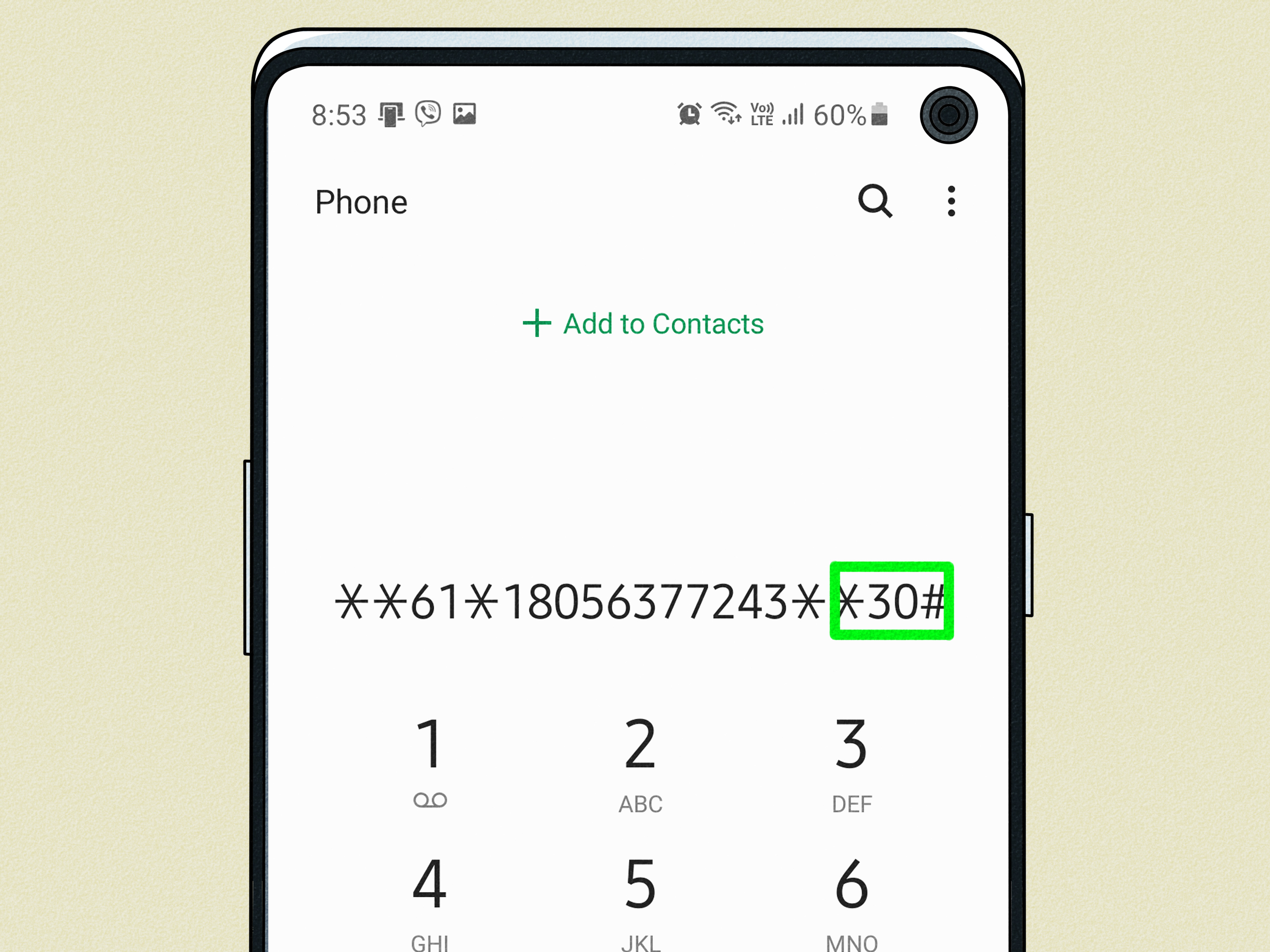
On many carriers that support GSM-style forwarding codes, the general format is:
Or, for voice calls specifically, some networks use:
Replace VOICEMAILNUMBER with the voicemail forwarding number you found using *#61#. Replace SECONDS with 5, 10, 15, 20, 25, or 30.
Example
If your voicemail forwarding number is +15551234567 and you want your Samsung to ring for 30 seconds before voicemail, you might try:
Then press Call. If the carrier accepts it, you should see a success message or hear a confirmation tone. Test it by calling your Samsung from another phone and letting it ring.
How to Change the Number of Rings on a Samsung with AT&T
AT&T is one of the carriers people ask about most often because some AT&T users can adjust ring time only through customer support, while others report success using network forwarding codes. The safest official approach is simple: contact AT&T and ask them to change the number of rings or seconds before voicemail answers.
AT&T’s own voicemail support guidance says customers who want more time before calls go to voicemail should contact AT&T, and agents can help change it. That means if the dialer code fails, you are not doing anything wrong. Your account may simply require a carrier-side change.
AT&T Method 1: Ask Support to Extend Ring Time
Call AT&T from your Samsung by dialing 611, or contact AT&T support through your account. Ask for something specific, such as:
“Please extend the ring time before voicemail answers on my wireless line. I would like the maximum available delay, ideally 30 seconds or more if my account supports it.”
Being specific helps because “number of rings” can be interpreted differently by different support agents. “Ring time before voicemail answers” is the clearer phrase.
AT&T Method 2: Try the Conditional Forwarding Code
If your AT&T line supports it, you can try checking the voicemail forwarding number first:
Then use one of these formats:
or:
If the command succeeds, test with another phone. If you get an error such as “Call forwarding connection problem,” “Invalid MMI code,” or “Generic failure,” contact AT&T. The setting may be blocked, unsupported, or handled only by the carrier on your account.
How to Change Ring Time on T-Mobile Samsung Phones
T-Mobile publishes short codes for call forwarding, including a code format for forwarding when there is no reply. For many T-Mobile lines, the voicemail deposit number used in the ring-time code is:
To set the phone to ring for 30 seconds before voicemail, open the Samsung Phone app and dial:
Then press Call. You can replace 30 with 5, 10, 15, 20, or 25 if you prefer fewer rings.
If the code does not work, turn off Wi-Fi calling temporarily, make sure you have mobile signal, and try again. Some supplementary service codes are processed by the cellular network, so they may fail when the phone is not properly connected to mobile service.
How to Change Ring Time on Verizon Samsung Phones
Verizon works differently. Verizon supports call forwarding and conditional call forwarding codes, but changing the exact number of rings before Verizon voicemail answers is often not available as a normal self-service setting for wireless customers.
Verizon’s conditional forwarding code is:
This forwards unanswered calls after the phone rings first. However, this is not the same as changing Verizon’s voicemail ring timer. It is mainly used to forward missed calls to another number, such as a business line, answering service, or Google Voice number.
To turn off Verizon call forwarding, use:
If you want Verizon voicemail itself to answer sooner or later, contact Verizon support and ask whether your line can have the voicemail ring duration adjusted. Some Verizon guidance and community responses indicate the wireless voicemail delay may be fixed around the carrier’s default range, while business or home phone services may have separate ring-count settings.
Using Google Voice Voicemail with a Samsung
Some Samsung users are not trying to change carrier voicemail at all. They want missed calls to go to Google Voice voicemail instead. In that case, you need conditional call forwarding, not just a ring-count change.
For AT&T-style conditional forwarding to Google Voice, the common commands are:
These cover unanswered, unreachable, and busy calls. For Verizon, the common command is:
The exact behavior depends on your carrier. After setting it up, call your Samsung from another phone, ignore the call, and confirm that Google Voicenot carrier voicemailanswers.
How to Use Samsung Call Forwarding Settings
If you prefer menus instead of codes, try this route on your Samsung Galaxy phone:
- Open the Phone app.
- Tap the three-dot menu in the top-right corner.
- Tap Settings.
- Tap Supplementary services.
- Tap Call forwarding.
- Select Voice calls if prompted.
- Choose Forward when unanswered.
- Enter the forwarding number or review the current voicemail number.
This menu may not appear on every Samsung model or carrier firmware version. If “Supplementary services” fails to load, switch off Wi-Fi, connect to mobile data, and try again. Carrier settings are often pulled from the network, and the phone may refuse to load them when it cannot reach the carrier properly.
What If You Get an Invalid MMI Code Error?
An invalid MMI code error usually means the carrier did not accept the command. It does not necessarily mean your Samsung is broken. Try these fixes:
- Turn off Wi-Fi calling and retry using mobile signal.
- Restart your phone and enter the code again.
- Use the exact voicemail number shown by
*#61#. - Try the alternate format with
*11*before the seconds. - Set 30 seconds instead of 40 or 45, because many carriers cap the delay at 30.
- Contact your carrier if the code still fails.
Why Your Samsung May Still Go to Voicemail Too Fast
If you changed the ring time but calls still drop into voicemail quickly, check these common causes.
Do Not Disturb Is On
Do Not Disturb can silence calls or send them away faster than expected. Go to Settings, tap Notifications, open Do Not Disturb, and make sure it is not active during the time you are testing.
Spam Protection Is Blocking Calls
Samsung phones include caller ID and spam protection features. If a caller is flagged as spam, the phone may behave differently from normal incoming calls. Test with a trusted number saved in your contacts.
The Number Is Blocked
A blocked number may go straight to voicemail or fail to ring normally. In the Phone app, open Settings and check Block numbers.
Wi-Fi Calling Is Changing Call Behavior
Wi-Fi calling is useful, but it can complicate testing. If your changes are not sticking, disable Wi-Fi calling temporarily, test on the mobile network, and then turn Wi-Fi calling back on.
Your Carrier Has a Fixed Voicemail Timer
Some carriers simply do not let customers adjust voicemail timing from the handset. In that case, your best option is to call support and ask whether the voicemail timer can be changed manually.
Recommended Ring Time: What Should You Choose?
For most people, 25 or 30 seconds is the sweet spot. It gives you enough time to hear the ringtone, find the phone, glance at the caller ID, emotionally prepare yourself to answer like a functioning adult, and tap the green button.
A shorter delay, such as 15 seconds, may be better if you rely heavily on voicemail or use your phone for business and want callers to reach a message quickly. A longer delay is better if your phone is often in another room, buried in a bag, connected to Bluetooth, or set to a ringtone that begins softly.
Real-World Experience: What Usually Works Best
In day-to-day use, the biggest mistake people make is assuming the Samsung phone itself owns the ring-count setting. It feels logical. You bought the phone, the phone rings, therefore the phone should control the rings. But voicemail pickup is a carrier network event. Your Samsung is just the visible part of the process.
The most reliable first step is to test your current timing. Use another phone, call your Samsung, and count the seconds from the first audible ring until voicemail answers. Do this twice. If your phone rings for only 15 or 20 seconds, changing to 25 or 30 seconds can make a noticeable difference.
On T-Mobile and some T-Mobile-based carriers, the dialer code method is often straightforward. Enter the correct code, press Call, wait for confirmation, and test. On AT&T, results can be mixed. Some users successfully apply the code, while others must contact support. On Verizon, the situation is more restrictive for wireless voicemail timing, although conditional forwarding with *71 is useful if you want missed calls to go somewhere other than Verizon voicemail.
Another practical lesson: always write down the original forwarding number before changing anything. If you accidentally replace your voicemail forwarding number with the wrong destination, missed calls may stop reaching voicemail. That is when “I only wanted two more rings” becomes “why does my dentist keep getting my missed calls?” Nobody wants that subplot.
It is also smart to test with normal cellular service, not only Wi-Fi calling. Supplementary services such as call forwarding are carrier features, and some phones behave unpredictably when you try to update them over Wi-Fi calling. A clean test looks like this: turn off Wi-Fi, confirm you have mobile signal, enter the code, wait for the success message, restart the phone, and then call your number from another device.
If you use a Samsung Galaxy with dual SIM or eSIM, pay extra attention to which SIM is handling calls. The call forwarding menu may show SIM1 and SIM2 separately. Changing the forwarding rule on the wrong line will not help the number you actually use. For dual-SIM users, this is one of the most common reasons the setting appears to “do nothing.”
For business users, the best setup may not be a longer voicemail delay. If calls matter, consider conditional forwarding to a Google Voice number, a business phone system, or another line that can answer when you cannot. A longer ring time helps you answer more calls, but it does not solve missed-call workflow. Conditional forwarding can.
Finally, do not underestimate the ringtone itself. A soft ringtone with a slow intro can make a 20-second ring feel like 10 seconds. Choose a clear ringtone, raise call volume, turn on vibration, and enable caller name announcements if that helps. Sometimes the cheapest fix is not a carrier code; it is choosing a ringtone that does not begin like a sleepy wind chime in another room.
Conclusion
Changing the number of rings on a Samsung is really about changing how long your carrier waits before forwarding unanswered calls to voicemail. On many networks, you can use a conditional forwarding code with a delay in seconds. On AT&T, you may need support to adjust the voicemail timer. On T-Mobile, the published short-code method is often the cleanest route. On Verizon, wireless voicemail timing is usually more limited, though conditional forwarding is available for sending missed calls to another number.
Start by checking your forwarding status with *#61#, write down the voicemail number, try the correct code for your carrier, and test from another phone. If it fails, do not wrestle your Samsung like it owes you rent. Contact the carrier and ask for the voicemail ring time to be changed from the network side.