There are two kinds of people in the PC world: those who want every setup to look like a glowing spaceship, and those who see a beige 386-era case and whisper, “Finally, culture.” The project idea behind NFC hidden in floppy disk for retro-themed PC belongs firmly to the second group. It takes the physical charm of old-school computing, sneaks modern hardware behind the curtain, and creates a game-launching experience that feels like the 1990s accidentally discovered wireless technology.
Instead of using a floppy disk to store actual game files, the disk becomes a beautifully disguised trigger. A small NFC tag is hidden inside or attached to the floppy. A modified floppy drive contains an NFC reader connected to a microcontroller such as an Arduino. When the disk slides into the drive, the system reads the tag’s unique ID and tells the modern PC which game or application to launch. The result is wonderfully theatrical: insert a labeled floppy, hear the satisfying click, and watch a game appear almost instantly. It is retro cosplay for your computer, but with better loading times and fewer mysterious grinding noises.
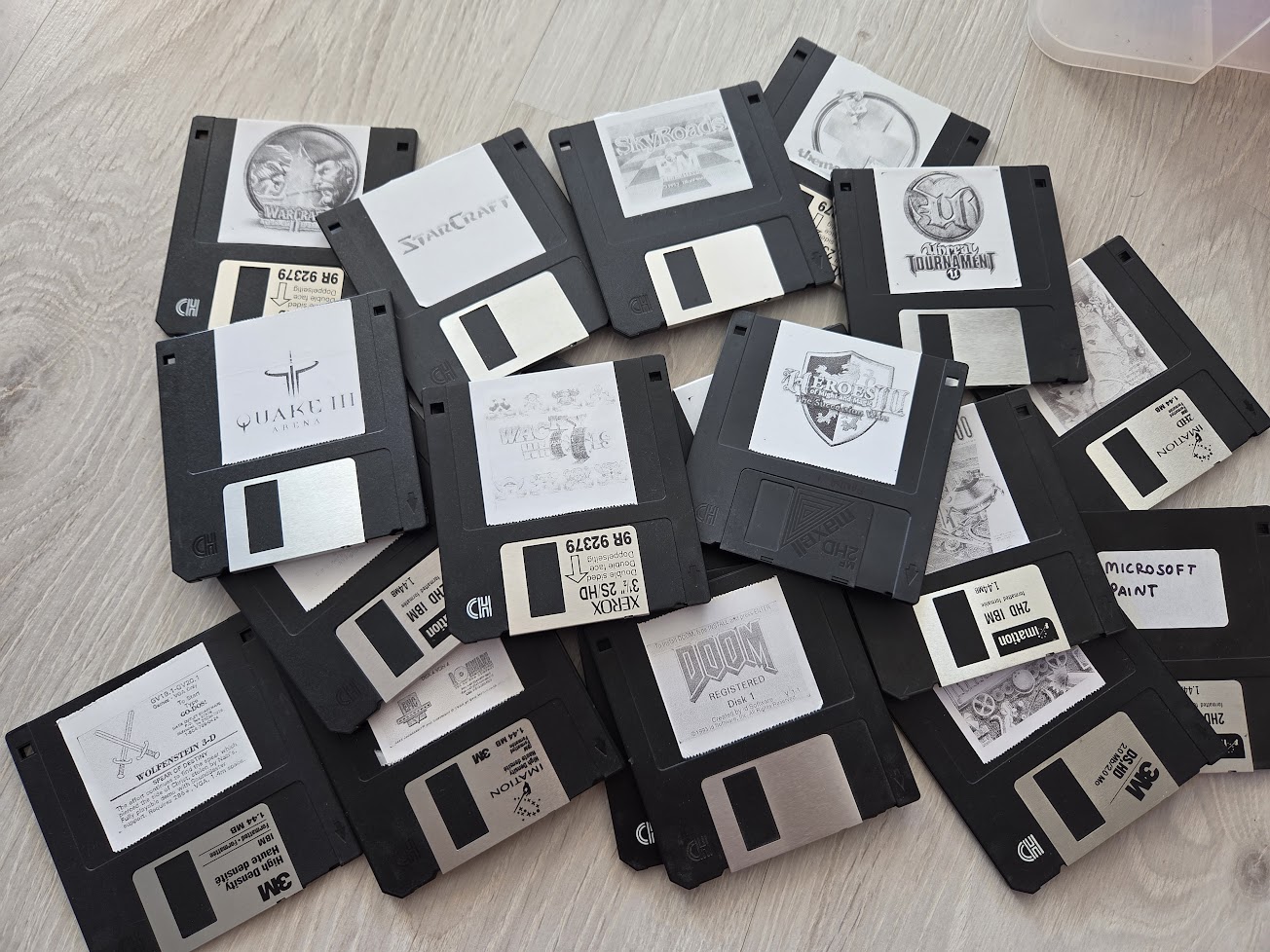
This concept is not just a cute gimmick. It is a clever example of tangible user interface design, where physical objects become controls for digital actions. For retro gaming, home labs, media stations, maker spaces, and display builds, an NFC floppy disk launcher can make software feel collectible again. A folder full of shortcuts is efficient. A shelf of fake floppies labeled “Doom,” “Commander Keen,” and “Monkey Island” is a conversation starter.
What Is an NFC Floppy Disk Launcher?
An NFC floppy disk launcher is a modified retro PC accessory that uses Near Field Communication to identify physical floppy disks and trigger actions on a computer. In a typical build, the original floppy drive mechanism is no longer used for reading magnetic media. Instead, the front panel, slot, and eject button preserve the authentic look while the inside hides a reader module, wiring, and a microcontroller.
Each floppy disk receives an NFC sticker or tag. That tag does not need to store the entire game. In most versions, it only provides a unique identifier. The real game files remain on the computer’s SSD, hard drive, or emulator library. A small background script on the PC listens for the tag ID and matches it to a command, such as launching DOSBox, opening ScummVM, starting a Steam title, running a shell script, or loading a custom front-end.
Think of it like a hotel key card for your game library. The floppy is not the room; it is the key that opens the room. And unlike a real 1.44 MB floppy, it does not panic when asked to handle a modern game folder the size of a small moon.
Why Hide NFC Inside a Floppy Disk?
The beauty of the project is that it preserves the feeling of old computing without forcing users to suffer through all the limitations of old computing. Real floppy disks are charming, but they are slow, fragile, tiny in capacity, and increasingly inconvenient. A standard 3.5-inch floppy disk became famous for storing about 1.44 MB, which was plenty for documents and small programs decades ago. Today, that is not enough space for a single high-resolution icon, let alone a game.
NFC solves the problem by separating the ritual from the storage. You still insert the disk. You still read the label. You still feel like you are choosing software from a physical collection. But the PC launches the game from modern storage, using emulators or native applications. The magic is in the illusion: the floppy looks like it is loading the game, even though the heavy lifting happens elsewhere.
The Retro PC Experience Without the Retro Headache
Many retro-computing fans love original hardware, and for good reason. Authentic machines have quirks, sounds, constraints, and personalities that modern systems often lack. But maintaining vintage PCs can become a hobby within the hobby. Capacitors age. Drives fail. CRTs are heavy enough to qualify as gym equipment. Old operating systems can be fussy, and transferring files may require adapters, patience, and possibly a small offering to the technology gods.
A retro-themed modern PC offers a practical compromise. You can build a computer inside an old case, keep the beige-box charm, and still enjoy current hardware, reliable storage, modern networking, and easy backups. Add an NFC floppy disk system, and the machine gains a playful interface that feels era-appropriate while remaining fast and flexible.
How the System Works
The basic workflow is surprisingly simple. The floppy disk contains an NFC tag. The floppy drive contains an NFC reader. A microcontroller reads the tag and sends its ID to the computer. The computer matches the ID to a command and launches the selected game or program.
1. The NFC Tag
NFC tags are small, inexpensive, passive devices. “Passive” means they do not need a battery. When the reader creates a short-range electromagnetic field, the tag receives enough energy to respond. This is why NFC is ideal for hidden-object projects. A thin sticker can sit on the back of a floppy disk, under a custom label, or inside a modified shell without needing a power source.
For this kind of launcher, the tag usually only needs to provide its UID or a small stored value. The PC software can then decide what that UID means. One disk might map to a DOS game. Another might launch a playlist, a virtual machine, a browser kiosk, or a retro-themed menu.
2. The NFC Reader
Common maker-friendly NFC and RFID reader modules include the MFRC522 and PN532 families. The MFRC522 is especially popular in Arduino projects because it is affordable, widely available, and supported by community libraries. It operates at 13.56 MHz and is commonly used with MIFARE and NTAG-style tags.
In a floppy drive conversion, reader placement matters. NFC has a short range, often just a few centimeters depending on the tag, antenna, reader, and surrounding materials. Metal can interfere with reliable reads, so builders may need to remove or replace parts of the original drive’s internal metal frame. Plastic, 3D-printed brackets, acrylic, cardboard prototypes, or even LEGO-style structures can help position the reader close to the tag while keeping the front of the drive looking untouched.
3. The Microcontroller
An Arduino Uno or similar board can act as the bridge between the reader and the PC. The microcontroller polls the NFC reader, captures the tag ID, and sends that ID over USB serial. This keeps the drive-side electronics simple. The Arduino does not need to know what every disk does; it only needs to report, “I saw tag 04-A1-B2-C3.”
That separation makes the system easier to maintain. If you want to change what a disk launches, you can update the PC-side script instead of rewriting the microcontroller firmware every time. In practical terms, this means fewer trips into the Arduino IDE and fewer chances to mutter, “Why did this work yesterday?”
4. The PC Script
On the computer, a background script listens to the serial port. Python is a common choice because it is easy to read, works across platforms, and has libraries for serial communication. The script receives the NFC tag ID, checks it against a mapping table, and runs the assigned command.
For example, one ID could launch a DOSBox command for a classic DOS game. Another could start ScummVM for a point-and-click adventure. Another could open a Steam URL, run a batch file, trigger a Linux shell script, or start a curated retro front-end. This flexibility is what makes the build useful beyond nostalgia. The floppy becomes a physical shortcut system.
Why This Build Feels So Satisfying
Modern interfaces are efficient, but they can feel invisible. We tap glass, click icons, scroll grids, and search libraries. That works, but it rarely feels memorable. Physical media creates ceremony. Choosing a disk from a box, reading the handwritten label, inserting it into a drive, and pressing a button turns a simple software launch into a tiny event.
This is the same reason vinyl records, mechanical keyboards, instant cameras, and retro game cartridges still have devoted fans. The object matters. The process matters. The friction is not always a flaw; sometimes it is the flavor. An NFC hidden in floppy disk build brings that flavor to a modern PC without requiring the user to accept the original technical limits.
Best Uses for an NFC Floppy Disk Retro PC
Retro Gaming Station
The most obvious use is a retro gaming PC. Label each floppy with a classic title, insert the disk, and launch the game through DOSBox, ScummVM, Wine, an emulator, or a native launcher. This setup works especially well for a living-room retro station, a game room, or a convention display where the interface needs to be fun and self-explanatory.
Museum or Classroom Exhibit
An NFC floppy system can teach people about the transition from physical media to digital libraries. Visitors can insert different “program disks” and see software open instantly. Because the disks do not contain the real files, the exhibit can be more durable and easier to reset than a true vintage setup.
Creative Portfolio Launcher
Designers, developers, and artists could use floppy disks as project cards. One disk opens a portfolio video. Another launches a local website. Another starts a slideshow. It is quirky, memorable, and much more fun than saying, “Please click folder number seven.”
Home Automation and Media Control
The concept is not limited to games. NFC-tagged objects can trigger music playlists, lighting scenes, smart-home routines, or media collections. A floppy disk labeled “Movie Night” could dim lights and open a media center. A disk labeled “Focus Mode” could launch a writing app and start a playlist. Suddenly, productivity has an eject button.
Design Tips for Building One
The best NFC floppy projects succeed because they respect both aesthetics and reliability. A beautiful drive that only reads tags when Mercury is in retrograde will not be much fun. Start with the physical layout. Test the NFC reader and tags outside the drive first. Confirm the read distance. Then test inside the floppy shell. Only after that should you commit to final mounting.
Use consistent tag placement on every disk. If one tag sits near the top-left corner and another sits near the center, the reader may behave unpredictably. A simple template can make disk preparation easier. Put the tag in the same spot, then cover it with a printed label that matches the retro theme.
For the drive, keep the external parts as original as possible. The charm comes from the illusion that this is an ordinary floppy drive. The front bezel, slot, LED window, and eject button are visual anchors. If the eject button still works mechanically, even if it only pushes the disk out of a simplified holder, the experience becomes much more convincing.
Software Considerations
The PC-side script should be simple, predictable, and safe. A mapping file is often better than hardcoding every command directly into the script, especially if the library grows. A JSON or YAML configuration can list tag IDs, titles, commands, working directories, and optional notes. That way, adding a new floppy becomes a matter of scanning the tag, copying the ID, and assigning the command.
It is also smart to add debounce behavior. Without it, the system may read the same tag repeatedly and launch the same game multiple times. A delay, “last scanned” memory, or tag-removal detection can prevent accidental duplicate launches. You may also want an “unknown disk” message, a sound effect, or a small on-screen notification for extra polish.
Security matters too. A launcher script should avoid blindly running untrusted input. In a personal hobby build, the risk may be low, but it is still best practice to map known tag IDs to approved commands rather than letting tag content execute directly. The floppy should be a key, not a tiny chaos goblin with shell access.
The Aesthetic: Beige Is Back, Somehow
For years, PC design moved toward black rectangles, glass panels, RGB lighting, and minimalist slabs. Those can look great, but they can also blend together. Retro-themed builds stand out because they have texture and personality. Beige cases, chunky buttons, turbo LEDs, smoked plastic, old badges, and fake drive bays all communicate a specific era of computing.
An NFC floppy drive fits perfectly into that design language. It does not look like a modern accessory awkwardly glued onto an old case. It looks like it belongs there. That is the trick: the technology is modern, but the interaction is historically flavored. The user gets the fantasy of loading games from floppy disks while the computer quietly uses modern storage and emulation behind the scenes.
Potential Improvements and Variations
A basic NFC floppy launcher is already delightful, but there are many ways to expand it. Add a small OLED display that shows the game title after the disk is inserted. Use the original drive LED to blink when a tag is detected. Play a short floppy-drive sound effect for theatrical authenticity. Add a front-end menu that shows box art, release year, and launch options.
Advanced builders could keep parts of the original floppy mechanism intact, using switches to detect insertion and ejection. Others might build a hybrid system where the disk’s NFC tag selects a disk image, while an emulator loads the corresponding environment. For extra drama, the PC could display a fake “Reading disk…” animation before launching, even though the game is ready instantly. Is that unnecessary? Absolutely. Is it wonderful? Also absolutely.
Challenges You Might Run Into
The biggest challenge is reliable NFC reading. Floppy disks contain metal shutters and internal materials that can affect placement. Drives also have metal frames that may block or weaken the signal. The solution is usually careful positioning, testing, and replacing interfering parts with non-metallic supports.
Another challenge is cable management. Old PC cases were not designed with hidden USB-connected microcontrollers in mind. Keep wiring tidy and secure so the drive can be removed or serviced later. If the build is meant for public use, make the disk path durable. People will insert disks with enthusiasm, confusion, or the energy of someone trying to feed a vending machine that owes them chips.
Finally, software paths can be annoying. Emulators, game directories, and command-line options must be consistent. A good launcher script should log what it sees, report unknown tags, and fail gracefully when a file path changes. Future you will appreciate present you’s decision to write readable configuration files.
Real-World Experience: What It Feels Like to Use an NFC Floppy PC
The first thing you notice is how quickly the illusion works. A floppy disk is such a familiar object, even for people who have only seen one as a save icon, that the brain immediately understands the action. Pick disk. Insert disk. Computer does thing. There is no learning curve, no nested menu, and no need to explain a launcher interface. The interaction is almost comically obvious.
In daily use, the biggest pleasure is browsing the physical collection. A row of labeled floppies feels more personal than a digital library grid. You might label one disk with a thermal printer for that slightly awkward office-machine look. Another might have a handwritten title, complete with fake version numbers and tiny doodles. The labels become part of the entertainment. “DOOM II – Totally Work Files” has more personality than a desktop shortcut ever will.
The second thing you notice is speed. Real floppy loading had atmosphere, but it also had waiting. Lots of waiting. With NFC, the waiting becomes optional theater. You can launch instantly or add a short animation to make it feel more authentic. For a retro-themed PC used by friends or visitors, the instant response is important. People enjoy the joke because it works immediately.
There is also a satisfying maintenance advantage. If a game setup changes, the disk does not need to be rewritten. You update the mapping on the PC. The same physical disk can point to a new emulator command, a different folder, or a better launcher script. That makes the collection feel permanent while the software remains flexible.
From a builder’s perspective, the project teaches several useful maker skills without becoming overwhelming. You learn about NFC range, serial communication, microcontroller wiring, simple scripting, physical prototyping, and interface design. None of those pieces are impossible by themselves, but combining them into a polished object feels rewarding. It is the kind of project where a tiny technical success creates a huge emotional payoff.
The most memorable experience comes when someone else uses it for the first time. They insert a floppy, the PC launches a game, and there is usually a pause followed by a grin. That pause is the magic. It is the moment when the object and the software connect in the user’s mind. They know, logically, that the game is not really stored on the disk. But the performance is convincing enough that it feels true.
In a world where so much technology is hidden behind touchscreens, the NFC floppy disk launcher brings back a sense of playful physicality. It turns a modern PC into a small stage. The floppy is the prop, the drive is the trick door, and the game launch is the reveal. It is not the most practical way to open software, but practicality is not the point. The point is delight.
Conclusion
An NFC hidden in floppy disk for retro-themed PC build is a perfect example of modern maker creativity: simple parts, clever software, and a strong sense of humor. It preserves the ritual of old computing while avoiding the limitations of real floppy storage. By combining NFC tags, an Arduino-style reader setup, a modified floppy drive, and a PC-side launcher script, the project transforms ordinary disks into physical keys for games, apps, playlists, and automation routines.
For retro gaming fans, it makes a digital library feel collectible. For makers, it is a manageable hardware-software project with plenty of room for customization. For anyone tired of sterile modern PC design, it is a reminder that computers can still be weird, charming, and fun. Sometimes the future looks best when it is hiding inside a beige box from the past.
Note
This article is written for web publishing and is based on real-world NFC, Arduino/RFID, retro PC, DOSBox, ScummVM, and floppy disk launcher concepts. It avoids source-link clutter in the body while keeping the content practical, original, and SEO-friendly.